How to Request Payments with Razorpay and Google Sheets – Digital Inspiration

How to use Google Sheets to generate Razorpay payment links and easily accept payments from customers anywhere in the world!

Razorpay is a popular payment gateway in India that allows you to accept online payments from customers anywhere in the world. Your customers can pay with credit cards, debit cards, Google Pay, Walmart’s PhonePe and other UPI apps.
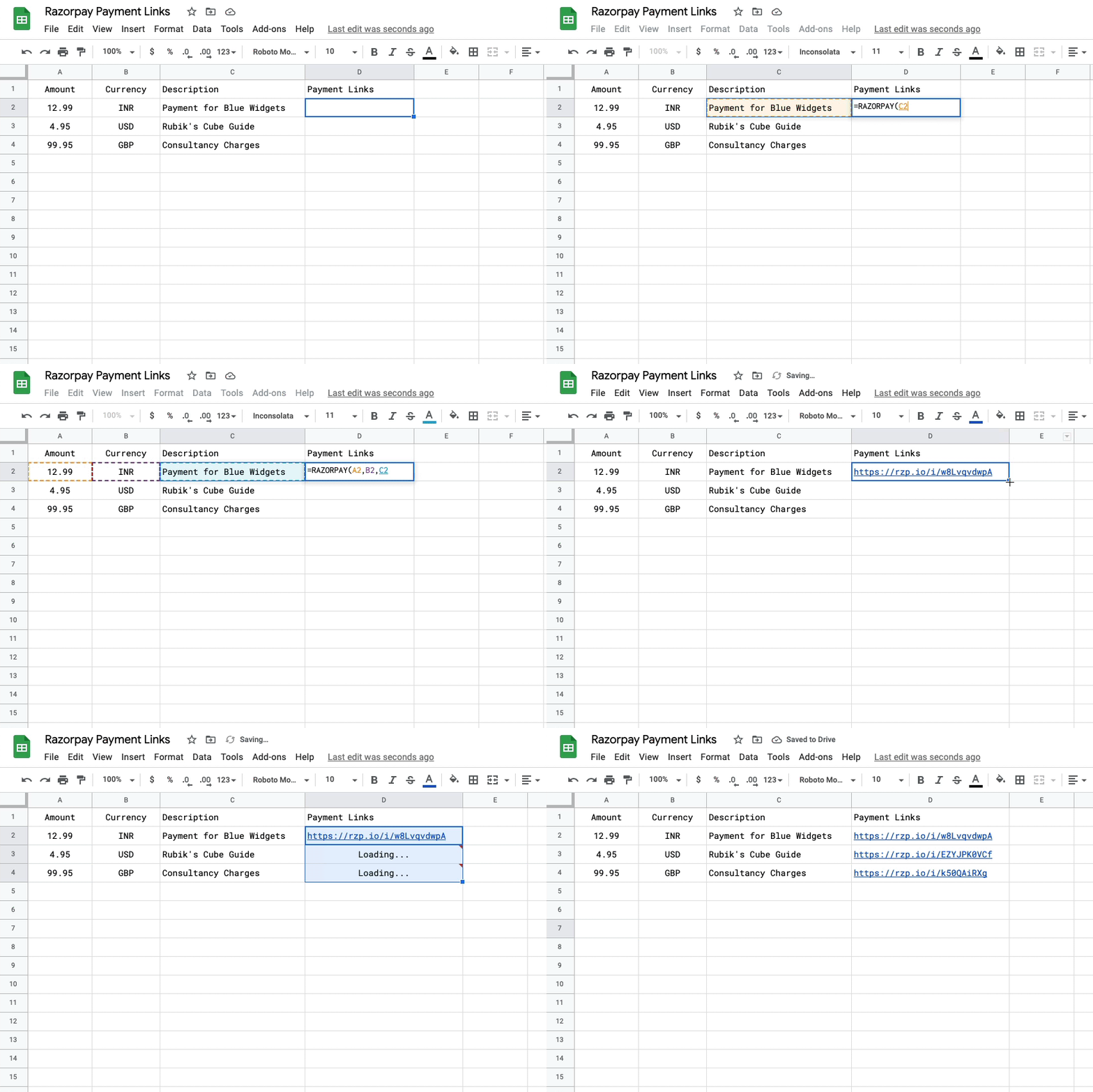
A great solution from Amit Agarwal for creating payment links in Google Sheets for Razorpay. The source post provides more details of how this works and setup required. The post also outlines how you can combine this with a mail merge to sort all your invoicing needs.

Source: How to Request Payments with Razorpay and Google Sheets – Digital Inspiration

Using community connectors to go beyond filter by email in Data Studio – pablofelip.online

This article discusses row-level security in Google Data Studio and shows how community connectors can be used to overcome the limitations of the native feature when accessing data stored in Google Sheets.

I don’t think one of our summaries could ever do justice to this contribution from Pablo Felip. The post has a very thorough summary of row-level security and how Community Connectors coded in Apps Script can be used for additional levels of functionality.

Source: Using community connectors to go beyond filter by email in Data Studio – pablofelip.online

Get the redirect location of a URL using Google Apps Script

Have a list of shortened urls and need their final destination? Use this custom function in google sheets to extract them all at once.

Handy little snippet that can make testing redirects on URLs a lot easier, which can be useful for expanding short links from social media sites like Twitter.

Source: get the redirect location of a url using google apps script

How to Convert HTML to PDF with Google Script – Digital Inspiration

With Google Apps Script, you can easily convert any HTML content into a PDF file. The converted PDF file can be either saved to a folder in your Google Drive, you can email the file as an attachment or the use the UrlFetchApp service of Apps Script to post the PDF file to an external service like Amazon S3 or Dropbox.

Source: How to Convert HTML to PDF with Google Script – Digital Inspiration

How to Validate Specific Users on a Web App in Google Apps Scripts – Yagisanatode

Learn how to validate specific users on a Web App, Google Workspace sidebar or dialogue box with Google Apps Scripts. In this tutorial, we will explore how to validate selected users to provide access to your web app. For our example, we validate users based on whether or not they have edit access to a Google Drive file ( a common occurrence). In the discussion, we will also look at alternative ways of validating emails.

Interesting solution for access control to a Apps Script web app by using a Google Doc share permissions as a proxy. The post contains all the code you need and a discussion of other approaches.

Source: How to Validate Specific Users on a Web App in Google Apps Scripts – Yagisanatode

How to Build Custom Functions in Google Sheets with Google Apps Script

Build your own functions in Google Sheets that do anything you need them to in a few lines of code.

This is a great tutorial if you are interested in finding out more about developing custom functions in Google Sheets. The post includes everything you need to get started from handling single cell and range inputs, to documenting your function so that users see inline help.

Source: How to Build Custom Functions in Google Sheets with Google Apps Script

Mergo – Mail Merge for Gmail – A free lifetime subscription for Google Workspace for Education users

As teachers gear up for the new school year, we’re glad to offer a free lifetime subscription to your school, college or university. 🥳

I’m sure many of you have come across Romain Vialard who has been contributing to the Google Apps Script community since the product was in beta.

Mergo, Mail Merge for Gmail, is one of the latest products to be developed by Romain and for Google Workspace for Education users the great news is that until the 20 September 2021 there is an offer for a free lifetime subscription! Follow the source link for more details.

Source: Mergo – Mail Merge for Gmail – Back to school

How to Create a Telegram Bot for Sending Notifications using Google Apps Script – Digital Inspiration

Learn how to create your own Telegram bot with Google Apps Script and post notification messages from Google Sheets, Forms and other Google apps.

We’ve a couple of Telegram bot posts already shared in Pulse. The latest come from Amit Agarwal who shares his insight, highlighting some particularly useful functionality and use cases. More details in the source link.

Source: How to Create a Telegram Bot for Sending Notifications using Google Apps Script – Digital Inspiration

Send data to a Google Form via Apps Script

Use Google Apps Script to create a prefilled URL of data that can be submitted to a Google Form.

Screenshot of Google Form questions

The following Google Apps Script is designed to submit specific data to a Google Form, by creating a prefilled URL. The reason for this was I needed some way of sending data from a number of individual Google Sheets (that I did not own) to one central location, but crucially it needed to be anonymised.

Sending the data directly to a Google Sheet includes version history both in the file and cell meaning it was not truly anonymous. Whereas sending the data through a Google Form and then on to the Response Sheet did strip away anything identifiable.

The logic behind this code is to create a prefilled URL which contains answers to each of the Forms questions. Use the previous webpage link to learn how to create such a URL first so that you understand each question on a Form has a unique value.

Source: The Gift of Script: Send data to a Google Form via Apps Script