When the users try to write to Spreadsheet using a form, the developers have to consider to the concurrent submission from the form. For example, when the multiple users submit the data with the form simultaneously, all data are possibly not to be saved to the Spreadsheet. So it is considered that it is important to know the information about the concurrent writing to Google Spreadsheet using a form. In this report, such situation was investigated.
A very useful analysis to see how many form submissions can be handled in Google Sheets at the same time. The experiment looks at both submissions using Google Forms and as a Web App.
Google Apps Script projects can be published as web apps …. This is helpful if you’re building a tool with a simple UI (using HTMLService), but they can also be used as webhooks to do work within a user account.
Google provides the option of service accounts, so why use webhooks?
For my project, it was because I needed to send calendar invites to other people. Service accounts are generally the way to handle those kinds of jobs, but it needed to have full account delegation, which means it can act on behalf of any user in the domain. That wasn’t an option in this case, so a webhook became the next best option.
Brian Bennett highlights the benefits of using ContentService and Web Apps as a way to let you interface other services.
Do you still spend time every day monitoring your sales report, identifying which customer subscription is going to expire soon, and manually draft an email to send out to your customer? Would it be better if this manual task can be automated every day for you? If that’s the case, this article can be a great help for you!
Following on from some recent Google Sheet payment solutions here’s a tutorial that highlights how you can use Sheets and Apps Script as a payment reminder tool. Combine with Stripe or Razorpay and you have a complete subscription management solution.
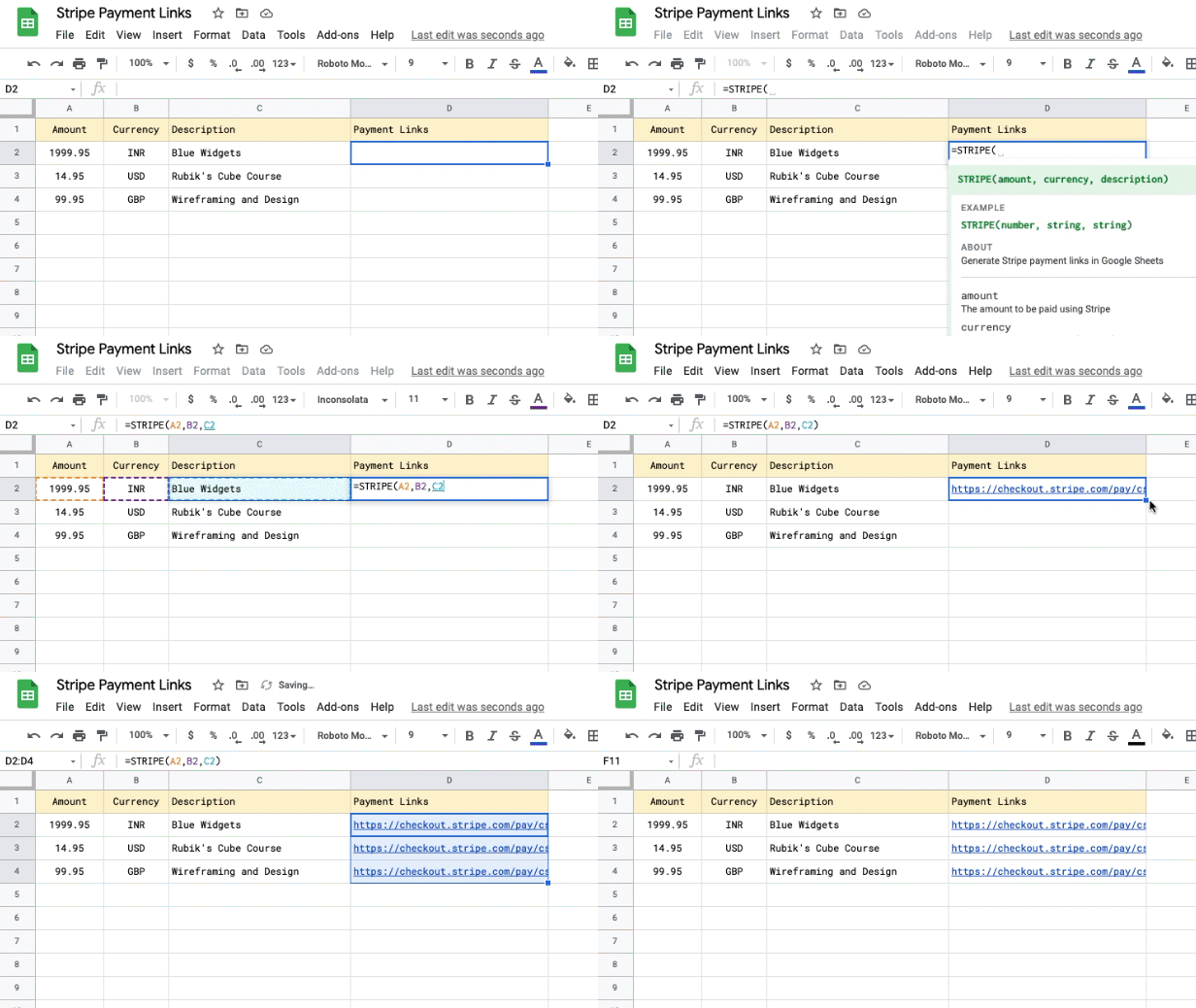
How to use Google Sheets to generate Stripe payment links and request payments in any currency from customers anywhere in the world!
We’ve previously featured Amit Agarwal’s Razorpay and Google Sheets payment solution. This latest example from Amit highlights how to integrate Stripe payments with Google Sheets. The source post contains the code you’ll need, how to setup and also automation options.
In this video, we’ll show you how to automate snapshots of your Google Sheets and have those logs stored in a separate Google Drive folder so that you can keep your logs nicely organized for future reference. To do this, we’ll be using Google Apps Script to create a script that references the SpreadsheetApp library and the DriveApp library.
There seems to be an increasing number of YouTube channels dedicating content to highlight Google Apps Script solutions. Here’s the latest one we’ve come across from aguycalledjoe at bootstrapping.tools
Give your scripts privileges that your users don’t have … In 99% of all cases, authorizations in Google Apps Script are extremely straightforward. When a user executes their script, they run it as themselves with their respective authorization scopes. … However, what if you need to give more rights to your app beyond what your intended users will have? … This is where service accounts come in.
A useful post to find out more about service accounts and how to use them with Google Apps Script. The tutorial put together by Dmitry Kostyuk includes example code for using a service accounts with Firestore, BigQuery and the Admin Directory API.
This Google Apps Script allows you to create a Google Calendar event by sending yourself an email in Gmail. Unlike Gmail’s current feature to create Google Calendar events, this script allows you to be on a mobile device.
Bulk convert all the Google Docs within a given folder to PDFs and optionally delete the Docs afterwards. Specify the destination folder for the PDFs.
Bulk convert Google Docs to PDFs using Apps Script
The following Google Apps Script tool is designed to bulk convert all Google Docs within a given Google Drive folder into PDFs. You can choose the destination folder for the PDFs to be put into and also whether you want the original Docs to be deleted. This tool does work on Shared drives.
Normally we get strings.xml files from our translation team, but today was one of those days, where (due to time constraints) we got the source Google Sheet file. We had to generate strings.xml files out of these. This gave me the perfect opportunity to explore Google Apps Script which you could run on your Google Sheet.
This post highlights how Google Apps Script can quickly solve those little problems, in this case how to generate language .xml files used in Android. Follow the link to the source post for an explanation and code.
In this post, we’re going look at how variables are set up and how they can store various pieces of information. We’re also going to look at reading and writing data from a spreadsheet, which is one of the most common tasks when working with one.
We offer a wide range of community contributions here on AppsScriptPulse. This one might be useful if you are just learning to code and want to understand some of the fundamentals or if you’ve been using Apps Script for a while learn about variable types available in the V8 runtime.