Totally Unscripted: Hello Alternate Runtimes – How to build Google Workspace Add-ons without using Apps Script – Thur 22 April at at 1200 PDT / 1500 EDT / 2000 GMT+1

Last month Google announced the general availability of alternate runtimes for Google Workspace Add-ons. With alternative runtimes, developers can write Add-ons in any language and on any infrastructure, and then publish them to the Google Workspace Marketplace. In this episode we are joined by Riël Notermans, owner of Zzapps (and Google Developer Expert) and Steven Bazyl (Developer Relations, Google Cloud). Riël, whose teams have been developing on Google Workspace for over a decade, will share his team’s key takeaways on Alternate Runtimes and Steven will provide additional tips on getting started including the GWAO Card Builder.

Tune in live to ask questions via the YouTube chat https://youtu.be/zDZqENU4B6s

For previous episodes, information and resources visit https://tu.appsscript.info/
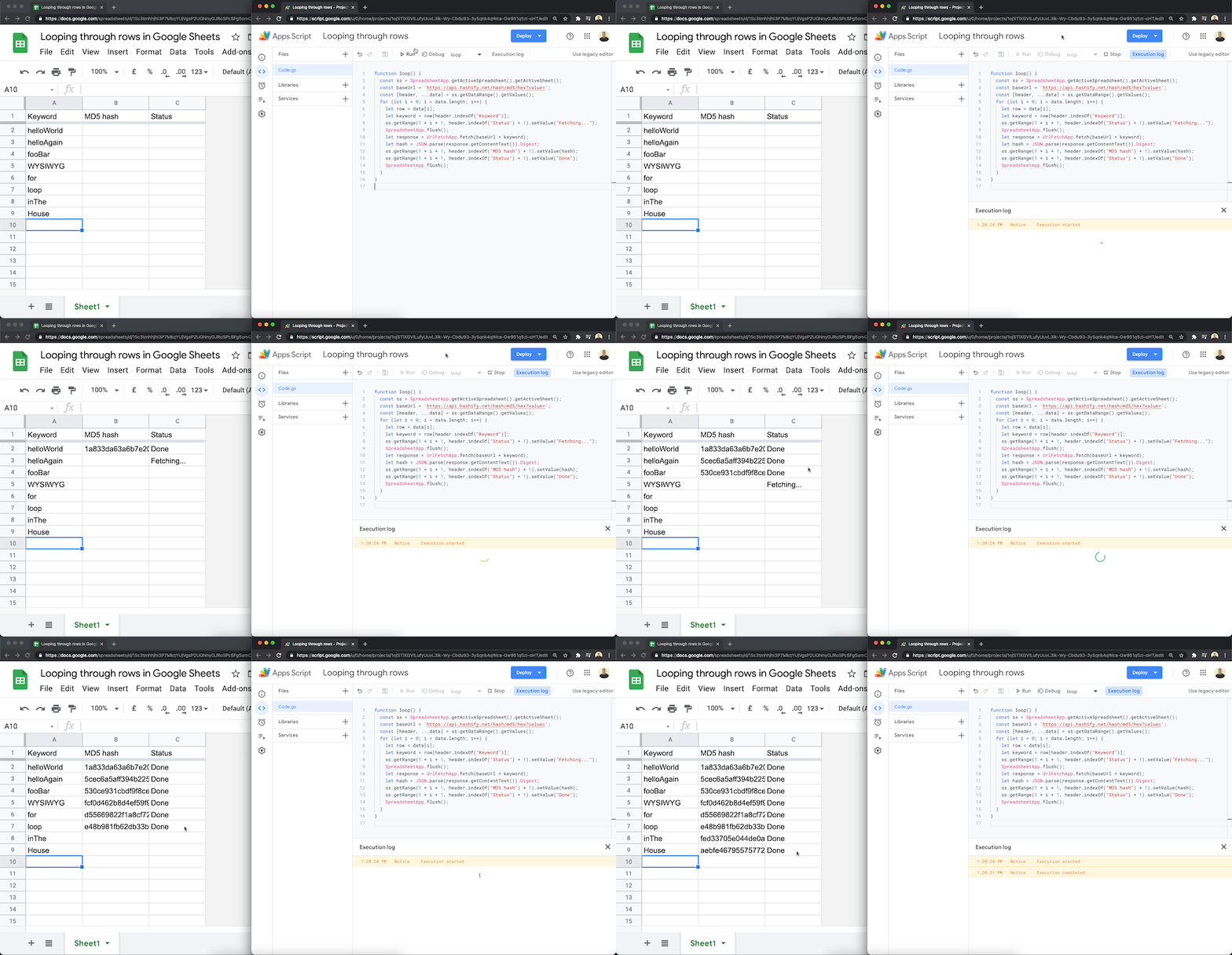
Visually display status when looping through Google Sheets data with Google Apps Script

show a processing status in a cell when looping through rows in google sheets using google apps script.

When working with small batches of data it can be useful to show the user that the data is being processed. Here is an example script from Sourabh Choraria which use SpreadsheetApp.flush() to force write updates to a Google Sheet. As this method relies on .setValue() instead of .setValues() it’s worth keeping in mind for bigger data sets that using HTMLService and a custom dialog or Speadsheet.toast()

If the .setValue()/.flush() Al from coda has provided this gist

Source: visually display status when looping through google sheets data

Totally Unscripted: Google Apps Script – Discover, Learn and Share Thur 15 April at at 1200 PDT / 1500 EDT / 2000 GMT+1

In this episode we are going to delve into the topic of how you discover, learn and can share Google Apps Script projects, tips and tricks. We hope we can give you some useful advice if you, friends and colleagues are just starting out coding with Apps Script, or tips if you have been coding for a while and want to improve your Apps Script knowledge. For this episode we’ve got two great guest Chanel Greco – saperis (Founder & CEO) and regular Apps Script contributor Bruce Mcpherson, who’s recent work on the visual Google Apps Script explorer tool, scrviz, is providing developers with new ways to explore and replicate existing Apps Script projects.

Tune in live to contribute to the YouTube live chat (recording immediately available). – https://youtu.be/pvwwr2dLkdA

For previous episodes, information and resources visit https://tu.appsscript.info/

Github as an Apps Script cache platform – Desktop Liberation

Use Github as a back end for caching large objects across platforms. It’s possible to use a github repo as the back end for a caching service, and by taking this approach we can share data between Apps script and multiple platforms. It also means you can retrieve the data with the git CLI in addition. It works in exactly the same way as all the other backends. … Using a regular git Repo means you can make it private and share it using the tools already built into Github.

Source: Github as an Apps Script cache platform – Desktop Liberation

Plotting Points on Image using Google Apps Script · tanaike

This is a sample script for plotting the points on an image using Google Apps Script. Unfortunately, in the current stage, there are no methods for directly editing the image and putting the texts and some shapes in the methods for Google Apps Script. So in this case, it is required to use the workaround.

Clever workaround that uses Google Slides as a canvas for adding text to images.

Source: Plotting Points on Image using Google Apps Script · tanaike

Taking Away the Pain from Unit Testing in Google Apps Script

Unit testing is an extremely important practice. It helps developers avoid bugs easily and lets you know when something is broken immediately. … There are numerous libraries that exist for unit testing in JavaScript, including Jest and Mocha; however, they aren’t necessarily well-adapted to run under the Google Apps Script environment. … For that reason, I built my own library with Google Apps Script in mind.

We’ve featured a couple of community contributions around Google Apps Script Unit Testing and if this is a topic that interests you then the related posts section below will link to additional resources. This post from Dmitry Kostyuk is a great addition and the accompanying UnitTestingApp library that is shared in the post has some very useful Google Apps Script related features such as a dedicated method to check your data is a 2D array (particularly useful in the context of handling spreadsheet values). Follow the source link for more details…

Source: Taking Away the Pain from Unit Testing in Google Apps Script

Totally Unscripted: Chatting with the community – Google Chat tips from GDEs Laura Taylor and Denis Valášek – Thur 08 April at at 1200 PDT / 1500 EDT / 2000 GMT+1

In this episode of Totally Unscripted we are joined by Google Developers Experts Laura Taylor and Denis Valášek to talk about Google Chat and opportunities to develop Google Chat bots and conversational interfaces with Google Dialogflow. We’ll cover everything that you need to know to get started, opportunities and pitfalls.

Tune in live to contribute to the YouTube live chat (recording immediately available). – https://youtu.be/mtDsScbfRIU

For previous episodes, information and resources visit https://tu.appsscript.info/

How to Unsubscribe from Mailing Lists and Junk Newsletters in Gmail with Google Apps Script – Digital Inspiration

Christian Heilmann’s tweet – Feature request for Gmail: automatically find and follow the unsubscribe link in all highlighted emails – prompted me to build an automated system for unsubscribing your Gmail address from the bulk senders. Here’s how it looks…

This is an older example from Amit Labnol that recently pinged my Google Alerts from this Best Unroll.me Alternatives post. The source post from Amit has some nice details about how marketing emails are marked up and the code shared might be a nice starter for your own solution.

Source: How to Unsubscribe from Mailing Lists and Junk Newsletters in Gmail – Digital Inspiration

3 Favourite things in one article – Apps Script, Redis and GraphQL – Desktop Liberation

I’m a great fan of both Redis and GraphQL. You’ll find plenty of articles about them around on this site. Although I’ve showed many examples of GraphQL and Apps Script, it was never possible to connect up Apps Script to Redis, because redis doesn’t use HTTP to communicate between Client and Server. I’ve come across upstash.com (with a free tier), that fronts a redis database with a GraphQL API.

The upstash.com service looks like a nice find from Bruce Mcpherson and his post details how you can use this for cross platform caching.

Source: 3 Favourite things in one article – redis, apps script and graphQl – Desktop Liberation

Replace text in Google Spreadsheets with Apps Script using TextFinder

Photo by Alex Nicolopoulos on Unsplash

Google Sheets has a powerful find and replace function. But you may want to use Google Apps Script to do the same job. StackOverflow has a question on this. The accepted answer would require you to loop through all cells, find the text, replace it and post the new text back to the cell. Google Apps Script has a more powerful, and simpler, method called TextFinder.

Usual post highlighting the TextFinder method which you can use to find and replace text in Google Sheets. The post has more information about this method and how to use it.

Source: Replace text in Google Spreadsheets with Apps Script