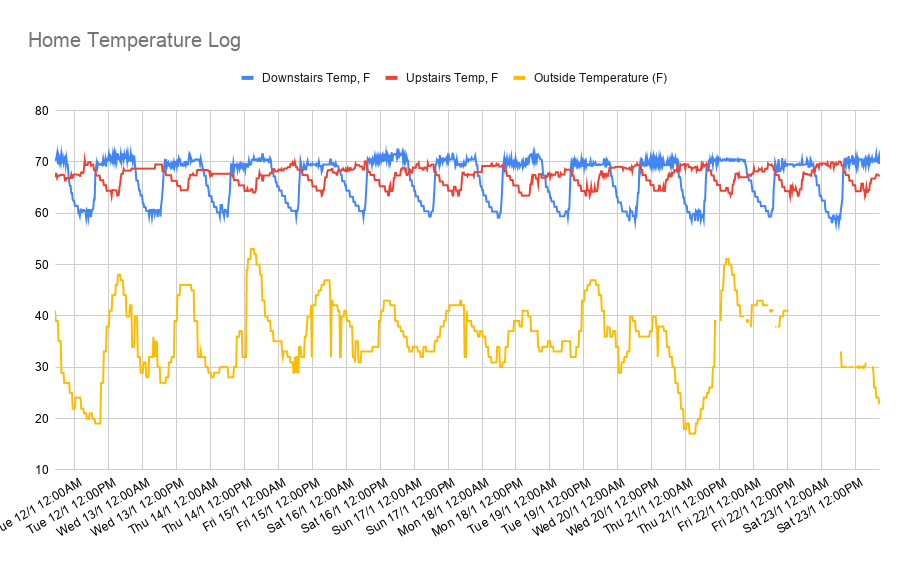
If you have a Nest thermostat at home, you can access it from your Google Sheet by using Apps Script to connect to the Smart Device Management API. It means you can do some cool stuff like build a virtual, working Nest thermostat in your Google Sheet
This article will discuss how to manage multiple, container-bound script projects using the Google Apps Script API from within Google Apps Script itself.
Interesting write up of how you can manage container bound Apps Script projects from an Apps Script…
Google Apps Script: WebApp In this tutorial, we will cover how you can get a unique temporary access key from a user accessing your WebApp that lasts for 30 days. Temporary access keys allow you to track users as they use your WebApp over time while still providing anonymity to the user by providing only an access key to that user.
There is a PDF file on the Internet. Say this one. And you want to save it to your Google Drive. The tedious way is to download it to your computer. … and then upload it to your Google Drive. (Seems like too much work.) If only you could send the PDF straight from where it is stored on the Internet, to your Google Drive…
Nice little snippet which shows how you can add .pdf files to Google Drive.
I thought it might be useful if you are learning Apps Script to be able to pull in examples to play around with. This latest release adds the ability to configure and clone projects from github directly into the Apps Script IDE.
We’ve previously highlighted Bruce Mcpherson’s visual Google Apps Script explorer tool, ‘scrviz’. If you are not familiar with this it is Bruce has figured a way to search and identify Google Apps Script projects publicly shared on GitHub. In this latest update to the tool you can now clone public Google Apps Script projects from scrviz straight into the Apps Script IDE.
The source link explains more about how you can do this:
A tutorial on how you can sync and analyze your Peloton workout stats into Coda with custom dashboards. Sync with a Google Apps Script or serverless function on Google Cloud.
We’ve featured this example from Al Chen on interacting with Peleton data with Google Apps Script before. Al has recently updated the post to include a “new table ‘Friend Workouts’ contains latest 10 cycling workouts from people you follow”. Follow the source link for more details…
{ APIs } NASA Mars Perseverance rover is now 273 Earth hours on Mars. About 11 Sols (Martian day). Just sitting on Jezero crater and doing all the checks for the great adventure ahead. If you know JavaScript Google Apps Script will can surely help you make those postcard from Mars delivered at your will.
Nice example from Janus Suarez showing you how you can use Google Apps Script to ‘fetch photos from Mars’. In this instance Janus is using the NASA API to collect and email the latest images from Perseverance. The code is available in the post and might be the start of your next fun project.
Is your website currently up and running? Wouldn’t it be nice to get notified if your website was down? Using Google Apps Script and Google Sheets, let’s create something that will check a list of your websites daily and email you if any of them appear to be down.
Nice little website status/monitor solution. The post full documents the code so if you are just learning Apps Script a nice resource.
I intend this post for established Add-on developers who want to use Angular in Google Workspace editor Add-ons and Google Apps Script webapps. This does not attempt to show how to create Add-ons or Angular apps, but the tooling and build process to use Angular apps in Add-ons. I am also assuming familiarity with installing and using CLI tools in your development workflow.
With my published content I like to include useful code snippets. As I published on a self-hosted WordPress blog I’ve used plugins to help format the code to make it easier to understand and also aesthetically look nice. In this post I share a WordPress plugin I’ve developed for Google Apps Script syntax highlighting.