Sending emails on a schedule with Google Apps Script

Ever wondered how you would automate tasks in Google Workspace without using a tool developed by an external entity? Google has your back. In this article, we will see how one can send emails on a schedule. As an example, I have used an annual event. A birthday reminder script, if you will.

A simple example but for those just starting out in Google Apps Script a nice example of using time-based triggers.

Source: Sending emails on a schedule with Google Apps Script

TSChatWise : Post lessons and learning resources specified in a Google Sheet to one or more Google Chat rooms — Getting Started

In a previous post I introduced TSChatWise … a Google Sheets and Apps Script powered Google Chat tool for teaching and learning. 🚀 This post is the third post in a TSChatWise “Getting Started” series where I’ll discuss how to get started with TSChatWise.

We’ve feature TSChatWise in AppsScriptPulse in the past but worth revisiting as author Laura Taylor has created some resources to help you get started.

Source: TSChatWise — Getting Started

Creating Colorful Buttons on Google Spreadsheet using Google Apps Script

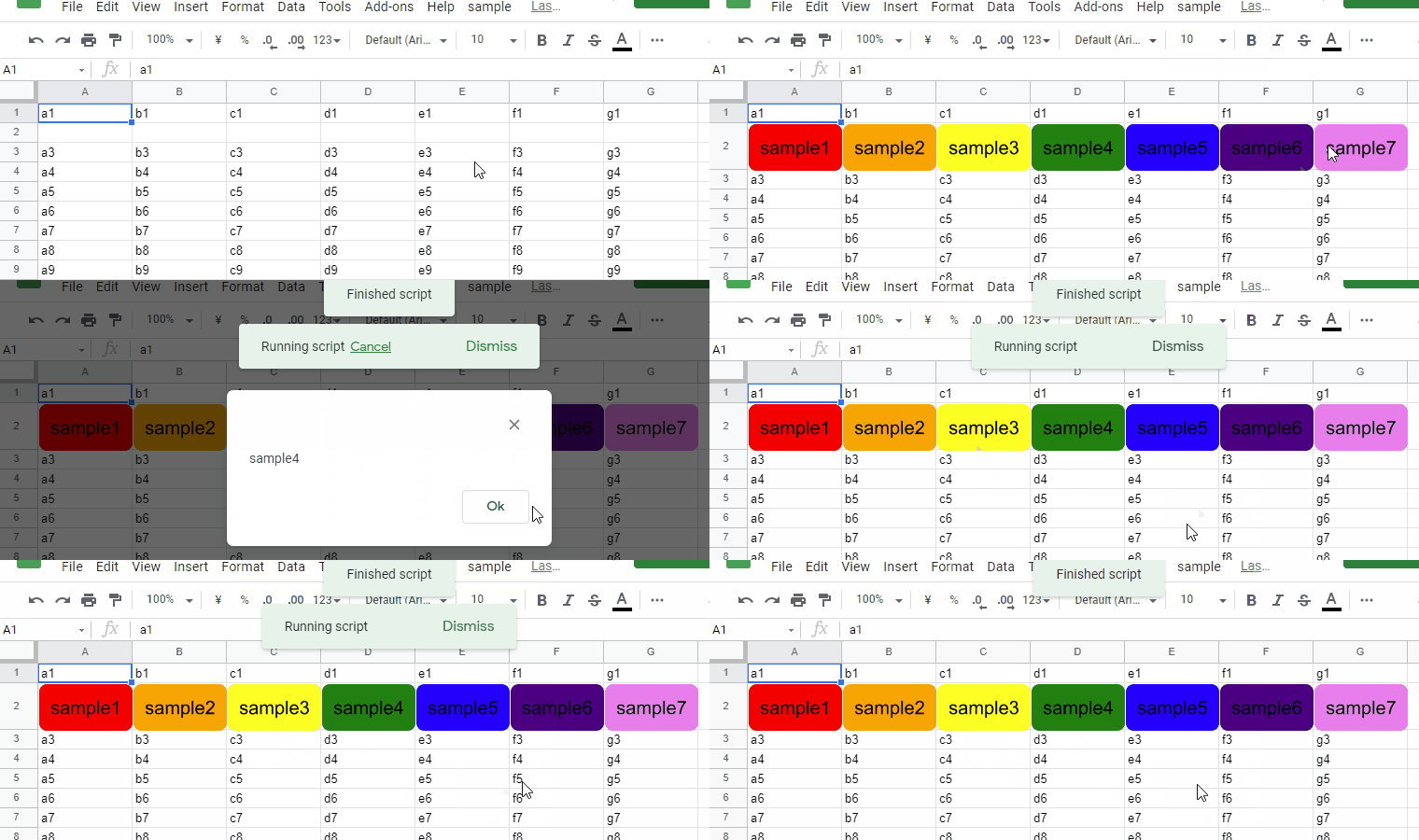
This is a sample script for creating the colorful buttons on Google Spreadsheet on Google Apps Script.

There are some interesting features in this script example, combining the use of Google Slides to create buttons and then assigning a script function to the result using the .assignScript() method.

Source: Creating Colorful Buttons on Google Spreadsheet using Google Apps Script

Data Enrichment with the Google Tables Apps Script Bot -Ben Collins

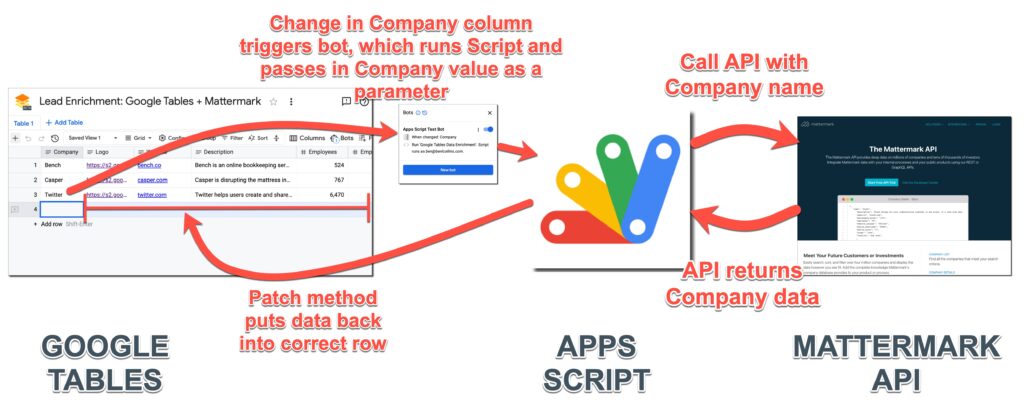
Learn how the Google Tables Apps Script Bot works and see an example of data enrichment using the Mattermark API.

In this post, I’ll show you how to use the new Google Tables Apps Script Bot. When something happens in your Google Table – a new row, or a value changes – a bot can be set to trigger an Apps Script function. It opens up a world of new possibilities.

While the Tables beta has been announced as joining Google Cloud it is still limited to US users. In the meantime for those outside the US we are limited to watching from the sidelines. Fortunately we can watch through the expert eyes of community members, in this case the esteemed Ben Collins. In this post Ben highlights how the experimental Tables Apps Script integration can be used to develop bots.

Source: Data Enrichment with the Google Tables Apps Script Bot –

Sheets Workbook functions in Apps Script – Date and Time and Temporal primer – Desktop Liberation

Timezones

If you are handling data from sheets it might be useful to use the same logic as is available in the worksheet for common tasks rather than reinventing them. Dates and Times are especially complicated as JavaScript dates are not good with timezones and date arithmetic, especially since spreadsheets and scripts can exist in different timezones from each other. I’m using Temporal – dates, times and timezones and the proposed new Date system for ECMAScript to emulate what Sheets functions do, and I’ll go through the implementation as a learning aid for Temporal as much as a documentation of the functions.

Source: Sheets Workbook functions in Apps Script – Date and Time and Temporal primer – Desktop Liberation

XPath Tester using Web Apps Created by Google Apps Script (working with existing Google Sheets functions in Apps Script)

In this post, I would like to introduce the xpath tester using Web Apps created by Google Apps Script.

This is an interesting little Apps Script solution from Kanshi Tanaike which uses the existing Google Sheets =IMPORTXML() in a Google Apps Script  Web App to test an XPath. As there is a delay in loading some Google Sheets function results this post includes a nice little coding pattern using a do...while loop to wait for results to render.

Source: XPath Tester using Web Apps Created by Google Apps Script

Creates a Google Workspace Add-on file picker card with CardService that opens a Google Picker in an overlay window – Google Apps Script – Yagisanatode

So you have this awesome idea for a Google Workspace Add-on (GWAO), but you need to be able to select Google Drive files and folders as a part of your process. … Ideally, you would want a built-in File Picker class that would select the files and folders from the directories you need. Whelp… unfortunately, we don’t have that right now for Google Apps Script’s Card Service.

One approach might be to build out a file picker card selecting each parent’s files and folders and navigate through it like, say, a linked list. … Instead, I decided to incorporate Googles File Picker API as a popup window from the sidebar, because, it’s kinda what it is designed for.

The Google Apps Script GDEs are publishing some very thorough tutorials just now. The latest comes from Scott Donald who has published a tutorial exploring how the Google Drive Picker can be used with Workspace Add-ons that use the Card Service. The post is particularly good at highlighting the steps required as a Google Cloud Console project.

Source: Creates a Google Workspace Add-on file picker card with CardService that opens a Google Picker in an overlay window – Google Apps Script – Yagisanatode

eMayordomo – Monitoring Gmail and conditional responses with Google Apps Script

Este artículo presenta eMayordomo, un desarrollo GAS capaz de vigilar un buzón de Gmail y responder automáticamente y de manera condicionada a los correos electrónicos procedentes de diversos formularios web, enviando mensajes preparados de antemano. Estas respuestas preparadas soportan HTML, imágenes en línea, archivos adjuntos y emojis.

Google Translate: This article presents eMayordomo , a GAS development capable of monitoring a Gmail mailbox and responding automatically and in a conditional manner to emails from various web forms, sending messages prepared in advance. These prepared responses support HTML, inline images, attachments, and emojis

For non-Spanish speakers you’ll have to hit Google Translate but it is well worth it for the very thorough documentation Pablo Felip has prepared, which includes the source blog post and GitHub repository. The repository is particularly useful to look at as Pablo has taken the time to document and explain the various Google Apps Script functions he has developed, methods used and potential issues/limitations when interacting with a Gmail inbox.

Source: Respuestas automáticas a formularios web con eMayordomo

Accelerate Google Workspace Add-on and chat bot development with the Card Builder tool | Demo

Take a quick tour through the new Card Builder tool for Google Workspace Add-ons and see how it helps you quickly design and generate code for card-based interfaces.

We’ve mentioned the Card Builder tool in a couple of episodes of Totally Unscripted but if you’ve got come across it yet Steve Bazyl provides a quick overview. This tool can be used to help developing Workspace Add-ons that use the Card Service (https://gw-card-builder.web.app/) and also Google Chat bots (https://gw-card-builder.web.app/chat).

How to Change the Font in your Google Documents with Apps Script – Digital Inspiration

How to change the font family and font styles of multiple Word documents in your Google Drive with Apps Script. This example show how to replace the font family of your Google Documents of specific sections – the heading titles are rendered in a different font while the tables, list items, body and table of contents are formatted with a separate font.

Source: How to Change the Font in your Google Documents with Apps Script – Digital Inspiration