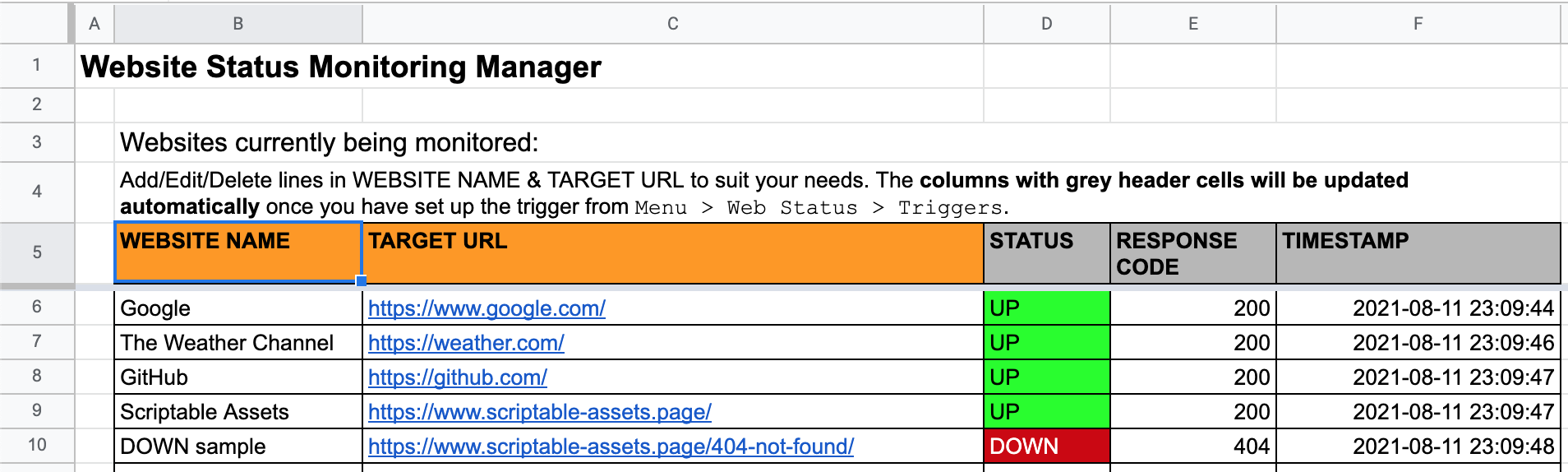
Website Status Monitoring using Google Sheets [and Google Apps Script with optional notifications to Google Chat]

A Spreadsheet-bound apps script solution to conduct automated status monitoring on websites listed by the user in a Google Sheets management file. A separate status log file in Google Sheets will be created so that users can easily integrate data with BI services such as Google Data Studio. Notifications of changes in website status will be sent to the user’s Gmail. An optional setting to send notifications to Google Chat is available.

Nice example of using Google Chat for individual/group notification. The developer of this is also very responsive on Github if you encounter issues or have suggested changes.

Source: Website Status Monitoring using Google Sheets

Deliver asynchronous notifications in Google Chat using webhooks (Webhooks + Apps Script = Magic)

For community members receiving these timely updates, this “bot” may seem magical. In reality, it’s neither magic nor a traditional Chat bot, so the reference in the Chat UI calling it a “bot” is a bit of a misnomer. The Google Updates “bot” is in fact a simple Google Apps Script application that parses the RSS feed about new posts, and sends them asynchronously to the room via webhooks.

We’ve highlighted the ‘Wexbot’ before both in a Pulse post and in a Totally Unscripted episode, but nice to see it also feature in the official Google Developers blog.

Source: Deliver asynchronous notifications in Google Chat using webhooks

Tracking Google Sheet Opens with Google Apps Script

The basic principle behind tracking Google Sheet opens is the same as the one behind email tracking with a transparent pixel. In a Google Sheet, we will use the IMAGE()function, which will call a deployed Google Apps Script web app URL with some parameters in the query string. The web app will be able to do whatever you need among the following: record to a spreadsheet, create a message via a messenger, or simply send an email.

Source: Tracking Google Sheet Opens with Google Apps Script

How to Automatically Archive Gmail Messages and update your Gmail signature with Google Apps Script

Chanel Greco at saperis has shared some useful video tutorials that should help beginner Google Apps Script developers with working with Gmail:

In this Google Apps Script tutorial we will learn how to automatically archive Gmail messages.

In this video tutorial you will learn how to create an email signature in Gmail.

Get a list of Google Shared Drives by ID and Name in Google Apps Script – Yagisanatode

If your organisation is using Google Workspace Business Standard, Business Plus, Enterprise, or one of the other supported plans, you are likely taking advantage of the power of Google’s Shared Drives.

If you have decided to create a Google Apps Script project that needs to get a list of your Shared Drive (or a user’s shared drives in the case of a WebApp), then you might be scratching your head right now wondering how to get this list using the built-in DriveApp class.

Whelp, unfortunately, at the time of writing this article the DriveApp class does not have this functionality. However, it is pretty easy to access in a single line of code using an Advance API.

Source: Get a list of Google Shared Drives by ID and Name in Google Apps Script – Yagisanatode

How to Find and Replace Text in Google Docs with RegEx Search Patterns – Digital Inspiration

It is easy to search and replace text in Google Documents with the DocumentApp service of Google Apps Script. You can use use findText method with simple regular expressions to find text elements in the document that match a pattern and replace them with the specified text. All well and good but in some cases, this simple search and replace function may fail if the search text does not transform into a valid regular expression.

Some more regex goodness this time from Amit Agarwal who provides some very useful tips on escaping characters when using the DocumentApp service and findText method. Click through to the source link for more details.

Source: How to Find and Replace Text in Google Docs with RegEx Search Patterns – Digital Inspiration

An easy way to deal with Google Apps Script’s 6-minute limit

Image credit: Inclu Cat

Google Apps Script is handy, and it will help you a lot in your work. However, as you use it, you may hit a big wall. That is the six-minute limit on execution time. As the official documentation states, the maximum allowed time per execution of Google Apps Script is 6 minutes.

If the script execution time reaches 6 minutes, the script will stop suddenly, and an error message “Exceeded maximum execution time” will be displayed.

For as long as Google Apps Script has been around there have been various solutions published for handling the 6 minute execution limit. This post from Inclu Cat presents a nice overview and solution for the execution limit.

This is also an issue also recently covered by Amit Agarwal who takes a slightly different approach in Exceeded maximum execution time Exception in Google Apps Script, by breaking the execution before the limit is reached.

Source: An easy way to deal with Google Apps Script’s 6-minute limit

String validation for Google Apps Script projects

String validation for Google Apps Script projects

Sourabh Choraria has packaged some of the validator.js methods into a Google Apps Script library. Ported validators currently include isUrl and isEmail, date validators and more. Sourabh has also posted the backstory behind this library.

Source: GitHub – validatorgs/validator.gs: String validation for Google Apps Script projects.

Using npm modules inside of Google Apps Script

Boboss74, CC BY-SA 4.0, via Wikimedia Commons

I recently was processing some data using Apps Script, and needed to parse out second-level domain info from a bunch of URLs. This is definitely not the job for regular expressions, but it’s perfect for an npm module, psl, that uses the public suffix list.

But while Apps Script has come a long way, and features lots of ES2015+ goodness nowadays, it’s not possible to pull in arbitrary code from npm and run it directly. To work around this…

Jeff Posnick provides some guidance on how esbuild can be used to bundle npm libraries for use in Google Apps Script. For an alternative approach to this problem you might also want to check Adam Morris’ appscriptsModules.gs solution on GitHub.

Source: Using npm modules inside of Apps Script

Import data from MS SQL Server to Google Sheets using Google Apps Script

Image created by Trang Nguyen Ngoc with the icons by Freepik, Pixel perfect and phatplus on Flaticon

There are many ways to push data from SQL Server to Google Sheets, including using Python or Google Apps Script. While Python is great for a heavy SQL query, I find it a bit of a hassle when it comes to scheduling. Meanwhile, Google Apps Script works perfectly well for middle-size SQL queries and the triggers make it very simple to schedule, there is also no need to use any API.

In this article, I will share with you how to push data from MS SQL Server to Google Sheets using Google Apps Script and the tips I learned when implementing the solution.

Continuing the SQL theme this post from Trang Nguyen Ngoc provides a useful overview and introduction for connecting to a MS SQL databases using JDBC service. The post is particularly useful as it contains some tips if you encounter issues with connection.

[Note: there have been some issues recently with the JDBC service and if you encounter problems we recommend checking the issuetracker]

Source: Import data from MS SQL Server to Google Sheets using Google Apps Script