After joining Two Octobers this March, I was overjoyed to be able to focus on building tools that we can use to help grow client revenues. One tool that I had percolating in the back of my mind was a Google-Sheets-based Add-on for building and managing Google My Business Posts. Our team, codenamed “Skunkworks”, got to work and built our Add-On, AgencyAutomators – POSTS. While in the moment it felt like one small step for each of us, it felt like a huge leap for Two Octobers. We learned a ton along the way that I’ll be sharing with you here.
A very comprehensive guide on the challenges and solutions for developing Google Apps Script projects in teams. The post has lots of tips and tricks Noah and his team at Two Octobers learned along the way including hurdles overcome as part of the Add-on publication process. Follow the link for more details.
As part of the Rex Project, the audience is emailed collages like this one. It illustrates the details from the AI’s “simulation reports.” (The Rex Project)
It’s a one-man operation, so it’s just me. I’ve been playing around in Google, and they have a really cool service called Google Apps Script, and basically it’s a little programming language that lets me automate their services. So I’ve been writing a code that triggers the emails.
There’s not much detail as to how Apps Script was used in this art installation but it’s always nice to see script and art combine. The project is described as:
In a futuristic world, where the integration of human memories and computer cores has created artificially intelligent androids, companies are mass-recruiting employees to fast-track production. You, the listener, are hired to be an integral part of the quality-control in the emotional development sector. The Rex Project (workshop presentation) is an immersive, virtual, bite-size theatrical experiment that takes place in real time (over 11 days), and is presented entirely through audio-recordings and online platforms.
Use cases for Google Apps Script include syncing data from Coda to Google Sheets.
Always nice to see other products promoting integrations to Google with Google Apps Script. In this post/podcast Al Chen links to a detailed tutorial and code for syncing data to and from Google Sheets to Coda. If you aren’t familiar:
Coda brings all of your words and data into one flexible surface. Coda comes with building blocks—like tables and buttons—and time-saving templates, so your doc can grow and evolve with the needs of your team.
Follow the link through to the source for code and more details.
Before this, when a cell has only one hyperlink. In this case, the hyperlink was given to a cell using =HYPERLINK(“http://www.google.com/”, “Google”) but by a recent update, a cell got to be able to have multiple hyperlinks … In this report, I would like to introduce the method for setting and retrieving the multiple URLs for a cell.
Hyperlinks in Google Sheets cells is a bit of an obsession of mine and it’s nice to see Kanshi TANAIKE has a similar passion. Google are rolling out multiple hyperlinks in Google Sheet cells and Tanaike has provided details on how the hyperlink values can been get/set with Google Apps Script (the official docs are still catching up with Tanaike’s discovery :)
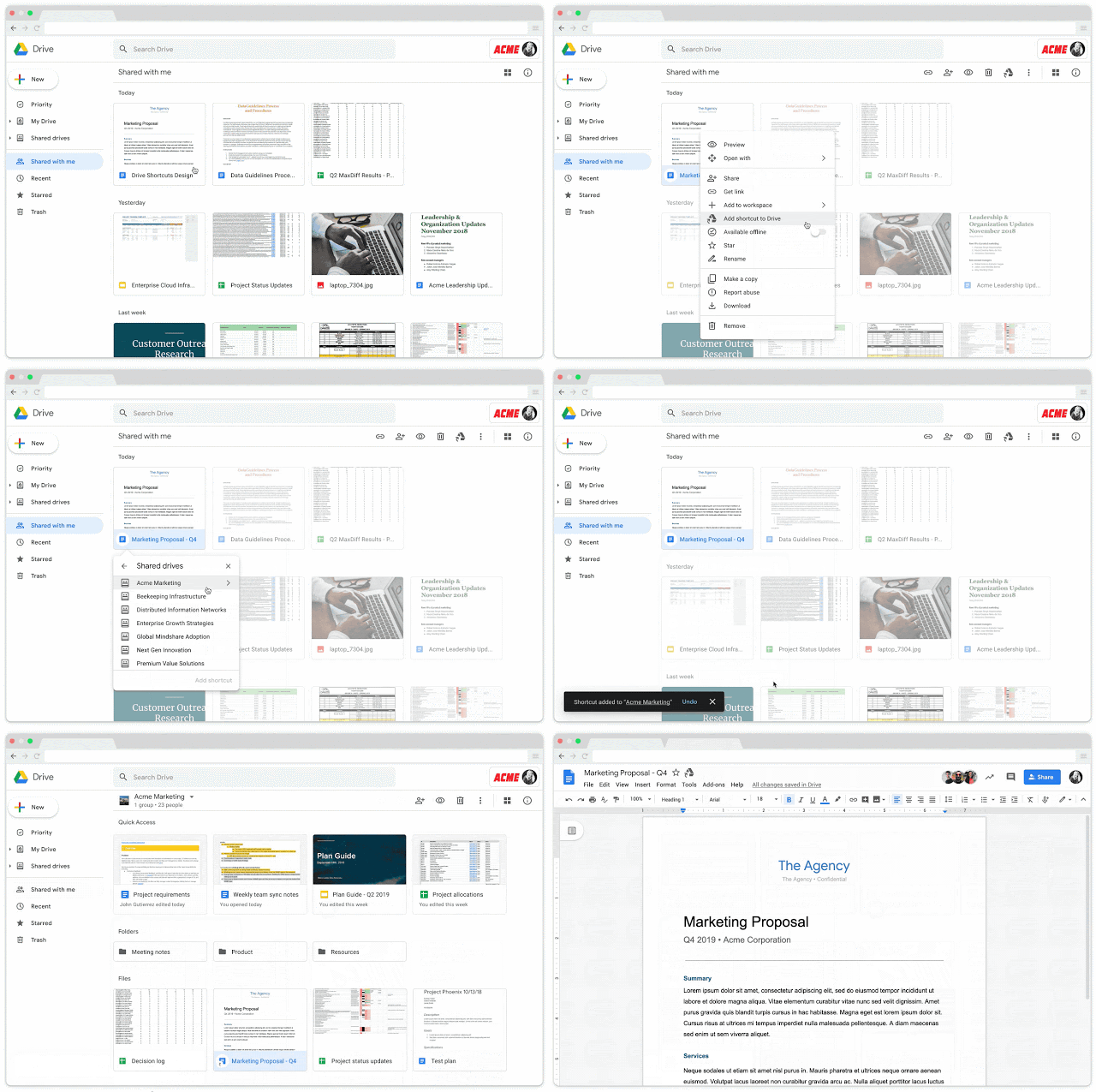
The following Google Apps Script is designed to create a Shortcut to an existing Google Drive folder, within another folder..
For Google Drive pros you can currently place a file in multiple folders, but Google will be removing this functionality on 30 September 2020. In March Google announced general availability of shortcuts in Google Drive, is is designed to replace the ‘file in multiple locations’ feature. For Google Apps Script developers wanting to migrate to Drive Shortcuts Phil Bainbridge provides this useful Apps Script snippet.
Dos funciones personalizadas para hojas de cálculo de Google desarrolladas en Apps Script que proporcionan un envoltorio para la función NSLookup, tal y como aparece en la documentación del servicio de resolución de nombres de CloudFlare. Consulta el registro indicado en el o los dominios que se pasan como parámetro utilizando el servicio de resolución de nombres de CloudFlare. Determina si un email o dominio (o lista de emails o dominios) está gestionado por Google o no. – pfelipm/dnsquery
Pablo Felip Monferrer has shared two custom functions for Google Sheets that provide an extension to the NSLookup function originally shared by Cloudflare. The first is a wrapper that makes it easy to list specific DNS record types for a single or list of domains. The second function uses the domains MX record to automatically detect if a domain has G Suite Gmail settings applied.
Recently I had setup a daily extraction automation from a marketing platform and they had SOAP API. I had worked with xml before, so after some trial and error I was able to fetch marketing data from trafficvance.com platform right inside Google Sheets
Nice post from Urwa Shabir highlighting how to interact with 3rd party APIs using SOAP which relies heavily on XML. The post covers formatting a SOAP request now that SOAPService is deprecated in Apps Script, as well as parsing the XML response.
They thought we wouldn’t go there, but they thought wrong. If you want or need to find out some DNS records inside of Google Sheets, create a Google Function
Eric Koleda spotted (see tweet) that Cloudflare has been having some fun with Google Apps Script sharing a custom function that lets you do a DNS lookup for domain names in Google Sheets. Eric notes he can’t imagine when you would need to do this, but I always find it encouraging to see big companies using and promoting Google Apps Script.
Proof of concept of how to get namespaces (sorta) in Google Apps Scripts libraries – classroomtechtools/NamespacedLib
For the seasoned Google Apps Script library author a continual frustration is the inability to get the online Script Editor to autocomplete if you have sub methods within your namespace. Adam Morris has discovered that the @name attribute can be used to fake this behavior … to a degree.