Firefast is a Firebase SDK for Apps Script V8 Runtime. Read and write data in Firebase using Google Apps Script

Firebase Realtime Database is a cloud-hosted NoSQL database. Data is stored as JSON and can be accessed in your Web, iOS, Android app using Google’s Firebase SDK. But, Google doesn’t provide such SDK for Apps Script. This library solves that problem. It gives you Firebase SDK for Apps Script.

Nice Google Apps Script library from Mani Doraisamy that makes it easy to read/write data from a Firebase Realtime Database. The site also highlights the performance gain of writing this library from the V8 runtime compared to the older FirebaseApp library shared by Romain Vialard. Mani’s code is open source and if you have issues, feedback or contributions you can add these via the Github repo.

Source: Firefast – Getting Started

Streamline access to resources for vendors via Google Sheet – Sheets to Apps

Need to share a variety of documents with vendors? Don’t want to share access one by one? In this episode of Sheets to Apps, we’ll cover how to use an Apps Script in a Google Sheet to automatically add members to a Google Group, helping you share documents at a large scale that will save you time.

We’ve previously shared the Medium post that provides more details for setting up this solution. If you missed that post or were unclear Alexandrina Garcia-Verdin, better known in the community as AGV, provides a very useful overview.

The code and other resources presented in this episode are available from the video description.

Reliable, Secure & Scalable use of Google Apps Script | Google Developers Experts

Most conversations around solutions or automations created using Apps Script eventually get to a point where being able to address concerns around its reliability, security and scalability becomes a challenge — more so if compared to having similar applications being built on other platforms (say: AWS, GCP, Firebase etc.).

In this post, we’ll see how to navigate our way through said constructs by addressing parts of these problems and also explore ways in which we can bake some solutions right from the get-go!

In this post Sourabh Choraria provides some very useful answers for common questions organisations have when using Google Apps Script as part of their infrastructure. Points covered in this post include: managing concurrent executions; being able to securely store, access & manage API keys, tokens; and considerations around quotas.

Source: Reliable, Secure & Scalable use of Apps Script | Google Developers Experts

Integrate Google sign-in using Firebase authentication on your Google Apps Script web app

make use of firebase’s pre-built ui to authenticate users on our google apps script web app

Sometimes with Google Apps Script web apps you need a way to authenticate the user whilst also publishing the web app to run under a specific account. Sourabh Choraria details how Firebase can be setup allowing you to authenticate users with their Google account.

Source: integrate google sign-in using firebase auth on your google apps script web app

Capture Gmail Messages in a Google Sheet using Google Apps Script | Practical Ecommerce

With Google Apps Script, marketers can capture Gmail messages, parse them for relevant information, and add them row-by-row to a Google spreadsheet. This can be especially helpful for capturing leads or contacts.

A comprehensive write-up from Armando Roggio on using Google Apps Script to copy emails from your Gmail account to Google Sheets. As an added bonus the tutorial is also written using the new V8 runtime syntax.

Source: Capture Gmail Messages in a Google Sheet | Practical Ecommerce

Take Your Business Online Integration to a Whole New Level with 56 Hours of Instruction on Google Scripts, Apps, Projects & Tips — Source Code Included

The training in The Increase Your Google App Productivity with Google Script Bundle can show you all you need to know to navigate the entire scene like a pro.

The training starts the introductory level Google Apps Script Complete Course: Beginner to Advanced. Here, even first time users get a velvet glove experience learning Script, how it operates and the ways you can use it to power up your app projects immediately.

For those of you who track Google Apps Script with Google Alerts your inbox is probably full of notifications about this Google Apps Script course provided by Google Developers Expert Laurence Svekis. Don’t delay to get this course discount…

Source: Take Your Business Online Integration to a Whole New Level with 56 Hours of Instruction on Google Scripts, Apps, Projects & Tips — Source Code Included

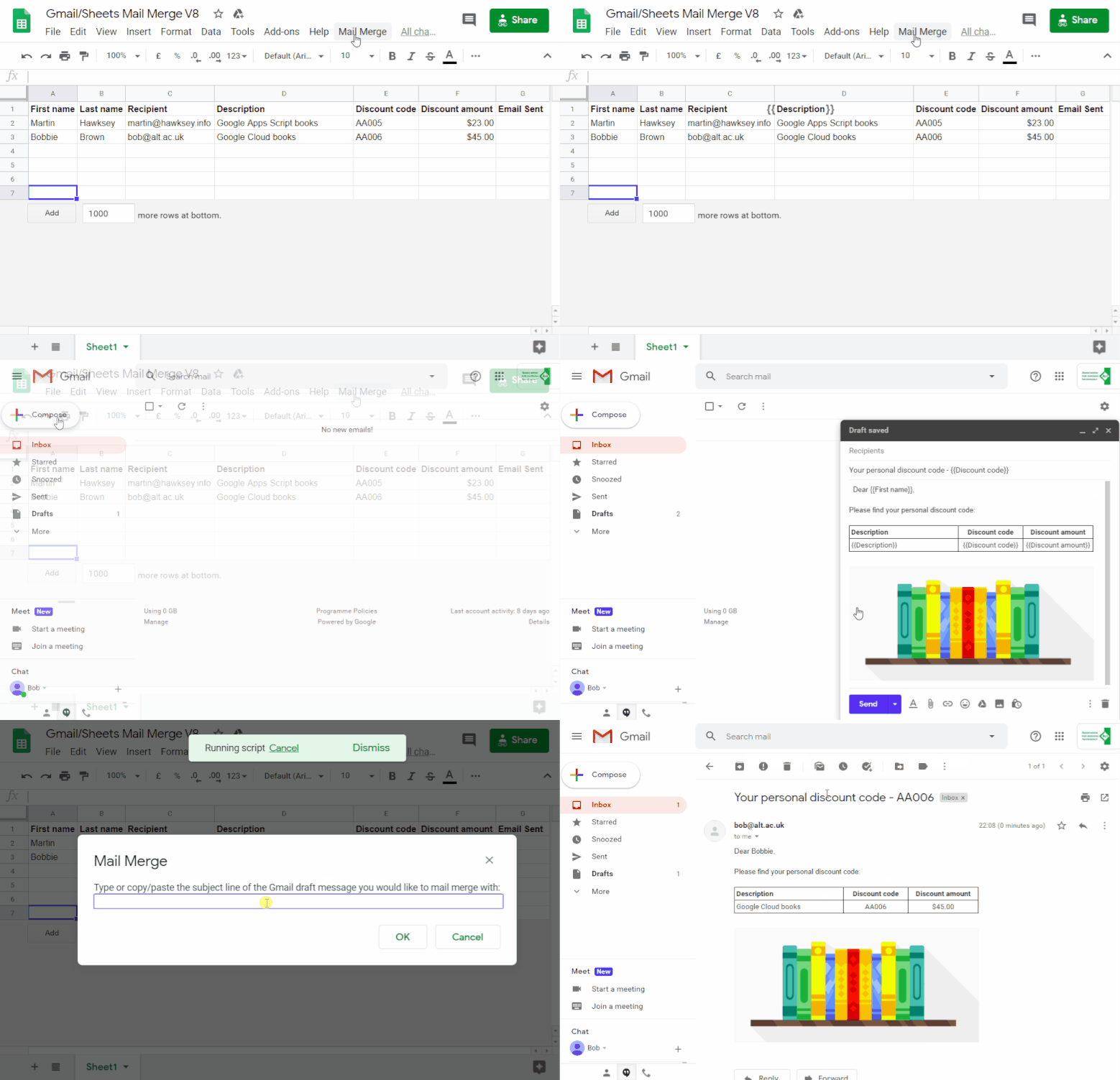
A bulk email/mail merge with Gmail and Google Sheets solution evolution using V8 – MASHe

Last year I had a ‘mail merge using Gmail and Google Sheets’ contribution accepted on the G Suite Developers Solution Gallery. Just over 6 months on there has been lots of useful feedback and requests for solutions to some of the limitations of the original published script. In the meantime Google has also made the new V8 runtime for Google Apps Script generally available. Given this it seemed appropriate to revisit the original solution updating it for V8 as well as covering the most commonly asked for changes. In this post I’ll highlight some of the coding changes as well as some easy modifications.

This post picks up some common requests I get for features like advanced send parameters (cc, bcc, sender name/from, replyTo), sending emails with emoji/unicode and scheduling/triggering bulk emails. Some other areas covered in this post might be of general interest to Apps Script developers interested in using formatted Google Sheets cell values for currencies, dates and more as well as detecting/ignoring filtered hidden rows.

Source: A bulk email/mail merge with Gmail and Google Sheets solution evolution using V8 – MASHe

Apps Script V8: Keystore for global space – Desktop liberation

One of the challenges with V8 compared to Rhino is that you can’t be sure of the order of global variable initialization. Personally this is not an issue for me, as I avoid any such use of global space, but it is an issue for some. A nice way of dealing with global space is to use namespaces and IEF as I described in Apps Script V8: Multiple script files, classes and namespaces but another, perhaps less obvious way, is put all the variables (and even functions) you need to access from multiple functions in a keystore.

Interesting solution for storing/retrieving variables, particularly when you are using the new V8 runtime.

Source: Apps Script V8: Keystore for global space – Desktop liberation

Using Google Apps Script to capture who sends email from your delegated gmail account

Overview of the power of Apps Script – Apps Script in a Snap

In this first episode of Apps Script in a Snap, Joanna Smith will go over what exactly Apps Script is and how you can use it to tailor any of G Suite’s productivity apps – such as Google Drive, Google Sheets, Google Docs, and Google Drive – to match and streamline your workflow.

The G Suite DevRel team have been busy. As well as AGV’s excellent Sheets to Apps series, some new videos are coming out from Joanna Smith in ‘Apps Script in a Snap!’. Currently these are very top level intro videos and it will be interesting to see where they go with this series.