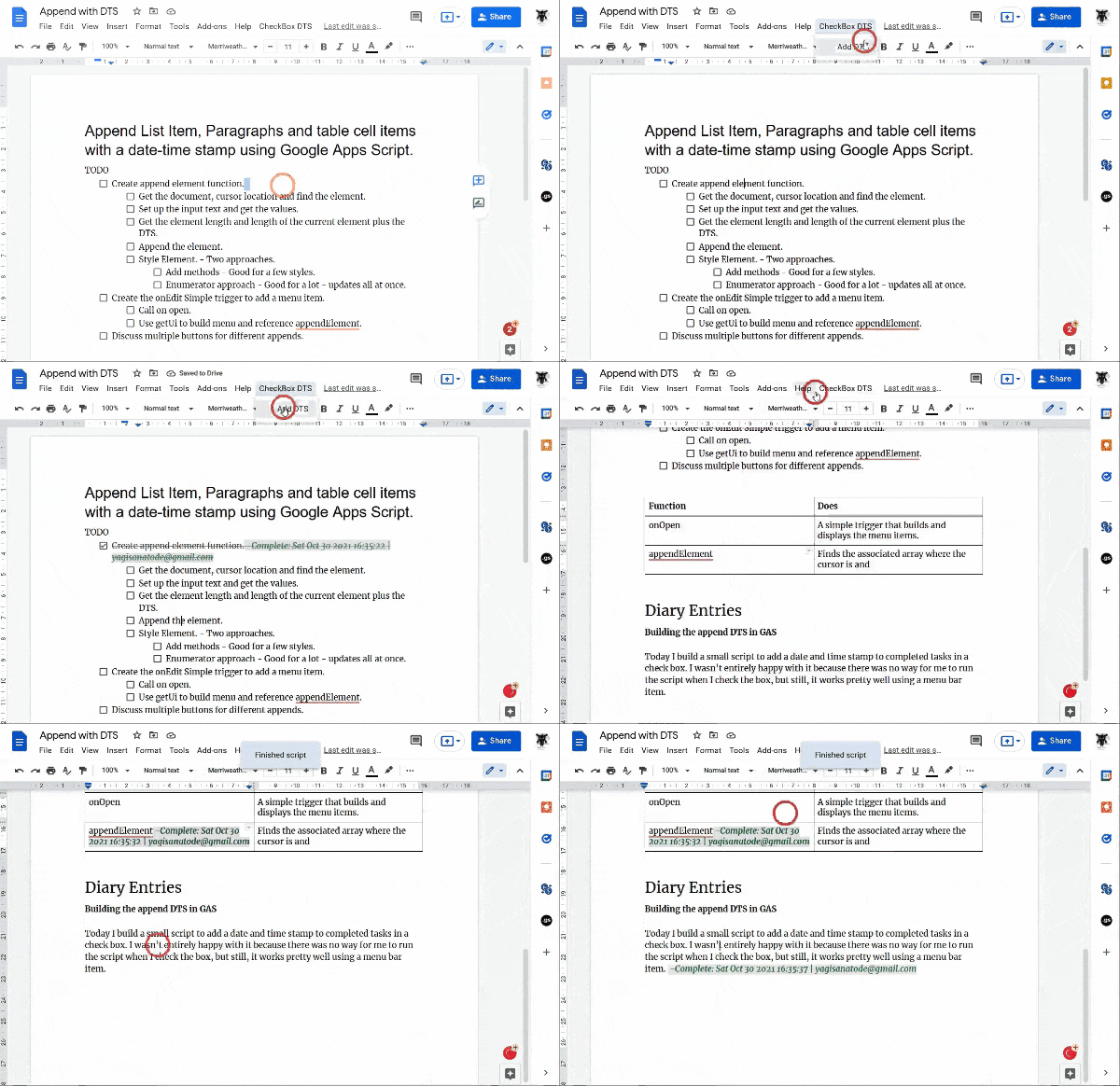
Learn how to append a date-time stamp to list items, paragraphs and more in Google Docs with Google Apps Script
A very slick example from Scott ‘Yagi’ Donald which shows a very simple method for appending text at the current cursor position and all achieved in just over 50 lines of code, with comments. Head over to the source for the full code and explanation.
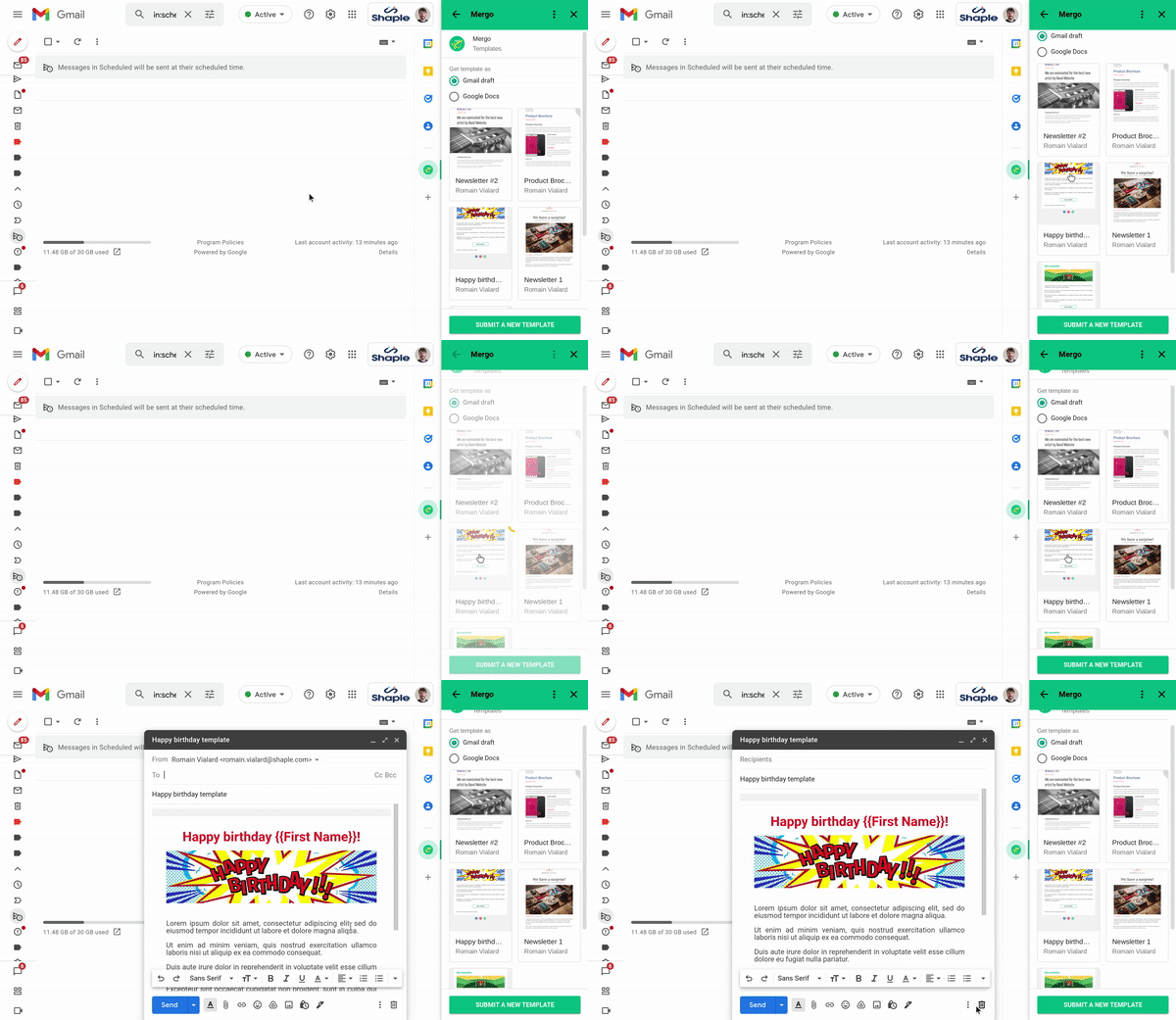
Mergo is a mail merge add-on for Gmail. With the new gallery, users can easily create, share & reuse templates.
Instead of starting your email from scratch, you can open the gallery and select a template: it will appear as a draft in Gmail.
We recently had Romain Vialard join us on Totally Unscripted to talk about some of his add-ons. This post is another example of Romain’s continual exploration of Apps Script, this time looking the new Grid view for the CardService. You an find out more in the source link.
The AppsScriptPulse website was launched in 2019, providing a curated collection of the latest Google Apps Script contributions from both Google, but focusing on community contributions. The site now has over 600 solutions, snippets, tutorials and resources updated almost daily. In this episode of Totally Unscripted we are joined by Romain Vialard, Phil Bainbridge and Scott ‘Yagi’ Donald who have individually provided the top 3 Pulse contributions for 2021.
We will discuss the solutions they have created which range from offline Apps Script development with VS Code/clasp to document automation to creating games in Google Slides. This episode will be broadcast live and you can join the conversation in the YouTube Live chat.
Google Apps Script Meetup at Google Cloud Next ’18
I’m sure many in the Google Workspace developer community will know the name Bruce Mcpherson and his website https://ramblings.mcpher.com/. There are very few people who can say they have written the book on Google Apps Script and Bruce is one of them with his O’Reilly publication ‘Going GAS’.
At Pulse we recently discovered that Bruce was getting close to his 1,000th post. This milestone has now been reached with Bruce’s latest contribution ‘Creating a connector for Data Studio‘. To help mark this achievement we got in touch with some of the many ‘Bruce fans’ to reflect on Bruce’s work to date and the impact it has had on their own work.
If you would like to add your own comment feel free to use the comments section.
Laura Taylor – Google Workspace GDE
Bruce Mcpherson is one of the most prolific technical writers I’ve ever encountered. His intricate systems knowledge along with his unique writing style make for very fascinating and helpful reading. Not only is Bruce a prolific writer but also a prolific developer, contributing a number of open source libraries many of which are used daily in the Apps Script ecosystem. A great debt of gratitude is owed Bruce as he has shared his knowledge with so many. Thank you, Bruce, for your service to the Apps Script community.
Ben Collins – Google Workspace GDE
When I moved from the Microsoft world to the Google world, around 2014, there was one site I kept landing on… and that was Bruce’s! I remember early in my Google Workspace and Apps Script journey, when I was in over my head with a client project, I emailed Bruce to ask if I could use one of his many libraries in the project. He quickly replied “of course!” and proceeded to help me with a few questions I had too. I had the great pleasure of meeting Bruce in person at Next 2019 and he’s a wonderful character with many great stories. We’re lucky to have Bruce as our talisman in the Google Workspace developer group. Cheers to the next 1,000!
Eric Koleda – Former Google Developer Relations
Bruce has been a pillar of the Apps Script community for years, and hitting 1000 posts is but one sign of his love and dedication to the productivity space. My favorite post of Bruce’s ( although it’s so much more than a post) is about cGoa, an OAuth2 library for Apps Script. When the Apps Script engineering team released the /usercallback endpoint they imagined many developers building their own OAuth2 code, but I think Bruce may have been the only person not employed by Google to wade into the murky waters of implementing an authorization library. Throughout this project and others Bruce has always focussed on usability and making sure that users could get to working code quickly. Congratulations Bruce!
Chanel Greco – Google Workspace GDE
I really appreciate how Bruce actively shares his Apps Script knowledge with others through his blog, his books or by answering questions on the different community platforms.
When searching for something Apps Script related, sooner or later, you’ll land on one of Bruce’s many resources. Many of us have developed our own Apps Script skills thanks to his contributions.
Thank you Bruce!
Charles Maxson – Google Developer Relations
Congratulations on 1,000 posts Bruce! (and THANK YOU from everyone who’s ever tried to use Apps Script – your work has no doubt been discovered and essential for all!)
I myself ‘met’ Bruce through his book “Going GAS: From VBA to Google Apps Script” where he became my personal interpreter in translating my years of Office VBA knowledge into Google Apps Script. As one of the original pioneers who started building solutions on Google AppsG Suite Workspace, what’s amazing is how Bruce has continued to give back to the community by sharing posts, libraries, videos, insights and expertise for such a long time. Having the privilege to work with Bruce now as a Google Developer Expert, he continues to amaze me how much knowledge he’s amassed and still humbly shares as regularly as ever.
Looking forward to you rambling on for another 1,000 Bruce!!!
Anu Srivastava – Google Developer Relations
Thank you so much for all your content! Especially for helping out the Apps Script community!
Clark Lind – Google AppsSuite Workspace GDE Hack
Thank you Bruce for all you have done for the GAS community. You have had worldwide impact and influence and continue to do so. I hope you continue influencing the next generation of scripters coming along. I’ve copied learned so much from you over the years, it has helped me in my own work and career. You have shown me just how much there is to learn, and how much I don’t know. ;)
Thank you!
Adam Morris — Google Developer Expert & Integrations Director @ Faria Education Group
I like writing libraries, but what I like even more is not having to write them. It’s a grand world indeed that we live in our current universe where we can run into problems and challenges in code, and embark on a journey that leads us to individuals such as yourself, who by their very prolific endeavours establish an even grander world. Thank you.
Andrew Roberts – Freelance Dev and Google Wordspace GDE
One of the true stalwarts of the Apps Script community, Bruce has been an inspiration and endless source of knowledge for the many years I have been involved in Apps Script. Back in my early days of having to Google for how to do most things, Bruce’s site was inevitably the site I’d end up at. The guy literally wrote the book! Almost getting to 1000s posts is an amazing achievement.
The post that particularly stands out for me, and I had lots of fun deploying, was on parallel processing with Apps Script to get around the execution limit. It even displays a funky little graph you can watch.
Thanks again Bruce for your continued support and contributions.
Riël Notermans – Google Developer Expert and company owner of Zzapps, a Workspace reseller
Me, Martin and Bruce.
There are some people that I always look forward to seeing and to spend time with. Bruce is well in that list ;) Actually it has been for too long.
Hanging out in real life or virtually discussing some features that work great or not, or listening to what Bruce has to say about, well, anything, it is a great experience. Professionally I would not know where to begin the ‘thank you’s’, but one of the most recent is with Bruce ‘mentoring’ me on a Kubernetes project. I got a kickstart in understanding the concepts, together with Bruce pieces of great code and his well-known ramblings really got me going. Congrats Bruce and looking forward to meet again!
Amit Agarwal – Founder @ Digital Inspiration and Workspace GDE
Thank you Bruce for your amazing contributions to the Google community. You cannot imagine how much impact your work has had on the lives of so many developers worldwide. Personally, I have admired your coding style and learnt so much by looking at your work. Thank you again!
Martin Hawksey – University of Edinburgh and Google Workspace GDE
One library that I’ve used a lot in my own work is cGoa, which lets you do OAuth2 for Apps Script in a few lines of code. There are a couple of other OAuth2 libraries, but as someone also writing about Google Apps Script solutions, the cGoa setup is straightforward and easy for others to follow. From one post from Bruce it has featured in six of my own, an example of the value of Bruce’s ‘ramblings’ to the community.
This is a sample script for sending Outlook emails using Microsoft account with Google Apps Script. Before you use this script, please install OnedriveApp which is Google Apps Script library. And, please authorize your Microsoft account for using Microsoft Graph API.
The author of this contribution, Kanshi Tanaike, always comes up with interesting Google Apps Script solutions. This particular example uses a OnedriveApp library which makes it easy to interact with other part of the Microsoft Graph API expanding the possibilities.
In this post, we’re going to look at a simple issues reporting system, where the teacher fills out a Google Form to report the issue. This is stored in a Google Sheet, and an email with the summary of the issue is either sent to the maintenance person or IT technician, depending on the type of issue.
This is based on a system I introduced at the academy where I work, which is in Spain but not all the teachers speak Spanish, so the form allows them to report the issue in English and then it’s translated into Spanish for the relevant person to resolve the issue.
In this post Baz Roberts highlights the benefits of Google Apps Script Language Service to translate Google Form responses into another language.
As part of our last episode of Totally Unscripted we spoke to former Google Workspace DevRel Eric Koleda about his new role supporting the Coda community.
Coda provides word-processing, spreadsheet, and database functions. It’s a canvas that blends spreadsheets, presentations, apps, and documents together. The software can integrate with third-party services like Slack and Gmail.
Eric gave a fantastic overview of the Coda platform highlighting opportunities for developers to integrate with services like Google Apps Script via the Coda REST API and the new Coda Packs, which are currently in beta.
The clip is an excerpt from the full show where we get to see these features in action and some additional resources referenced are linked below:
This is a sample script for sending multiple emails using the batch request with Gmail API using Google Apps Script. When multiple emails are sent using “GmailApp.sendEmail” and “MailApp.sendEmail”, a loop is used. But in this case, the process cost becomes high. In this post, I would like to introduce the sample script for reducing the process cost under this situation. Gmail API can be requested with the batch request. The batch request can be processed with the asynchronous process. By this, I thought that the process cost for sending multiple emails. So, this sample script sends multiple emails using the batch request with Gmail API.
I imagine many in the Apps Script developer community have a script or two that sends email. This post highlights a solution using the Gmail API to send emails in a batch, keeping in mind the limitations highlighted in the post.
Google Workspace Marketplace is proud to announce the availability for developers to display pricing for their applications published in the Google Workspace Marketplace, and the date their application listing was last updated.
Monetization of Google Workspace Marketplace Add-ons is a topic that has often been raised. This latest update from Google doesn’t directly address in-app purchasing but it does provide a way for listings to be more transparent about pricing. Check the source post for more details on this and other Google Workspace Marketplace updates.
In this episode of Totally Unscripted, we will catch up with Eric Koleda who has been a well known fixture to Google Workspace Developers for the better part of a decade. Now that his legendary career as a Google Workspace Developer Relations Engineer has come to a close, we will reminisce with Eric about the impact of Apps Script and how Workspace development has evolved. We will also take a look at the future and get some insights about his new role and the breakthrough technology at Coda, where he’s begun his new life after Apps Script.
This episode will be broadcast live TUESDAY 19 Oct. at 1200 PDT / 1500 EDT / 2000 GMT+1 and you can join the conversation in the YouTube Live chat.