Totally Unscripted: Building successful Add-ons for Google Workspace – 24 November at 1200 PT / 1500 ET / 2000 GMT

The next episode of Totally Unscripted is scheduled usual time Wednesday 24 November. For the episode we are looking at ‘Building successful Add-ons for Google Workspace’, joined by two top add-on developers, Romain Vialard, Founder of Scriptit & John McGowan, CEO of Unicorn Magic, and Elena Kingbo, Program Manager on the Google Workspace Platform team and involved in the Google Workspace Marketplace:

The Google Workspace Marketplace offers users and administrators alike a wide variety of third party solutions that extend Google Workspace. Creating a successful add-on for the Marketplace takes more than a bit of luck to stand out from the crowd. In this episode we will chat with two purveyors of well-known add-ons Romain Vialard, Founder of Scriptit & John McGowan, CEO of Unicorn Magic, to hear what it takes to create a thriving business in the world of Workspace Add-ons. Also joining us will be Elena Kingbo, Program Manager on the Google Workspace Platform team, who helps guide developers through their Add-on journey.

As always the show is broadcast live and you can ask questions via chat, but also interested to hear in advance any of your burning questions for our panel using the comments section below or tweeting them to @AppsScriptInfo. What are your pain points? If you haven’t published a Workspace Add-on what are the blockers? Or anything else you would like to hear more?

How to get Google Lighthouse reports using PageSpeedInsights API and Google Apps Script

Lighhouse
Image: CC-BY Google

Lighthouse is an open-source, automated tool for improving the quality of web pages. You can run it against any web page, public or requiring authentication. It has audits for performance, accessibility, progressive web apps, SEO and more.

On StackOverflow there is a nice question/answer from Mert Dökümcü on How to send Google Lighthouse reports to Slack using PageSpeedInsights API and Google Apps Script. You can read the full solution there and below is an excerpt from Mert’s post (copied here CC-BY-SA Mert Dökümcü) of the bit that really interested me, getting results from PageSpeedInsights.

First and foremost, get…

Once you have these, go to https://script.google.com/home and create a new script. The following code should do the trick:

var mobileData = fetchDataFromPSI('mobile');
var desktopData = fetchDataFromPSI('desktop');

function pageSpeedApiEndpointUrl(strategy) {
  const apiBaseUrl = 'https://www.googleapis.com/pagespeedonline/v5/runPagespeed';
  const websiteHomepageUrl = ''; // Your website
  const apikey = ''; // Your API key
  
  const apiEndpointUrl = apiBaseUrl + '?url=' + websiteHomepageUrl + '&key=' + apikey + '&strategy=' + strategy;
  return apiEndpointUrl;
}
function fetchDataFromPSI(strategy) {
  const pageSpeedEndpointUrl = pageSpeedApiEndpointUrl(strategy);
  const response = UrlFetchApp.fetch(pageSpeedEndpointUrl);
  const json = response.getContentText();
  const parsedJson = JSON.parse(json);
  
  const lighthouse = parsedJson['lighthouseResult']
  const originLoadingExperience = parsedJson['originLoadingExperience']

  const result = {
    'overall_performance': originLoadingExperience['overall_category'],
    'score': lighthouse['categories']['performance']['score']*100,
    'firstContentfulPaint': lighthouse['audits']['first-contentful-paint']['displayValue'],
    'speedIndex': lighthouse['audits']['speed-index']['displayValue'],
    'timeToInteractive': lighthouse['audits']['interactive']['displayValue'],
    'firstMeaningfulPaint': lighthouse['audits']['first-meaningful-paint']['displayValue'],
  }
  return result; 
}

Checking Google Groups membership recursively using Google Apps Script

Learn how to check indirect membership of users or groups in the context of the Google Groups Service using Apps Script.

This is a great post if you want to learn about how to programmatically navigate the hierarchy of Google Groups, which may also come in handy when you are processing other tree like structures often found in JSON. All the code needed to run this is provided and clearly explained.

Source: Getting Google Groups membership recursively using Apps Script

Letting users run a Google Apps Script on Google Sheets without authorizing scopes and showing the source code

This is a sample workaround for letting users running Google Apps Script on Google Spreadsheet without both authorizing the scopes and showing the script.

The post highlights the use of the existing =IMPORTML() Google Sheets function and a publish webapp to run a Google Apps Script without the end user having to authorize the script. A limitation of this approach, and also important warning to keep in mind, is the deployed web app needs to be deployed to run as the script owner and by anyone who has the web app link.

Source: Letting Users Running Google Apps Script on Google Spreadsheet without both Authorizing Scopes and Showing Script

Totally Unscripted: What’s new in the world of Chat Apps? – 17 November at 1200 PT / 1500 ET / 2000 GMT

For our next episode of Totally Unscripted we look at Google Chat, specifically Google Chat Apps. As part of this we will be joined by Aidha Shaikh who leads the Chat App strategy at Google. This episode will be broadcast live and you can join the conversation in the YouTube Live chat.

Chat bots (aka Chat Apps) offer developers a framework for building solutions within conversations and direct messages inside of Google Chat. As Google Chat has become a more integral part of Google Workspace, Chat Apps have evolved to offer developers new capabilities which in turn creates opportunities for richer interactions, integrations and workflows. In this episode, we will discuss “What’s new in the world of Chat Apps” with Aidha Shaikh, Product Manager on the Google Workspace Platform team, who leads the Chat App strategy at Google.

How to Delete Blank Rows from Tables in Google Documents – Digital Inspiration

How to remove all blank rows from one or more tables in a Google Docs document with Google Apps Script. You may also delete blank rows from tables in Google Slides.

Source: How to Delete Blank Rows from Tables in your Google Documents – Digital Inspiration

Keep a Journal of Special Moments using Twilio Programmable SMS and Google Sheets

Learn how to build a Google Sheet journal that accepts new entries via text message. My toddler recently turned two and a half and my second daughter was born three weeks ago, so special moments are abundant but the ability to remember them is severely compromised. His suggestion of recording a memory every day in an Excel sheet or leather bound journal resonated with me, but after a few days of trying to find time to open up Excel and write a memory I realized I needed a more lightweight solution. … Twilio makes it easy and cheap to set up a dedicated phone number that can record those text messages to a Google sheet.

Nice example on the Twilio blog on using their service with Google Sheets. There is little setup required but this can all be achieved in 4 lines of code. Unfortunately, sending/receiving SMS messages with Twilio is not free, but it might be a service you keep in mind for Apps Script projects.

Source: Keep a Journal of Special Moments using Twilio Programmable SMS and Google Sheets

Enhanced menus in Google Sheets improves findability of key features (and an important update for Google Workspace Developers)

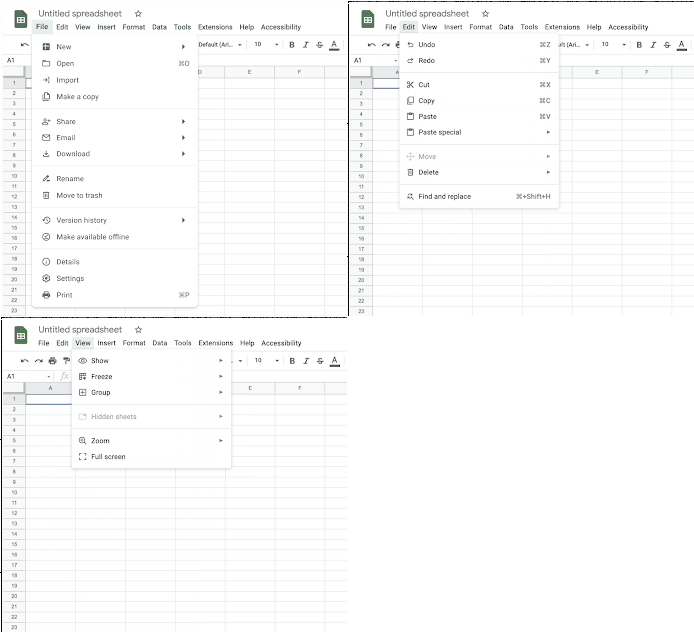
New Google Sheets menus

We’re updating the menus in Google Sheets to make it easier to locate the most commonly-used features. Some of your favorite menu items may have moved a little, but all existing functionality is still available. We hope that their new home will be more intuitive and make it easier and faster to navigate the product.

Google Workspace Updates

Google have updated the menus in Google Sheets to help with discoverability. For Google Workspace Developers one of the big changes is the new Extensions menu which replaces ‘Add-ons’ and includes links to Macros, Script Editor and AppSheet. Whilst painful if you need to update support documentation the new structure will hopefully make the location of these tools more intuitive. We covered the Google Sheets menu update in the latest episode of Totally Unscripted:

Source: Enhanced menus in Google Sheets improves findability of key features

Google Workspace Recap E044: Google DevRel team members Charles Maxson and Steve Bazyl talk about the Workspace Developer Ecosystem

We welcome two amazing members from the DevRel (Developer Relations) team this episode.

Charles Maxson is a Developer Advocate at Google where focuses on inspiring developers of all types to build solutions that leverage Google Workspace as a platform.

Steve Bazyl is a Developer Relations Engineer and Advocate at Google and has worked with various Google Workspace APIs and partners for over a decade. Google Workspace Developer Links

Totally Unscripted co-host, Charles Maxson, and regular guest Steve Bazyl recently featured on the Google Workspace Recap podcast talking about recent trends and development within the Google Workspace developer ecosystem.

Totally Unscripted: How SADA builds on Google Workspace – 3rd November at 1200 PDT / 1500 EDT / 1900 GMT

Totally Unscripted returns on 03 November at 1200 PDT / 1500 EDT / 1900 GMT (earlier time for those not watching in North America), this time joined by guests Kelly Wright (Director of Google Workspace, SADA) and Kevin Tuuri (Solutions Architect, SADA):

SADA is a Google Cloud Premier Partner that focuses on Google Cloud consulting, migration and deployment, custom development, user adoption, and change management services. As an industry leader in helping organizations implement Google Workspace, SADA has developed a practice area that builds custom solutions as unique as their customers. In this episode of Totally Unscripted, we will hear from Kelly Wright, Director of Google Workspace, and Kevin Tuuri, Solutions Architect, about how they help customers get more out of Google Workspace by customizing they way they use it. This episode will be broadcast live and you can join the conversation in the YouTube Live chat. – https://youtu.be/b_wiI8InwC0