Create automated backups of Google Sheets with Google Apps Script

The problem comes when you have to load that info in your app. … The more the data, the more time to load. You could use Apps Script to schedule backups of your data.

A nice introduce into Google Apps Script with an opportunity to learn how to archive data from one Google Sheet to another. This solution comes from Mozart García who is more often seen on YouTube producing short Google Apps Script how-to in Italian (Bravo! Mozart on recently passing 4K subscribers)

Source: Create automated backups with Apps Script

Using Google Apps Script to get Google Workspace user profile pictures without using the Admin APIs

Image credit: Google

Chances are that you may need to display user’s picture profiles in your applications. However, this API is part of the Directory API, which is part of Google Workspace Admin area. And chances are that your Organization has simply not giving you the rights to use Admin APIs

Sometimes within your Google Workspace domain you’d like to include account profile images. A number of Google Workspace APIs, like the Drive API, will include profile pictures in the response object. When this isn’t the case this post by Turhan Oz is a nice reminder that the dedicated People API can be used to get profile images. Click through to the source post to read more and sample code.

Source: AppScript — get user profile picture without using Admin APIs

How you can use Google Docs to write and execute Google Apps Script code

Image credit: Amit Agarwal (labnol.org)

There is a way to use Google Docs as a programming IDE and run JavaScript code inside the editor …  It is no replacement for a dedicated IDE like Visual Studio code but Google Docs can be used as a JavaScript playground to quickly run code snippets.

A familiar story I hear is people with no formal coding experience starting their developer journey with Google Apps Script. I find being able to run small snippets of code are a great way to learn and a number of sites like W3 Schools and also increasingly Stack Overflow include the ability to ‘try it yourself’ with inline code runners.

If you are looking to support users getting started with Google Apps Script Amit Agarwal has this little code snippet which lets you inline/run Google Apps Script code in Google Docs. There are both limitations and considerations with this approach but as a quick way for learners to run and collaborate on small snippets, which can be contextualised with explanatory text/resources, it’s a nice starting point. Check out the source link for more details.

Source: How to Use Google Docs as a Code Runner – Digital Inspiration

Uploading multiple records with the Salesforce API using Google Apps Script

Image credit: Eduardo Ramon Resser

Sometimes, when using Salesforce, we come across the situation of needing to upload several object records at once, such as accounts, contacts, tasks, etc.

There are several ways to resolve this issue. One approach that can be efficient is through Google Sheets, especially if you want to “convert” each row in a table into separate records in Salesforce.

In the example of this article, I will talk about an implementation for bulk exporting of tasks using information contained in a table in Google Sheets using the Salesforce API.

This post on interacting with the Salesforce API highlights the tricky situation of handling different user credentials. The author comes up with a clever solution of using user owned Google Docs as a way to store different identities. Another approach is to use Google Apps Script’s Properties Service. The Properties Service includes an option to store User Properties which are only accessible to the user running the script.  The downside of this approach is you then have to create UI for the user to input properties.

Source: Uploading Multiple Records Via Salesforce API Using Google Apps Script

How Google Workspace is delivering innovation for the future of hybrid work | Google Cloud Blog

Google Workspace is the most popular productivity tool on the planet — relied on by more than 3 billion users. To help organizations thrive in a hybrid world, we’ve invested heavily in immersive connections, our approach to bringing people closer together through our communication products, and smart canvas, our next-generation collaboration experience, while enhancing our cloud-first security model to help people work safer.

Today is the first day of Google Cloud Next ’22 and this flagship event is being used to announce a number of upcoming features for Google Cloud and Workspace. This post (source link at the end) from the Google Cloud blog gives a summary of some of the key announcements including:

  • Bringing people together with immersive connections – which announces a number of new features being introduced to enhance Google Meet, the much requested feature to include inline threaded conversations in Google Chat as well as broadcast only Chat spaces
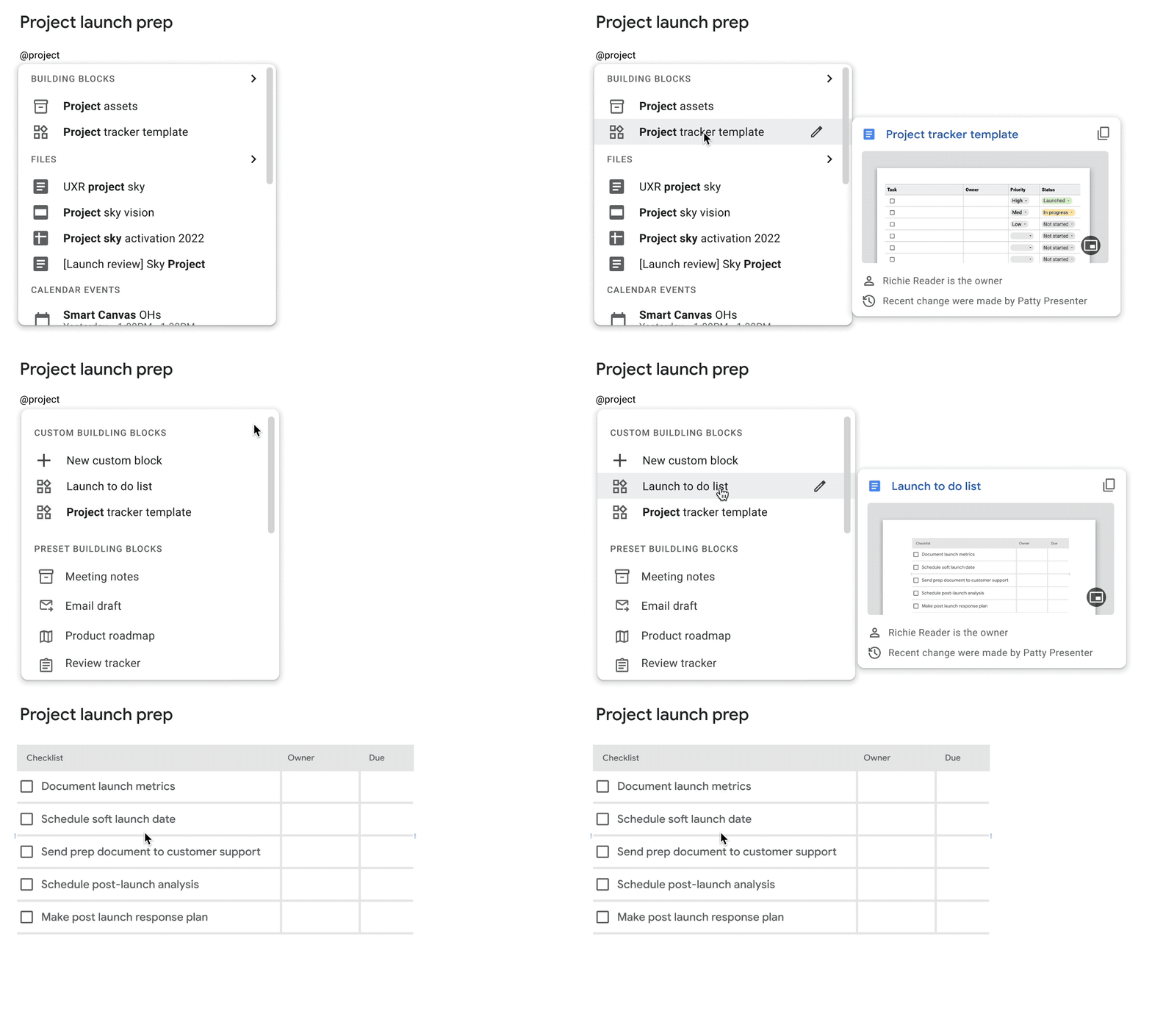
  • Collapsing the boundaries between people and apps with smart canvas – which highlights updates, mainly to Google Docs, to enhance productivity with custom building block and user defined variables. Google Sheets is also getting some smart chips enhancements including smart chips data extraction and third party integration as well as a new timeline view rolling out this month
  • Work safer with Google – a reiteration of Google’s commitment to security with updates on data loss prevention being extended to Google Chat, Trust rules in Drive and client side encryption for Gmail and Calendar
  • Extending the power of Workspace – the one perhaps of most interest to Pulse readers are the opportunities to build on Google Workspace with additional APIs for Meet and Chat, a Meet add-on SDK to third party integrations directly in Meet, and an official Google Chat integration from AppSheet apps.

For some of these announcements you’ll have to wait until 2023 at the earliest to get your hands on them. For a wider narrative and to see how the tech press is responding to today’s Google Cloud Next ’22 announcements here are some stories that have caught my eye:

Source: How Google Workspace is delivering innovation for the future of hybrid work | Google Cloud Blog

How to create a Trello card using Google Apps Script

Photo by Christina @ wocintechchat.com on Unsplash

If you are a Google Workspace and Trello power user like me, I’m sure the thought has come across your mind of connecting your Google Apps to Trello, but every time you search for a solution you get an ad for Zapier or IFTTT. I try to avoid these solutions because they are great at making an initial connection, but if you ever want to do anything advanced, it will require you to sign up for a premium subscription. After searching and not finding answers, I decided just to try and build it for myself.

If you are a beginner to Google Apps Script this is a nice tutorial if you are interested in learning about connecting with other services, in this case Trello. Hopefully this post also illustrates that coding aspect of connecting with other services using Google Apps Script can be straightforward once access had been setup on the third party site.

Source: How To Create a Trello Card from Apps Script

An automatic random team maker using Google Apps Script

In this post, we’re going to look at a script to be able to make even teams from a selection of players. I play football every Sunday and every week my friends sign up to play and most weeks there are different players playing, so we end up having to make the teams, and trying to do it as fairly as we can, which inevitably takes some time.

Nice ‘weekend project’ from Baz Roberts highlighting how Google Apps Script can be used to do a weighted random shuffle of data. The post includes a line-by-line explanation of what the script is doing and a great resource if you are at the beginning of your Apps Script journey.

Source: Automatic Team Maker — Apps Script (also available on bazroberts.com)

Live and pre-recorded tech talks for Google Workspace Admins

Google Workspace Admins is an IT admin driven series of live and pre-recorded technical talks covering any and all topics that a Google Workspace Admin would find useful. We’ll cover topics that would benefit the Tier 1 IT help desk admin on up to the super admin and the CIO. Signup to get invited to all future events.

I’ve been a Google Workspace Admin for over a decade, mostly working on small domains. More recently my role requires me to support larger domains, often with enhanced security needs and the requirement to generally do everything on a bigger scale. This is where tools like GAM and Google Apps Script become essential to help with the heavy lifting.

Broadening the range of Google Workspace domains I support has also required me to broaden the channels and communities where I can learn and keep up-to-date. Recently, I was pointed to the Google Workspace Admins YouTube channel. Whilst this channel is relatively new it’s bursting with a wide range of technical focused solutions and discussions. Follow the link to subscribe to the channel and there is a form to get invited to all future events.

Source: Google Workspace Admins

Efficient file management using batch requests with Google Apps Script 

Google Drive alone can handle small file management jobs, but for larger batches of files, it can be too much for a simple Drive script to manage. With Google Apps Script, even large batches can be executed within 6 minutes, offering businesses the monetary and time benefits of efficient file management. This report looks at how Google Apps Script improves file management with batch requests, judging its efficacy by measuring the benchmark.

We’ve regularly highlighted work from Kanshi Tanaike in Pulse and it’s nice to see it also being highlighted in the official Google Cloud Blog. I’m sure many Google Workspace developers, like me, have encountered issues with managing large volumes of Google Drive files. In the post Kanshi Tanaike highlights how batch methods can be used to greatly speed up the process when interacting with the Google Drive API.

Source: Efficient File Management using Batch Requests with Google Apps Script | Google Cloud Blog

Updated Apps Script integrated development environment will replace the legacy experience by Q4 2022 | Release Notes  |  September 27, 2022

Apps Script has turned down the legacy integrated development environment (IDE) in favor of the redesigned IDE that launched in December 2020.

Google have announced the updated Apps Script editor will replace the legacy experience by Q4 2022. Whilst the new IDE was a huge step forward there are some core features from the old Script Editor, which will hopefully make it into the new IDE before Q4. The ones I hear most often are access previous script versions and search/replace across project script files. For the later in the meantime I recommend looking at the Black Apps Script Chrome extension. Whilst this extension primarily enables a true dark mode it also lets you search across script files.

Source: Release Notes  |  Apps Script  |  Google Developers