Using Design Patterns in Google Apps Script – Introduction to façade and proxy patterns

A lot of users try and quickly learn GAS and use it to make their lives easier. It’s all great, however the code we sometimes tend to come across on StackOverflow and other sites lacks best practices, hence I thought it was time to start bringing them up and I will start today with design patterns.

As noted by the post author Dmitry Kostyuk the Google Apps Script V8 runtime opens up many new coding opportunities previously not available to Apps Script developers. Using the common use case, fetching data and writing it to a Google Sheet, Dmitry explains how the façade and proxy code patterns can be used to write efficient easy-to-read code.

Source: Using Design Patterns in Google Apps Script

Google Apps Script: Store a Unique User Key from a User Accessing your WebApp – Yagisanatode

Google Apps Script: WebApp In this tutorial, we will cover how you can get a unique temporary access key from a user accessing your WebApp that lasts for 30 days. Temporary access keys allow you to track users as they use your WebApp over time while still providing anonymity to the user by providing only an access key to that user.

Source: Google Apps Script: Store a Unique User Key from a User Accessing your WebApp – Yagisanatode

Download Gmail Messages as EML Files in Google Drive – Digital Inspiration

This Google Script will help you download your email messages from Gmail to your Google Drive in the EML format.

Nice little snippet from Amit Agarwal for generating .eml files from Gmail messages using Google Apps Script. The post has all the code you need for this.

Source: Download Gmail Messages as EML Files in Google Drive – Digital Inspiration

Adding an unsubscribe link to the Google Workspace Solution Gallery ‘Mail merge using Gmail and Google Sheets’

Recently I came across a nice post from Ravgeet Dhillon, which looked at how to Add Unsubscribe link in emails using Google Apps Script. The solution uses a Google Sheet and a Google Apps Script web app to add an unsubscribe link to emails. As I noted when shared via AppsScriptPulse this is a useful addition if your mailing needs comply with PECR or similar electronic communications regulation compliance.

Having recently updated my ‘Create a mail merge using Gmail and Google Sheets’ in the Google Workspace Solution Gallery to handle inline images I thought it would be useful to show how this example can be extended to include a variation on Ravgeet’s post.

Source: Adding an unsubscribe link to the Google Workspace Solution Gallery ‘Mail merge using Gmail and Google Sheets’

Create a custom automated Table of Contents for your Google Sheets tabs with Google Apps Script – Yagisanatode

In this tutorial, we will cover creating a custom Table of Contents that lists your Google Sheets tabs on its own tab using Google Apps Script. This Table of Contents (TOC) will update whenever you open your sheet or choose to update it with a button.

As always a very detailed explanation of how this solution works from Scott ‘Yagi’ Donald.

Source: Create a custom automated Table of Contents for your Google Sheets tabs with Google Apps Script – Yagisanatode

Everything you ever wanted to know about Gmail draft inline images and Google Apps Script but were afraid to ask

Image order in Gmail draft

A common workflow solution in Google Apps Script is to use a Gmail draft message as a template for sending emails. For the user the benefit is they can draft a message in a familiar environment adding formatting without having to worry about writing HTML. A problem often encountered is the inclusion of inline images. This post looks at solving the issue of missing inline images.

Source: Everything you ever wanted to know about Gmail draft inline images and Google Apps Script but were afraid to ask – MASHe

Add unsubscribe link in emails using Google Apps Script

Provide your subscribers an option to opt-out of mailing lists by adding unsubscribe link using Google Apps Script.

A useful post on creating a system to allow users to indicate they wish to opt-out of further mailings (useful for PECR or similar electronic communications regulation compliance). The post has the broad steps and code needed for this solution and you will need to fill in some of the blanks like how to record the unsubscribe_hash in the Google Sheet.

Source: Add Unsubscribe link in emails using Google Apps Script

Tweet formula for Google Sheets – Twitter Developer Blog

The new Twitter API brings a much better way to get a list of publicly available Tweets in Google Sheets to retrieve Tweets and their details, including the username of the author.

Always nice to see when other web services feature Google Apps Script. This is a great example from Daniele Bernardi (‎@i_am_daniele‎), DevRel at Twitter, highlighting how Google Sheets custom functions can be used to interact with the Twitter API. The post has everything you need to know plus a link to a gist with all the code.

Source: The Tweet formula for Google Sheets

Create custom prefilled Google Forms links in custom emails with Google Apps Script – Yagisanatode

Recently I raised a support ticket with a tech company I was subscribed to where we were trying to resolve an integration issue I had with their service. Once we had it all resolved they followed up with a feedback form. That feedback form just happened to be a Google Form.

In this tutorial, I’ll walk you through accessing the prefill tool in Google Forms. Then, if you are keen on doing some coding, we’ll create a little custom feedback form for unique users that we will deliver via email.

Nice tutorial from Scott ‘Yagi’ Donald on using prefilled Google Form links. For beginners the post includes everything you need to know. For more experienced developers Scott includes some nice code for handling Google Sheet data.

Source: Create custom prefilled Google Forms links in custom emails with Google Apps Script – Yagisanatode

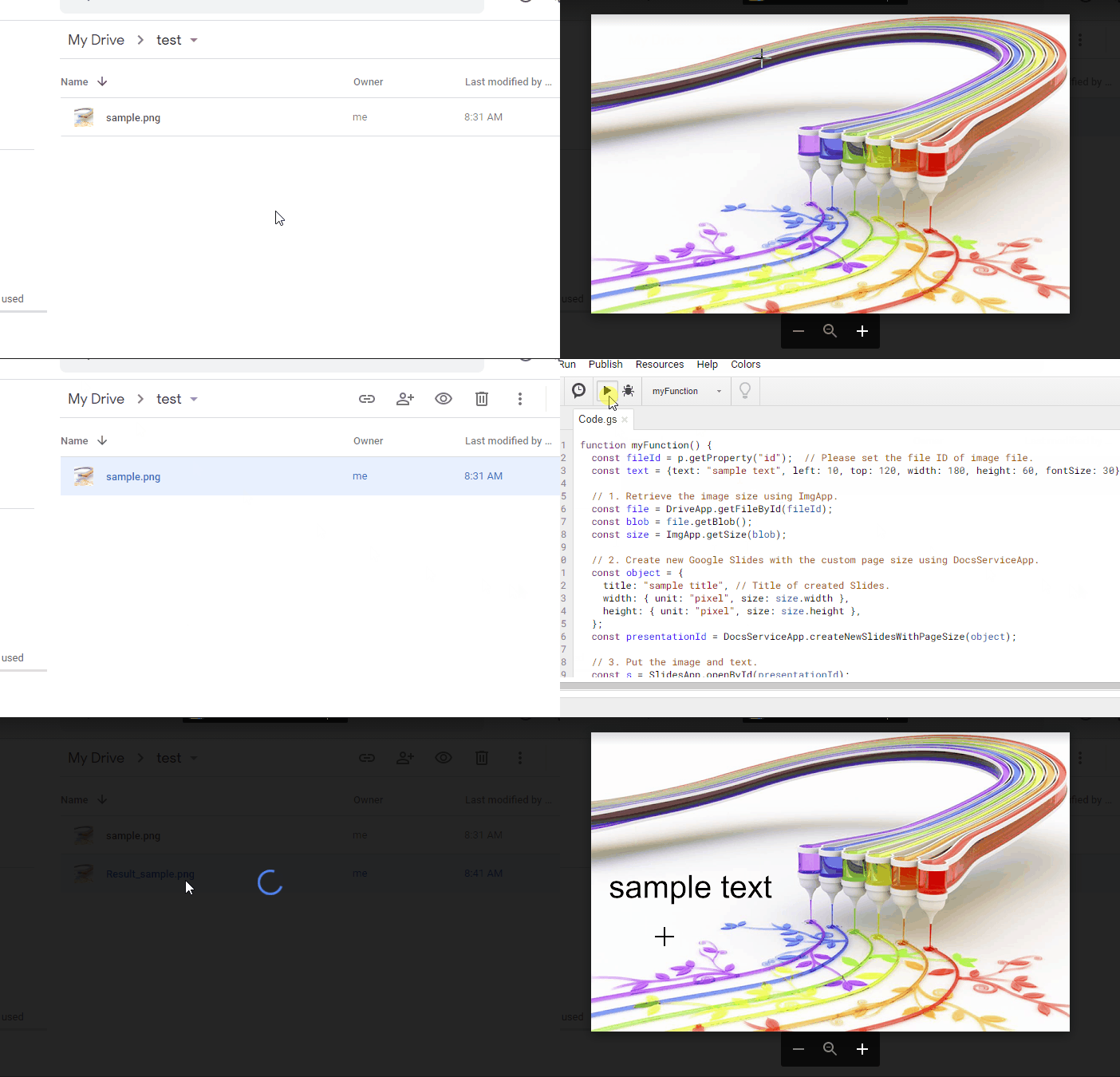
Inserting Text on Image using Google Apps Script

This is a sample script for inserting a text on an image using Google Apps Script. The flow of this sample script is as follows:

  1. Retrieve the image size using ImgApp.
  2. Create new Google Slides with the custom page size using DocsServiceApp.
  3. Put the image and text.
  4. Export the result image

Source: Inserting Text on Image using Google Apps Script