r/GMail – Has anybody here tried to improve Martin Hawksey’s free Mail Merge system? [adding custom attachments to mailing] 

Has anybody here tried to improve Martin Hawksey's free Mail Merge system?
by inGMail

I’m not really a reddit user but this question about adding custom attachments my Google Workspace Solutions Gallery – Mail Merge example landed in my inbox. The solution is, in Google Apps Script tradition, one line of code! The line is:

if(row['Attachment'] != '') emailTemplate.attachments.push(DriveApp.getFileById(row['Attachment']).getBlob());

The logic is:

  1. check if the row value in the column named Attachment 
  2. if true call Drive to open file with attachment id and push to the emailTemplate object.

The line is added just after:

const msgObj = fillInTemplateFromObject_(emailTemplate.message, row);

If you prefer you can also copy this sheet for a working example. To attach different files the Attachment row cell needs to include a Google Drive file id. There are a number of ways you can get Drive file id’s. For example, here is a Getting all files’ file-id from a folder in Google Drive snippet.

If you are interested in more of what is happening in this solution, the emailTemplate object is returned by getGmailTemplateFromDrafts_(). This function gets the Gmail draft message and as well as any attachments including inline images. If you are interested in handling attachments and inline images you can read more in Everything you ever wanted to know about Gmail draft inline images and Google Apps Script but were afraid to ask.

Getting started with Google Apps Script – Aryan Irani

Image credit: Aryan Irani

In this course, we will be covering the basics of Google Apps Script and working our way by working with Google Sheets, Google Workspace API’s and more. After working with variables, operators, loops in Google Apps Script, we will be working with Google Sheets, where we will start out by getting and setting values in Google Sheets, followed by doing some amazing projects in Google Sheets and Google Apps Script. After working with Google Sheets, we will work with Google Forms, Google Classroom, YouTube and more.

It’s always pleasing to see new Google Apps Script courses being published. The latest one we’ve spotted has been created by Aryan Irani and hosted on Udemy. We’ve not taken this course but the landing page contains an overview and previews of some of the video content.

Source: Getting started with Google Apps Script – Aryan Irani

2-Way sync between sheets without a unique ID

How to setup 2-way sync within the same workbook without any unique ID.

I’m in the habit of adding IDs to sheets where I need to do lookups, but sometimes, I inherit a sheet without IDs in place (or I can’t edit the sheet structure). Spencer outlines a clever way to handle syncing between two sheets without using IDs in this video.

Source: 2-Way Sync: No Unique ID

Pseudo OnEdit Trigger for Google Document using Google Apps Script

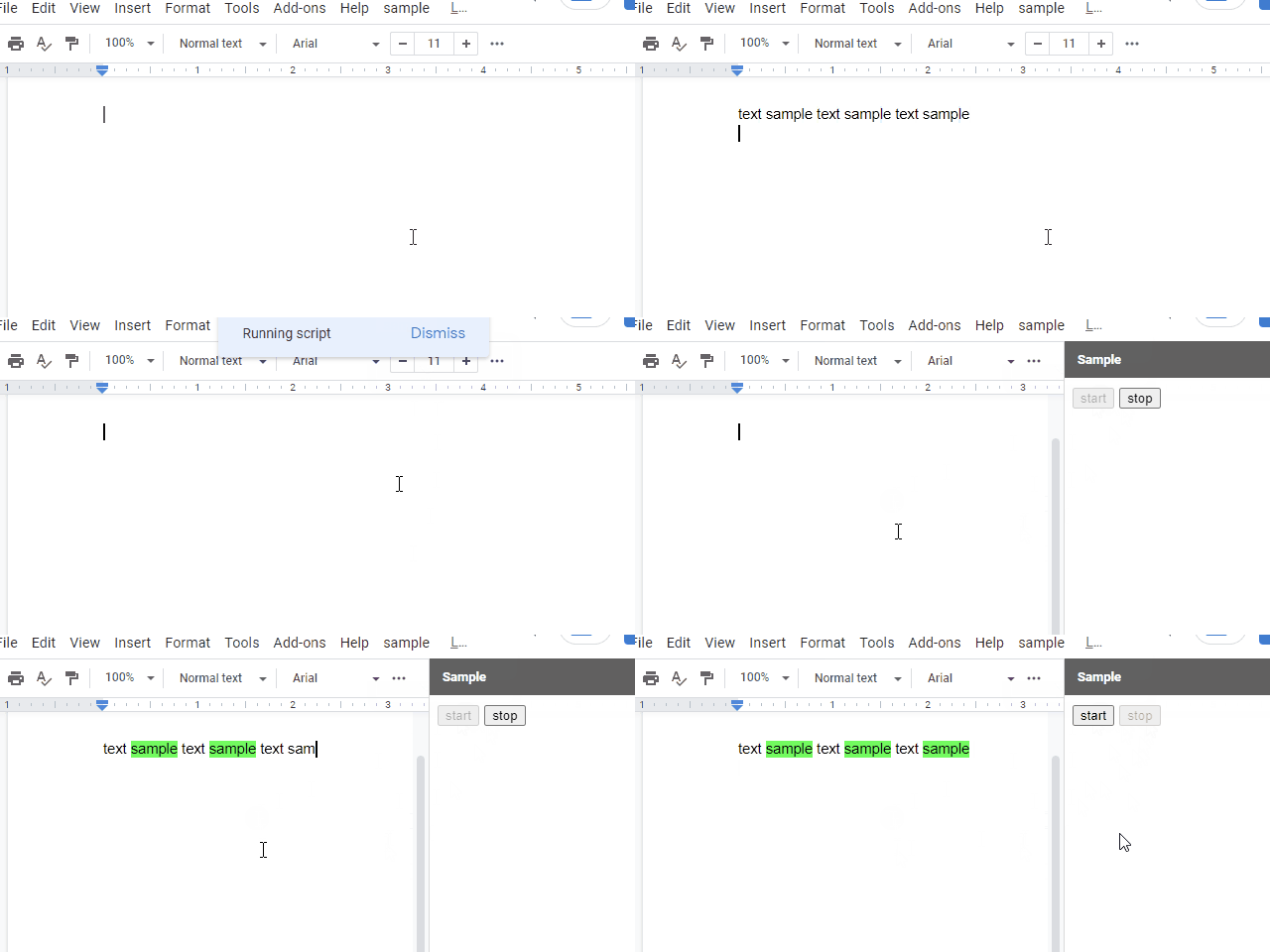
In the current stage, there is not OnEdit trigger for Google Document. But I sometimes have the case that I want to use OnEdit trigger. So, as the current workaround, I created this sample script. I think that this workaround can be also used for Google Slides, Google Form and also Google Spreadsheet. In the case of Spreadsheet, what the existing OnEdit trigger and the time-driven trigger cannot do can be achieved.

Source: Pseudo OnEdit Trigger for Google Document using Google Apps Script

How to Automatically Add Teachable Students to Google Drive Files and Folders when they Enroll in your Course – Yagisanatode

Learn how to instantly share newly enrolled teachable students to Google Drive files and folders with Google Sheets and Apps Script.

Scott ‘Yagi’ Donald provides a very thorough walk-through of how he has connected a webhook from a third party service to Google Sheets to share specific Google Drive folders and files with named users. This post is well worth a visit as it contains a number of tips and tricks like using Google Forms to follow-up with user email addresses that are not associated with a Google account.

Source: How to Automatically Share Teachable Students to Google Drive Files and Folders when they Enroll in your Course – Yagisanatode

Adding Members to a mailing list using an API, Google Forms and Google Apps Script

Image credit: Baba Funke

I decided to explore something similar to a Webhook for Google Forms. In other words, something that triggers another action when a Google form is submitted. In this case, when a Google form is filled and submitted, the results should be sent to an API endpoint for adding members to a database. I found an answer in Google Apps Script, a coding language based on Javascript which allows for programmatically extending Google Apps like Google Forms, Sheets, Docs etc.

A nice explanation of how triggers can be used in Google Forms to push new data to other systems. The post is easy to read and includes lots of screenshots to help prevent you getting lost.

Source: Adding Members to a mailing list using an API, Google Forms and Google Apps Script

How to Fetch Employee Data from Workday by Building the Great Deku Tree Inside of Google Sheets

They say you only live once, and, with that, you may only once find yourself at a company with a video-game-centric culture. Life at Twitch creates a unique opportunity to bring the magic of gaming to your workday, even when you’re in esoteric corners of the work world such as People Analytics.

Ever wondered how people reporting was handled at Twitch? Max Brawer, Head of People Analytics at Twitch, brings his ‘A’ game outlining how a little Google Apps Script and some Workday API wrangling can be used for some fun reporting. You can read more in the source link and here’s Max’s old post on The Endless Possibilities of Freeing Your Data from Workday and Putting it into Google Sheets: a How-to.

Source: How to Fetch Employee Data from Workday by Building the Great Deku Tree Inside of Google Sheets

How to get Google Lighthouse reports using PageSpeedInsights API and Google Apps Script

Lighhouse
Image: CC-BY Google

Lighthouse is an open-source, automated tool for improving the quality of web pages. You can run it against any web page, public or requiring authentication. It has audits for performance, accessibility, progressive web apps, SEO and more.

On StackOverflow there is a nice question/answer from Mert Dökümcü on How to send Google Lighthouse reports to Slack using PageSpeedInsights API and Google Apps Script. You can read the full solution there and below is an excerpt from Mert’s post (copied here CC-BY-SA Mert Dökümcü) of the bit that really interested me, getting results from PageSpeedInsights.

First and foremost, get…

Once you have these, go to https://script.google.com/home and create a new script. The following code should do the trick:

var mobileData = fetchDataFromPSI('mobile');
var desktopData = fetchDataFromPSI('desktop');

function pageSpeedApiEndpointUrl(strategy) {
  const apiBaseUrl = 'https://www.googleapis.com/pagespeedonline/v5/runPagespeed';
  const websiteHomepageUrl = ''; // Your website
  const apikey = ''; // Your API key
  
  const apiEndpointUrl = apiBaseUrl + '?url=' + websiteHomepageUrl + '&key=' + apikey + '&strategy=' + strategy;
  return apiEndpointUrl;
}
function fetchDataFromPSI(strategy) {
  const pageSpeedEndpointUrl = pageSpeedApiEndpointUrl(strategy);
  const response = UrlFetchApp.fetch(pageSpeedEndpointUrl);
  const json = response.getContentText();
  const parsedJson = JSON.parse(json);
  
  const lighthouse = parsedJson['lighthouseResult']
  const originLoadingExperience = parsedJson['originLoadingExperience']

  const result = {
    'overall_performance': originLoadingExperience['overall_category'],
    'score': lighthouse['categories']['performance']['score']*100,
    'firstContentfulPaint': lighthouse['audits']['first-contentful-paint']['displayValue'],
    'speedIndex': lighthouse['audits']['speed-index']['displayValue'],
    'timeToInteractive': lighthouse['audits']['interactive']['displayValue'],
    'firstMeaningfulPaint': lighthouse['audits']['first-meaningful-paint']['displayValue'],
  }
  return result; 
}

Checking Google Groups membership recursively using Google Apps Script

Learn how to check indirect membership of users or groups in the context of the Google Groups Service using Apps Script.

This is a great post if you want to learn about how to programmatically navigate the hierarchy of Google Groups, which may also come in handy when you are processing other tree like structures often found in JSON. All the code needed to run this is provided and clearly explained.

Source: Getting Google Groups membership recursively using Apps Script

The Gift of Script: Convert Google Doc to PDF in a given folder

Convert a Google Doc into a PDF in a given folder and optionally delete the original Doc file.

The following Google Apps Script is designed to create a PDF file of a Google Doc in a Drive folder that you specify, with the option to delete the original Doc. This snippet of code is from larger developed solutions and allows you to understand and replicate the process.

This post is somewhat of an updated version of this Convert Doc to PDF and move into a new folder blog post. Whilst the code in it still works it was part of my early days of learning Apps Script and it was also when Google allowed for files to exist in more than one place (a feature now replaced by Shortcuts).

Source: The Gift of Script: Convert Google Doc to PDF in a given folder