The File Upload feature of Google Forms lets you receive files from form respondents directly in your Google Drive. You may add the File Upload question in your Google Form to receive PDF assignments from students, résumé applications, portfolio images from contestants, and so on.
When a respondent uploads a file through Google Forms, the file are stored in a fixed folder of your Google Drive. All files are uploaded in the same folder and, thus looking at the file in your Google Drive, it is difficult to determine which respondent has uploaded which set of files.
Learn how to organize file uploads and attachments from Google Forms and move files to a specific folder in Google Drive.
Totally Unscripted returns and we kick off the year looking at some of the highlights and developments you may have missed in 2020 for Google Workspace solution builders. Our panel includes Olaf Hubel, Google Workspace Developer Relations Manager, and other noted experts from the community. As well as looking at Workspace highlights from 2020 we’ll look at what might be in store for 2021. Tune in live to contribute to the live chat.
We run a lot of things through Google Sheets and Slack here at August. It’s a way of connecting and sharing information quickly and transparently with our clients and our team. We’ve put together a cheat sheet of a few simple Google Apps Script functions, along with the Slack API, so you can do the same.
Great post if you are looking for a quick start for interacting with Slack using Google Apps Script. As well as a detailed ‘how-to’ the post also includes a video walkthrough to help if you get stuck with any of the steps.
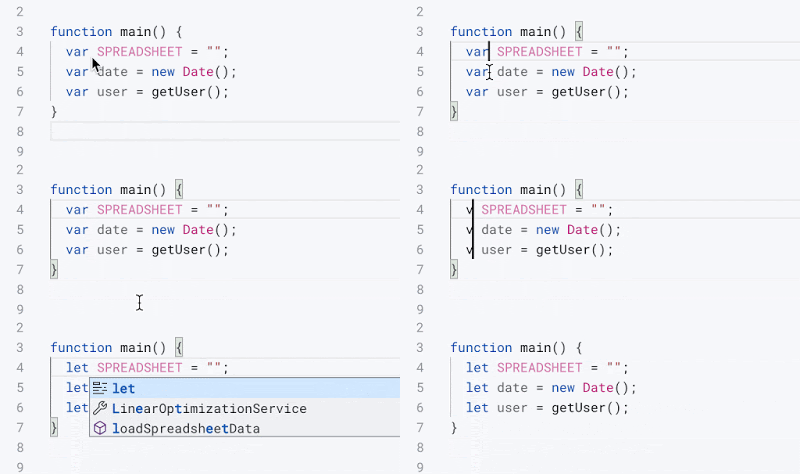
The new editor (Integrated Development Environment — IDE) for Google Apps Script is out! There is a lot of features in the new editor to make your lives easier; here’s my top 5 favorites that I think are helpful for beginners to write and manage their scripts.
We’ve reshared a number of community contributions about the new Apps Script IDE, but this is the first we’ve seen that is specifically targeted at beginners. As well as useful functionality within the IDE Cleo also shares some of her tips which should help writing code easier.
How to build a more perfect workflow for data updates and changes by coding in Apps Script between the Sheets
Thought provoking post by Max Brawer exploring the utility and fragility of using spreadsheets as part of a decision making processes and how Apps Script can be used to overcome some of these shortcomings.
In this article I will showcase one of the many ways you can customize your Google Workspace environment. We will implement two custom functions in Google Sheets. With these functions as an example I will demonstrate how to use Google Apps Script Libraries to organise and distribute your solution. There are multiple ways to distribute your Apps Script code within the Google Workspace, and this article will help you decide if this library method is right for you.
Always nice to have some advanced techniques in your toolbox. In this example from Jasper Duizendstra he explores how custom functions in Google Sheets can be packaged and used in Libraries.
Source: How to write a custom function library for Google Sheets
In this session we will have a look at the Google Workspace Solutions Gallery. “The Google Workspace Solutions Gallery is a collection of sample solutions that demonstrates how you can solve common business challenges with Google Workspace Developer technologies. These samples showcase different ways to integrate and customize the productivity tools you’re already using.” – https://developers.google.com/gsuite/solutions
As part of the Gallery anyone can suggest new solutions and we speak Jasper Duizendstra who has contributed the Record time and activities in Calendar and Sheets solution. We speak to Jasper about his experience summitting and getting a solution published.
A week ago Google announced the availability of an improved code editor for Google Apps Script. … In this article, I’ll focus on the changes related to Versions and Deployments in Apps Script.
Post from Romain Vialard unpicking deployments with the new Apps Script IDE. Romain highlights lots of very useful tips and things to be aware of when deploying Apps Script projects, in particular:
For existing scripts, deploying from the new IDE will create a new deployment with a different url for your web app
Meet the Google Workspace Developer Experts, a global network of experienced technology experts, thought leaders, and influencers who actively support developer communities around the world.
If you are starting out on a new product, environment or beginning to learn to code finding people to connect with within an existing community can often be a challenge. Thanks to the efforts of Charles Maxson hopefully those connections are made a bit easier.
Google Apps Script has a new editor, which is better, nicer, and completed ready for future new features. Today, I would like to introduce you to several dirty and secret tricks, what you can do.
If you like a keyboard shortcut you’ll love this post from Ivan Kutil! For those less keen on keyboard commands there is still plenty of other productivity tips from Ivan shared in this post.