Fix slow JDBC in Google Apps Script V8. Learn the native SQL JSON trick to boost throughput from 3 to 142 records/sec and bypass the 30-min timeout.
We have regularly featured solutions for connecting external databases to Google Workspace using the JDBC service. Our most recent example include a guide on connecting PostgreSQL to Apps Script [JDBC Guide, February 2026]. While this guide help establish connections, developers running large-scale synchronisations under the modern V8 engine frequently encounter severe performance drops. A detailed post from Pablo Felip analyses this runtime performance gap and provides a helpful workaround that can reduce execution times by over 98%.
Standard database queries in Google Apps Script suffer from severe performance degradation when using the JDBC service because the V8 runtime adds significant latency. To resolve this, Pablo highlights how developers can offload data processing to the database server by using native SQL features like FOR JSON PATH or JSON aggregation functions to bundle query results into a single, efficient JSON string. This approach dramatically reduces the processing, allowing the Apps Script code to fetch data as chunks and use V8’s native JSON parsing to reconstruct the table in memory. By using this approach, developers can achieve massive speed improvements and stay well within execution time limits.
Head over to Pablo’s blog to read the complete post, view the underlying benchmark metrics and see if this approach can speed up your database synchronisation workflows!
If, like me, you’ve often struggled with the pain of coding user interfaces with the CardService in Google Workspace, things are about to change. Using the new, open Agent2UI (A2UI) specification, agents can autonomously decide how to structure and render their own native interfaces in real time.
In a recent Pulse post, The Evolution of Google Chat: Exploring the New Wave of Developer Quickstarts, we highlighted a new Google tutorial that implements Agent2UI (A2UI) inside Google Chat. This guide shows you how to build a hybrid solution using Apps Script as a secure, lightweight gateway to Python-based agents running on the Vertex AI Agent Engine.
The Architecture: Apps Script as the Orchestrator
A common challenge when working with modern AI toolkits like the Agent Development Kit (ADK) is that they are not designed to run natively inside Apps Script. The quickstart bridges this divide by turning Apps Script into a lightweight, secure orchestration layer.
Instead of running heavy processing directly inside the script, Apps Script handles the Google Chat event, manages secure server-to-server authentication, and sends the payload out to an agent running on the Vertex AI Agent Engine.
Under the Hood
A look at the script provided in the quickstart shows how the Python backend passes UI layout instructions back to the Workspace front-end. When a user asks a question, the Python script processes the request, calls any backend tools and returns a single text stream structured like this:
When this response is returned to Google Apps Script, it triggers the extractA2UIParts() function which splits this raw payload on the ---a2ui_JSON--- separator. The text before the delimiter (e.g., “Hello! I found the profile…”) is taken and posted straight to the user and the raw JSON array after the delimiter is to make the card.
Something to keep in mind is that this framework is not yet a wholesale replacement for the entire CardService library, as you will see in the script it uses a basic render to convert the A2UI JSON into CardService elements:
switch (Object.keys(component)[0]) {
  case 'Text':
    const textParagraph = CardService.newTextParagraph();
    textParagraph.setText(extractTextValue(component["Text"].text, dataModel));
    widgetWithIds.push({ id: c.id, widget: textParagraph });
    break;
  case 'Image':
    const image = CardService.newImage();
    image.setImageUrl(extractTextValue(component["Image"].url, dataModel));
    widgetWithIds.push({ id: c.id, widget: image});
    break;
  case 'Button':
    // Maps inline labels or child text components to TextButtons
    // and packages them into a trailing ButtonSet...
    break;
  default:
    console.warn(`Could not render component: ${JSON.stringify(c)}`);
}
This means that for the time being, the script example is only able to handle basic UI elements rather than handling heavy, structured data-entry flows.
Future Directions
While the quickstart provides a foundational v0.8 entry point for developers, community members are already looking at how A2UI responses can be used in Google Workspace interfaces.
An excellent example of this is Curtis Krygier’s open-source a2ui-catalogue project. Curtis has started a component library designed to build agent-driven interfaces for Google Workspace starting with Google Meet and Google Chat.
Instead of trying to bundle complex, pre-composed UI elements on the backend, Curtis advocates for a substrate model:
Atomic Philosophy: Developers define a fixed visual vocabulary of atomic “primitives” once on the client side (such as TypeScript Lit web components).
Token Efficiency: The AI agent reasons entirely within this stable vocabulary. It passes raw state updates rather than inventing presentation layouts on every conversational turn. This reduces token overhead and eliminates slow backend container redeployment loops.
Interchangeability: By completely decoupling primitives from the transport layer, the exact same v0.9 component tree can reflow dynamically across completely different containers. A layout originally designed for a fullscreen stage in a Google Meet iframe can seamlessly stack and reflow to fit inside a compact Google Chat card or side panel.
Summary
For Google Workspace developers, the base A2UI Agent quickstart serves as an excellent hands-on starting point to experiment with agent integrations in Google Workspace. The underlying frameworks are evolving rapidly, as are the solution wrappers like a2ui-catalogue. Given a speed of change don’t expect a completely frictionless, single-click deployment out of the box, and you’ll likely need to lean into a little “Gemini-powered” fault finding should sort things out.
gas-fakes server enables local development and testing of GAS webapps and Add-ons on Node with support for templating and server side calls
Bruce Mcpherson has updated his gas-fakes command-line tool, adding a local web server command to emulate Google Apps Script Web Apps and user interfaces:
At the heart of this update is the new gas-fakes serve command. This command spins up a local HTTP endpoint that routes requests directly to your doGet or doPost and other server side functions. This emulates the Apps Script environment, enabling a “save and refresh” workflow that was previously impossible without constant cloud deployments.
For those tracking the project, this update joins a deep archive of local execution experiments. We first examined the library’s foundational role as a secure sandbox for running AI-generated code [September 2025]. Since then, we have explored how to containerise Apps Script logic for Google Cloud Run [February 2026] and how to implement securing local execution via agentic automation [April 2026]. This latest release targets local web development. It eliminates the constant friction of saving, pushing and redeploying code to the cloud just to test minor visual tweaks.
How the Local Emulator Operates
The local emulator runs a lightweight Node.js process to mimic the Google Apps Script environment directly on your machine. When you run the server, the utility instantly parses your HTML templates and directs client-side google.script.run calls straight to local JavaScript function exports. This workflow lets you debug your interface and server logic in real time with zero latency, saving hours of deployment downtime.
Sandbox and Security Considerations
One thing to keep in mind is that your local machine does not enforce Google’s strict iframe security restrictions. Developing with this in mind will prevent broken features if your project is deployed to Google Apps Script. To find out more and view the complete setup code, read Bruce Mcpherson’s complete guide.
If you have been following the Google Workspace developer release notes over the last few months, you will have noticed a recurring theme: the velocity of Chat API updates. One of the most recent updates in March 2026 for Dialogflow and Pub/Sub integrations led me to the official documentation and the growing list of quickstarts. I thought it would be useful to spotlight what’s available.
The Foundations
For many of us in the community, lightweight automations are the bread and butter of our daily workflows. For programmatic interaction with Google Chat, there are three foundations you can choose from.
Apps Script: The classic, low-barrier-to-entry approach. Apps Script remains the fastest way to prototype and deploy custom Chat apps, especially with the new AddOnsResponseService (introduced in Developer Preview in January 2026 and made Generally Available in March 2026) which makes managing interactive responses easier than ever.
HTTP Service: Perfect for developers looking to use Cloud Run, Cloud Functions, or external on-premises servers to handle their application logic.
Pub/Sub: The essential architecture for enterprise environments. If your Chat app needs to sit securely behind a corporate firewall while still reacting to real-time events from the Workspace Events API, Pub/Sub is the way to go. (This integration entered Developer Preview in February 2026 and reached General Availability in March 2026).
Conversational AI with Dialogflow
GenAI has revolutionised what we expect from a chatbot, but structured, intent-based routing still plays a vital role in customer service and deterministic workflows.
Dialogflow ES & Dialogflow CX: These quickstarts demonstrate how to seamlessly integrate Chat with Dialogflow. While ES handles standard intent-based natural language understanding, CX is incredibly powerful for complex, multi-turn conversational flows and advanced state management. (These integrations were launched in Developer Preview in December 2025 and became Generally Available in March 2026).
The Next Frontier: Autonomous AI Agents
This is where the recent release notes truly come to life. Google is leaning heavily into autonomous problem-solving, moving beyond simple call-and-response bots to agents that can reason, critique, and act on your behalf.
ADK AI Agent: Utilises the Agent Development Kit (ADK) to host AI agents on the Vertex AI Agent Engine. This is your starting point for building agents that can autonomously perceive their environment and execute complex, multi-step actions. (Sample introduced in January 2026).
Agent2Agent (A2A): A fascinating paradigm shift. This quickstart showcases a multi-agent system (like the LLM Auditor sample) where sub-agents interact with each other. For example, a “Reviser” agent writes a response, and a “Critic” agent reviews it for factual accuracy against Google Search grounding before it is ever sent to the user. (Sample introduced in January 2026).
Agent2UI (A2UI): Focuses on bridging the gap between autonomous reasoning and user interface interactions, allowing agents to dynamically render cards and UI elements based on conversational context. (Currently in Early Stage Public Preview).
Gemini Enterprise Agent: Tailored for the enterprise, this quickstart shows how to integrate deeply with Gemini Enterprise AI agents to drive innovation and problem-solving securely within your organisation’s data perimeter.
Get Building!
With the recent general availability of Chat apps as Google Workspace Add-ons, you can now manage these advanced Gemini and Dialogflow agents via a single Apps Script deployment. Furthermore, new UI capabilities like dynamically populated drop-down menus with autocomplete and the ability to programmatically manage custom Chat sections mean the user experiences we can build are richer than ever.
And let us not forget the Chat Model Context Protocol (MCP) currently in Developer Preview. By setting up an MCP server, we can now enable these AI agents to securely read messages and take actions directly within our Chat spaces.
The barrier to entry for building deeply integrated, AI-powered Chat apps has never been lower.
In a recent special edition of the Google Workspace Developer News, host Chanel Greco shared a comprehensive summary of the platform announcements made at Google Cloud Next 2026. While the event covered a lot of ground, the standout story for me is the upcoming integration of Gemini directly into the Apps Script Editor. This update looks set to shift the development experience toward a natural language approach, allowing you to build and maintain automations without necessarily starting from a blank script.
AI-Assisted Development in the Apps Script Editor
The Gemini integration should help users in three specific ways. First you can ask Gemini to write your code from a prompt in the side panel (03:43). When you do this Gemini is able to create your different script project files including your manifest, Apps Script code and HTML.
Next, you can use Gemini to make changes to your existing code (03:56). Instead of hunting for the right line to edit, you can just tell the side panel what you want to change or improve. Gemini then shows you an inline diff, so you can review exactly what’s being updated before you hit save.
Finally, Gemini should help you fix errors much faster (04:10). When you run into a bug or a console error, you don’t have to try and guess what went wrong. You can get a context-aware explanation directly from your execution logs and apply a fix with a single click.
Apps Script as a Core Service
Another big announcement is that Apps Script is moving to a Google Workspace Core Service (04:21) starting in June 2026. This is a huge deal for enterprise developers because it means your custom scripts will have the same reliability, security and compliance standards as the rest of Workspace. It gives you that extra peace of mind that your critical automations are running on robust, enterprise-grade infrastructure.
Also Announced at Next 2026
The event included several other notable updates for the developer community:
Google Workspace MCP Server (00:15): Now available in public developer preview, the Workspace MCP Server acts as a bridge between AI agents and your Workspace data. It comes with dedicated APIs so your agents can work across Gmail, Drive, Calendar and Chat.
Universal Search (01:08): Coming soon, this will let an agent search through all your Workspace apps at once. Instead of looking in one specific place, the agent gets a full view of a user’s context across everything in the suite.
Workspace CLI (01:33): We are also getting an official Workspace CLI soon. It will be interesting to see what the differences are between this official tool and the early version of a Workspace CLI we recently discussed which focused on atomic skills and recipes.
Custom Chat Agents (02:08): There is a new set of APIs for building more powerful Chat apps. You’ll have much more control over the UI, including things like carousels and dynamic dropdowns, as well as full Markdown support for better-looking messages.
If you want to start playing with the new MCP Server, you can sign up through the Developer Preview Program.
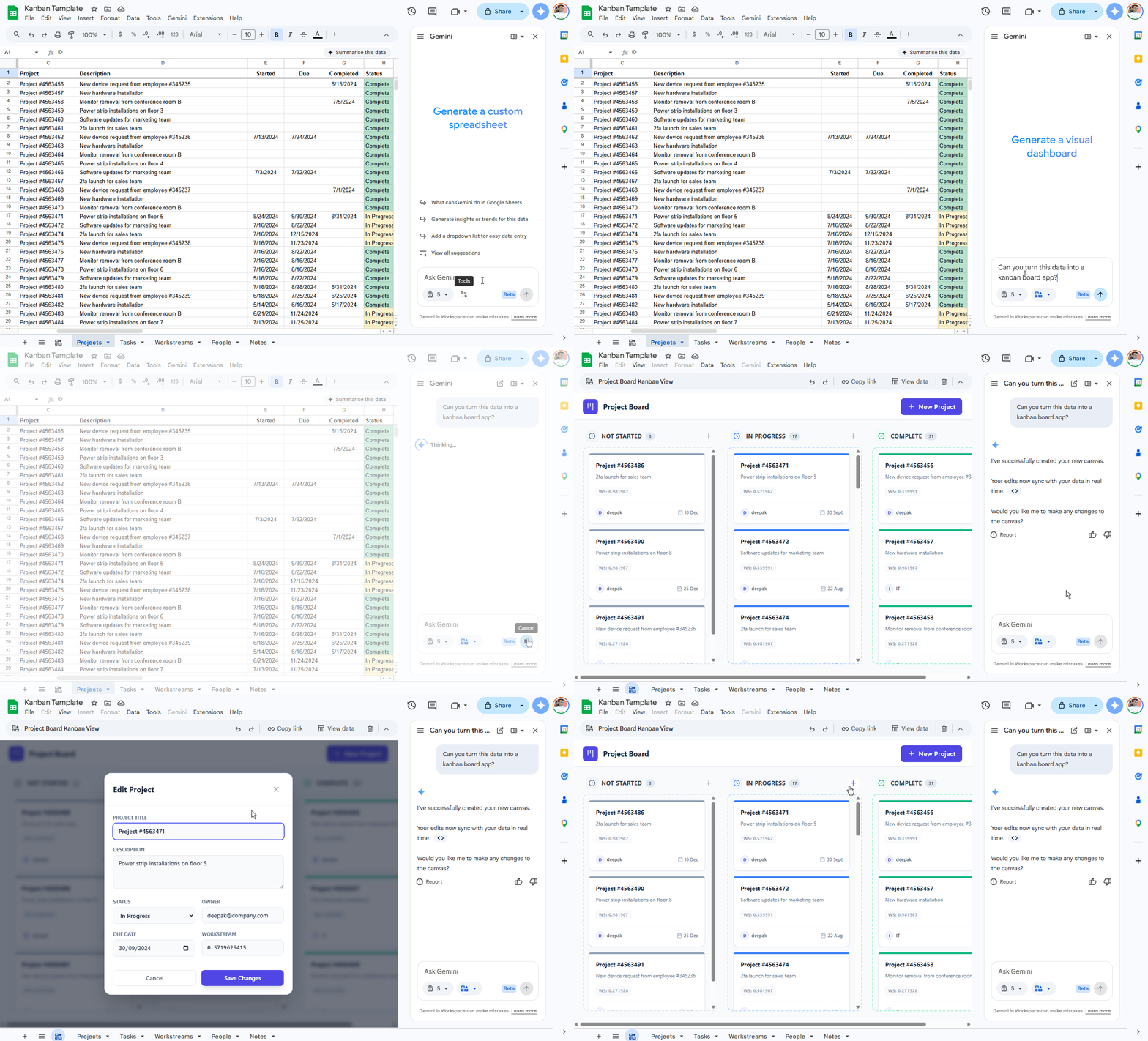
Sheets canvas allows users to conversationally build interactive, read-write mini-apps directly from their spreadsheet data. At this time, Sheets canvas is limited to supporting only single-table and single-header tables.
The new Sheets canvas is undeniably a powerful tool for creating interactive applications directly from spreadsheet data. It removes a lot of friction for rapid app creation and allows the building of visual interfaces through simple conversation beyond the current tools in Google Sheets. It is an impressive leap forward.
One question I had was how Sheets Canvas compares to other no-code tools like AppSheet. To help explore this, I thought it would be useful to run a practical comparison. In this post, we will build a Kanban board using the same project management dataset, allowing us to evaluate the new Sheets canvas against Google AppSheet.
Because we are using a template, there is zero setup required. A look at the underlying data structure and you’ll see this app has five distinct tables connecting projects to tasks and workstreams, while mapping people to specific notes. Whilst it still uses a standard Google Sheet as a data source, AppSheet allows us to use true relational data. For example, projects can have related tasks, assigned team members, and detailed histories.
Sheets canvas takes a different approach. Inside your spreadsheet, you open the Gemini side panel, enable the canvas tool, and provide an instruction like “Can you turn this data into a kanban board app?”, which you can view (readonly) here.
This experience is similar to the existing AppSheet ‘Gemini for App Creation’ with two key differences: in the Sheet canvas we are starting with existing data and the development process is iterative; and if you do continue to ask Gemini to update the canvas, for example, to pull sub-tasks and user avatars from other tabs, something to be aware of is that the result is a clever illusion. Because canvas only ingests the active sheet, you cannot dynamically query other tabs. This is a known current limitation:
Currently, canvases only use data from a single Sheet tab. The canvas provides a read-write interface for your spreadsheet data. If you have edit access, you can edit, delete, or add data directly within the canvas as an alternative to the grid view. If you have comment or view access, you can’t modify the canvas.
Under the Hood: Actions vs Bespoke Code
Comparing how these tools actually generate the interface provides another stark contrast. Asking Gemini to build the board generated hundreds of lines of custom React code. It imported standard web development libraries to render a bespoke interface directly over the spreadsheet cells. You are quite literally prompting an AI front-end developer to build a miniature web application that sits on top of your grid.
Data Integrity: Strict Rules vs Surface Forms
AppSheet enforces data integrity at the system level. You can configure deep initial value formulas that populate fields dynamically based on user context or timestamps. You can deploy strict validation rules that prevent a user from selecting a date in the past or entering a mismatched email address. The application simply will not save the record until the conditions are met.
Sheets canvas handles data entry through surface-level web forms. Looking at the generated code for our Kanban board reveals that the AI used standard HTML form attributes to require certain fields and injected fallback text into the React state to mimic initial values. It is functional. It works well for simple applications; however, the canvas interface does not natively inherit the data validation rules you build into the underlying spreadsheet cells. If you want strict input controls, you must explicitly prompt the AI to write custom JavaScript to catch those errors in the browser.
Security, Governance, and Shadow IT
The biggest difference between Sheets canvas and AppSheet emerges when you look at it at an enterprise level. A Sheets canvas is simply a file formatting layer. Its security model relies entirely on standard Google Drive permissions. If a user has edit access to the spreadsheet, they have edit access to the canvas.
AppSheet operates as a true enterprise platform. It lives behind a dedicated Admin Console where IT teams maintain oversight over every application built across the organisation. For teams using AppSheet Enterprise Plus licences, administrators can define governance policies that automatically enforce corporate compliance across hundreds of independent projects. An administrator might create a rule that instantly blocks deployment if a user attempts to connect an unapproved external database or fails to mandate strict domain authentication.
The Feature Comparison
To help you decide which tool fits your current project, here is a breakdown of their core capabilities.
Feature
Sheets Canvas (Alpha)
AppSheet
Primary Purpose
Building custom interfaces to visualise and update single-sheet data.
Building robust business applications with a dedicated desktop mode.
Data Source
A single Google Sheet tab.
Multiple sources including Sheets, SQL, and external APIs.
Data Structure
Flat. Cannot access other tabs dynamically. AI relies on faking relationships with hardcoded static data.
Relational.
Data Validation
Basic HTML/React form rules. Requires custom JavaScript for complex logic.
Deep system-level validation and computed initial values.
Read/Write Access
Editors can edit, delete, or add data. Viewers cannot.
High. Requires structured logic and intentional design.
Security & Governance
Relies on standard Google Drive file permissions.
Centralised admin console with strict policy-driven enterprise governance.
The Verdict
If you need a quick dashboard to track your team’s weekly tasks, use Sheets canvas. It is fast, intuitive, and keeps everyone working within a familiar spreadsheet environment while the AI handles the complex front-end code.
If your workflows are growing, if you need to connect multiple data sources like mapping notes and users to specific projects reliably, or if your IT department requires strict visibility over internal tools, AppSheet remains the undisputed choice.
Google Cloud Next 2026 in Las Vegas brought a wave of announcements for the Google Workspace. I recently watched the special edition recap featuring Workspace Studio Product Manager, Carlin Yuen, and host Chanel Greco. You can watch the full conversation here on YouTube. For those building solutions and managing integrations, I have broken down the key announcements and what they mean for our community. One caveat is there was no confirmation in the video on when all these new features will be available, however, my sense from reading the official wrap-up posts is that many are arriving very soon. In the case of Skills, it appears to be rolling out immediately.
Bringing Automation to the Surface
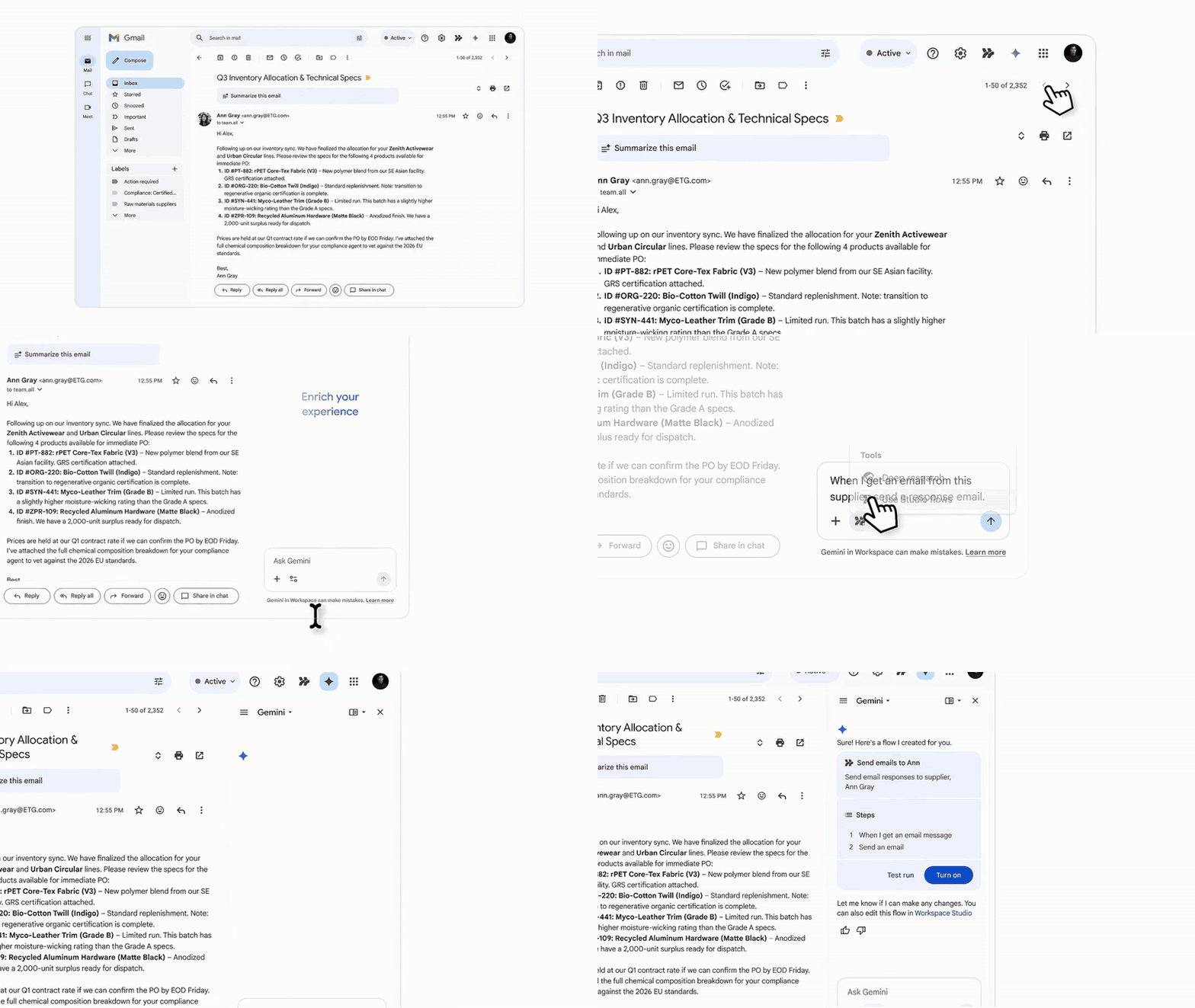
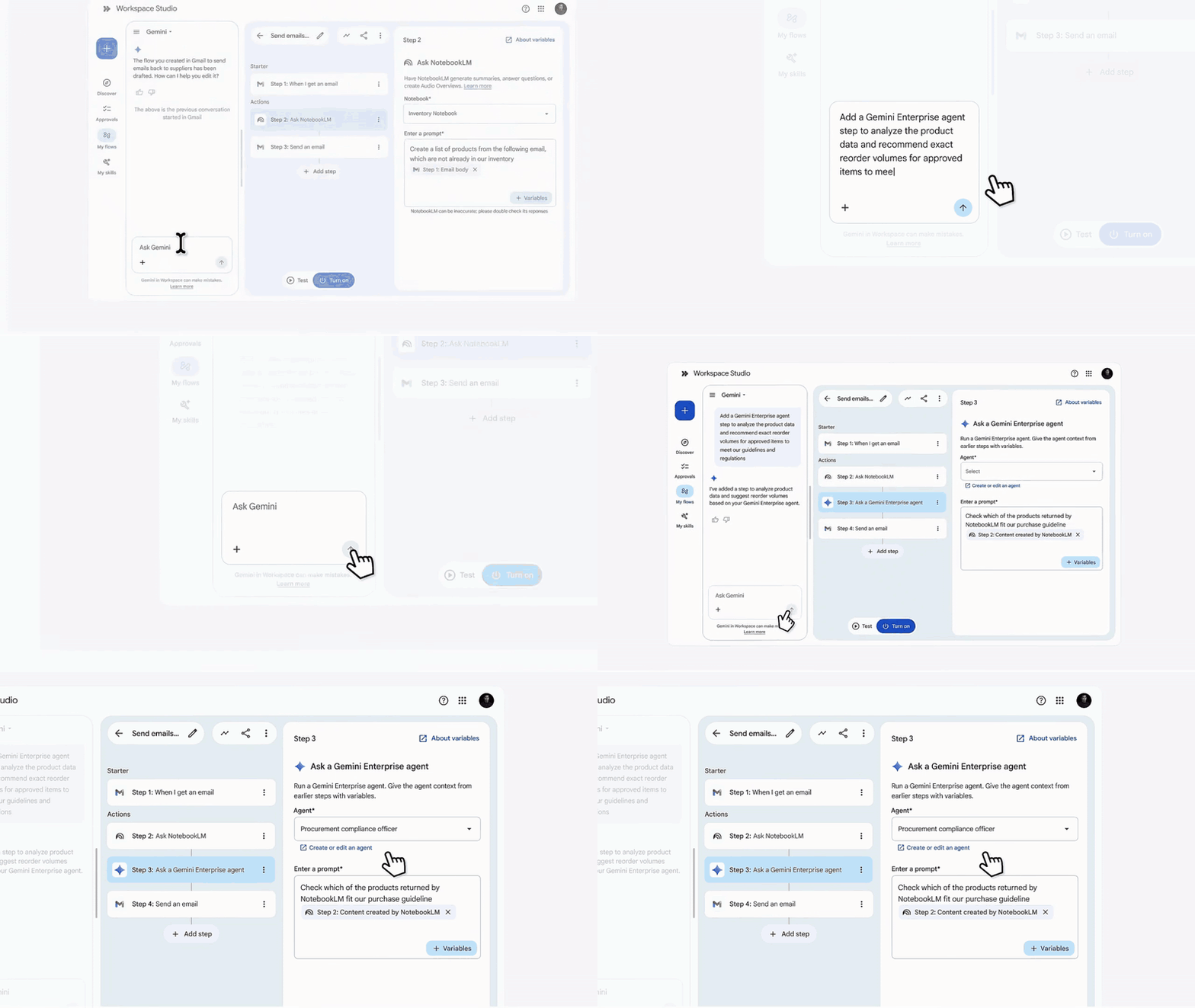
A recurring theme in Workspace is minimising the friction of context switching. To help with this, users will be able to request and generate automated workflows directly within the Gemini side panel (01:23). This brings the automation layer directly to the user’s immediate environment, removing the need to navigate away to separate developer consoles.
Image credit: Google
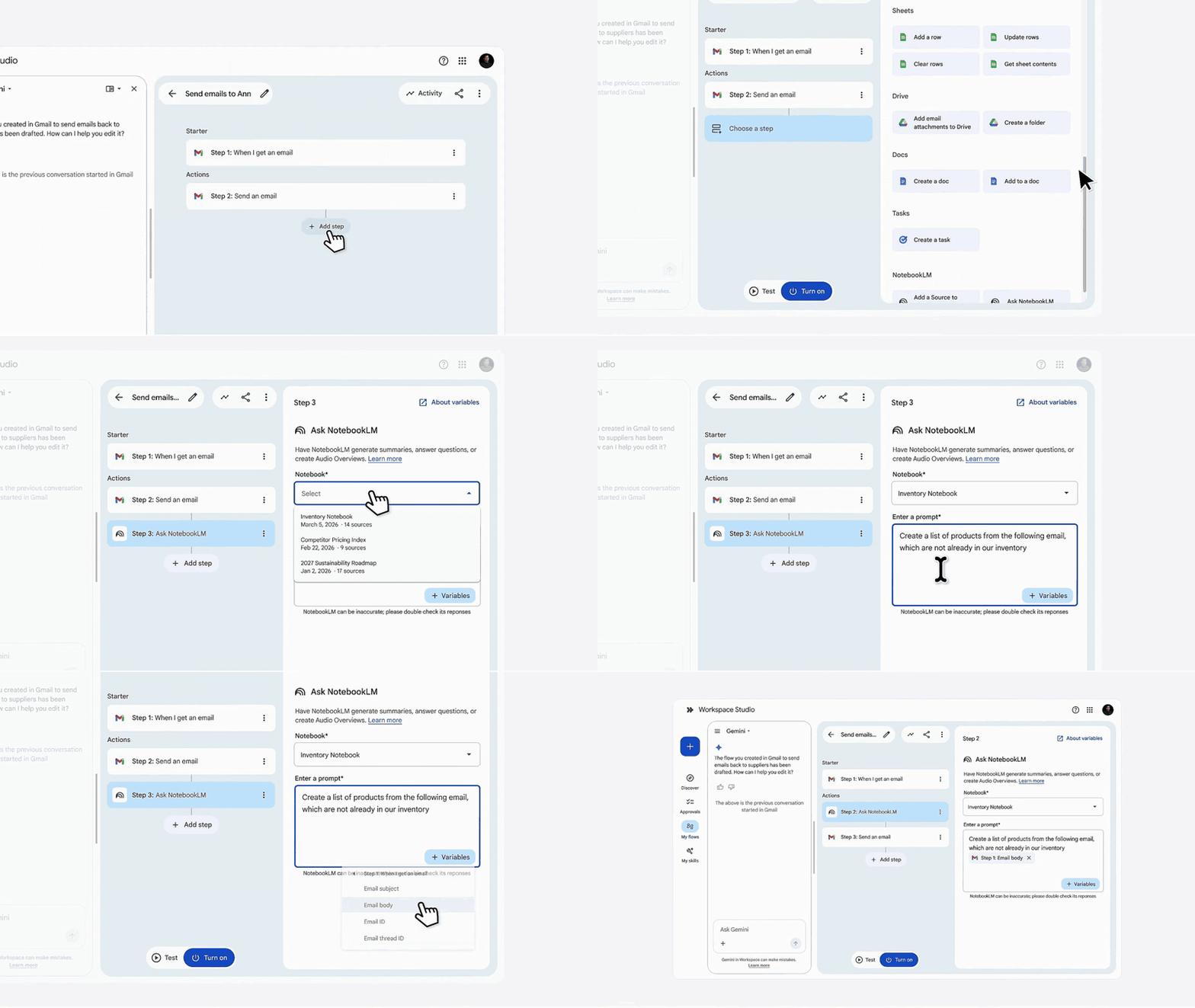
Beyond surface-level generation, the integration paths are expanding. One of the substantial updates is that Workspace users will be able to create flows that use NotebookLM notebook to both query and add sources (02:41). This enables automated Q&A and FAQ workflows, with the ability to dynamically add resources to notebooks :0.
For the power user and the Workspace administrator, the customisation updates are particularly relevant. We will be able to build custom triggers and steps using Google Apps Script (06:58) directly within these flows. This bridges the gap between low-code convenience and complex, proprietary logic. If you are integrating with external platforms, there will be new out-of-the-box connectors for services like HubSpot, Salesforce, and Jira. Webhooks are also fully supported for connecting to custom endpoints.
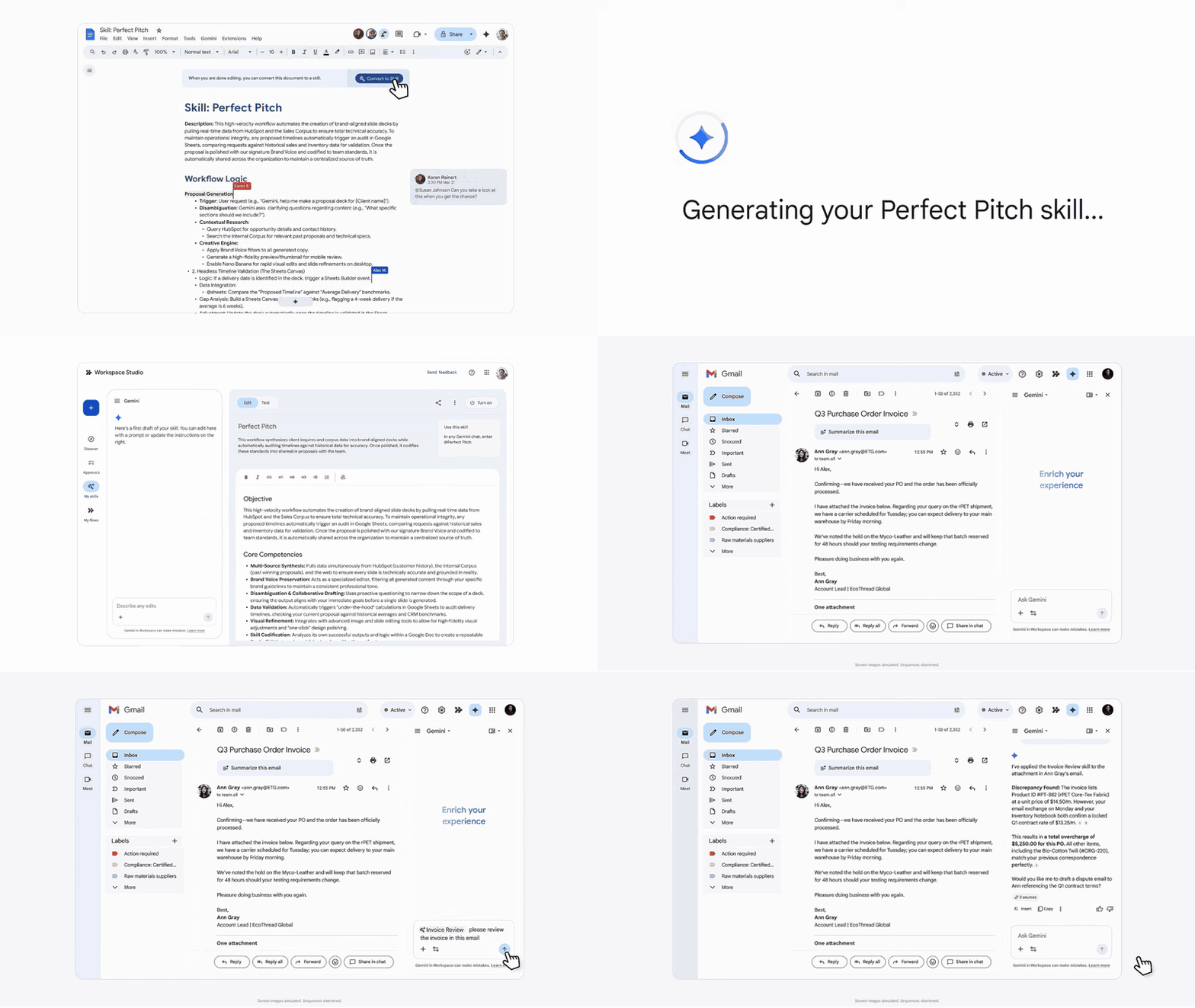
Another really interesting upcoming feature is the introduction of “Skills” (11:03). As we have seen recently discussed on AppsScriptPulse, Skills represent an emerging method for effective agentic automation. Instead of relying on monolithic scripts, this capability allows professionals to codify company guidelines, playbooks, or specialised know-how into reusable, atomic assets.
Image credit: Google
Security, Governance, and Transparency
As we build more autonomous flows that interact with shared resources, including posting to chat spaces and modifying shared Drive folders, this brings security considerations. Thankfully, the new updates include robust security and governance controls. A new unified Approvals page in Workspace Studio (08:21) will allow users to review and approve sensitive actions on their data before they execute.
Image credit: Google
For administrators, it looks like there will be a new management dashboards (09:53) that will provide clear visibility to manage agent access and permissions across the organisation.
Image credit: Google
A feature discussed but not shown in the video is users will see clear visual badges (10:35) indicating when an action was performed by an automated agent. This type of attribution is something I know will be valued by users and necessary for maintaining transparency in an increasingly automated work environment.
A Comparative Study of Agentic Frameworks and Multi-Agent Orchestration
Earlier this week, we explored how Bruce Mcpherson’s gas-fakes agent provides a secure, sandboxed alternative to my initial experiments with the Workspace CLI. While securing local execution is a necessary step, it surfaces an entirely new operational headache. As we build out these agentic behaviours, what happens when your AI has access to too many tools?
As Kanshi Tanaike identifies, these systems hit a cognitive wall known as ‘Tool Space Interference’, a concept recently detailed by Microsoft researchers, which is widely recognised across the industry as context bloat. As noted in Google’s recent engineering piece on architecting context-aware frameworks, “single-agent systems struggle with context bloat; multi-agent systems amplify it.” If you load an agent’s active memory with 160 different Workspace functions, its reasoning accuracy degrades significantly; your token costs also spiral out of control.
Tanaike tackles this phenomenon head-on in his latest comparative study. He contextualises my own CLI skill-based prototyping and Bruce’s local emulation, mapping them against the architecture of the newly announced Gemini Enterprise Agent Platform at Google Cloud Next ’26.
I must admit, while I was proudly figuring out how to chain a few CLI commands together without crashing my terminal, Tanaike was already designing complex orchestration networks using multiple autonomous agents to resolve this friction.
Delegating to Sub-Agents
To combat Tool Space Interference, Tanaike proposes dynamic tool creation. Rather than pre-loading an agent with functions, a primary orchestrator delegates tasks to sub-agents that write, test, and deploy custom Google Apps Script code on the fly. This entirely removes the need to store static skills in the agent’s memory.
Alternatively, he suggests using the Agent-to-Agent (A2A) protocol to shift large libraries of predefined skills onto remote Apps Script Web Apps. By bypassing complex cross-domain authentication using local agent cards, this method clears the main agent’s active memory while retaining frictionless access to legacy macros.
The Conscious Expert: Zero-Trust Routing and Caching
To safely manage these multi-agent delegations, Tanaike introduces two advanced frameworks: the Federated Context-Aware Routing Architecture (Federated CARA) and the Self-Optimising Tool Caching Network (SOTCN). From a data governance perspective, these concepts provide a fascinating blueprint for enterprise security when combined.
Federated CARA acts as a zero-trust architecture that evaluates the classification of the data involved in any given prompt. Based on this sensitivity, it dynamically routes the AI task to either a containerised emulation environment or a remote A2A subagent. This design maps perfectly to the Agent Gateway and Agent Identity features introduced within the Gemini Enterprise Agent Platform, ensuring that native IAM access control policies are strictly enforced to guard against data exfiltration.
Building on this secure routing pipeline, SOTCN functions as an additional security perimeter by treating skills as modular assets kept in “cold storage”. By using semantic search, the network programmatically retrieves and inserts only the necessary capabilities into the agent’s prompt during a given session. This approach has just been validated by the launch of Google’s official Agent Skills repository at Next ’26. By publishing compact, agent-first Markdown files to be loaded entirely on demand, Google is signalling a wider industry push towards “Context Engineering”.
Tanaike’s synthesis offers a highly scalable roadmap for multi-agent orchestration. I highly recommend reading his full paper and watching the accompanying explanatory video to see how these architectures align with Google’s new enterprise standards.
gf_agent is an interactive automation agent for Gemini CLI that enables users to access and manupulate workspace resources conversationally.
The automation of Google Workspace is advancing rapidly. We are moving away from static scripts and rigid cloud triggers towards environments where AI agents autonomously orchestrate complex tasks. Recently, I shared a recipe exploring how we could use the Workspace CLI to call the Apps Script Execution API. I was quite pleased with it, however, a recent email exchange with Bruce Mcpherson quickly highlighted a much more efficient path.
Bruce pointed out that his new gf_agent for the Gemini CLI bypasses the need to write these intermediary scripts entirely. By using his gas-fakes emulation environment, the agent accepts plain English requests, generates the required Apps Script logic dynamically, and executes it securely on your local machine. It is a brilliant piece of work. You simply ask the agent to summarise your latest emails or resize images in a document, and it handles the heavy lifting without using the Apps Script runtime.
To illustrate this capability, Bruce shared an excerpt from a recent run demonstrating a complete web to document flow, similar to the Workspace CLI / Apps Script Execution API example. The log captures the moment the system activates the local skill, maps the available resources, and then executes the required logic directly from the terminal:
✦ I will activate the gf_agent skill to access specialized guidance for Google Workspace automation.

╭───────────────────────────────────────────────────────────────────────────────────────────────────────────────────────╮
│ ✓  Activate Skill "gf_agent": Specialized agent for automating Google Workspace tasks locally using gas-fakes. Gener… │
│                                                                                                                       │
│ Skill gf_agent activated. Resources loaded from /Users/brucemcpherson/.gemini/skills/gf_agent:                        │
│                                                                                                                       │
│ Showing up to 200 items (files + folders).                                                                            │
│                                                                                                                       │
│ /Users/brucemcpherson/.gemini/skills/gf_agent/                                                                        │
│ ├───documentation.md                                                                                                  │
│ ├───index.md                                                                                                          │
│ ├───README.md                                                                                                         │
│ ├───SKILL.md                                                                                                          │
│ ├───scripts/                                                                                                          │
│ │   └───builder.js                                                                                                    │
│ └───skills/                                                                                                           │
│     ├───base.md                                                                                                       │
│     ├───cache.md                                                                                                      │
│     ├───calendar.md                                                                                                   │
│     ├───charts.md                                                                                                     │
│     ├───document.md                                                                                                   │
│     ├───drive.md                                                                                                      │
│     ├───forms.md                                                                                                      │
│     ├───gmail.md                                                                                                      │
│     ├───jdbc.md                                                                                                       │
│     ├───lock.md                                                                                                       │
│     ├───properties.md                                                                                                 │
│     ├───script.md                                                                                                     │
│     ├───slides.md                                                                                                     │
│     ├───spreadsheet.md                                                                                                │
│     ├───urlfetch.md                                                                                                   │
│     ├───utilities.md                                                                                                  │
│     └───xml.md                                                                                                        │
╰───────────────────────────────────────────────────────────────────────────────────────────────────────────────────────╯

✦ I will use the workspace_agent to fetch the content from the URL, create a Google Document from the HTML, copy it, and then
  resize the images in the copy using the recommended Docs API workaround, as setWidth/setHeight are not supported in the
  local environment.

╭───────────────────────────────────────────────────────────────────────────────────────────────────────────────────────╮
│ ✓  workspace_agent (gas-fakes-mcp MCP Server) {"script":"\nconst url = 'https://ramblings.mcpher.com/resurrecting-sc… │
│                                                                                                                       │
│ 2026-04-24T11:49:08.017Z ...using env file in                                                                         │
│ /Users/brucemcpherson/Documents/repos/empty/recipe-web-to-doc-gf/scripts/.env                                         │
│ 2026-04-24T11:49:08.763Z ...gas-fakes version 2.3.9                                                                   │
│ 2026-04-24T11:49:08.763Z Fetching content from:                                                                       │
│ https://ramblings.mcpher.com/resurrecting-scriptdb-nosql-database-for-apps-script/                                    │
│ 2026-04-24T11:49:09.451Z [Worker] ...authorized backends: google via DWD ([email protected])                           │
│ 2026-04-24T11:49:09.451Z [Worker] ...using scriptId: ab9c5881-...-2bc29a0c8834 (source: env)                          │
│ 2026-04-24T11:49:14.788Z Created original document with ID: 1sQ7oGqKm9XOQzsYQF10fM6uiAoD2_OSJ6uAJgunPnbE              │
│ 2026-04-24T11:49:17.980Z Created copy document with ID: 1Labz...ZSSo                                                  │
│ 2026-04-24T11:49:19.052Z Found 12 images in the document.                                                             │
│ 2026-04-24T11:49:19.053Z Applying 24 updates to resize images...                                                      │
│ 2026-04-24T11:49:21.557Z Image resizing complete.                                                                     │
│ 2026-04-24T11:49:21.557Z Original Doc URL:                                                                            │
│ https://docs.google.com/document/d/1sQ7...PnbE/edit                                                                   │
│ 2026-04-24T11:49:21.558Z Resized Doc URL:                                                                             │
│ https://docs.google.com/document/d/1Labz...ZSSo/edit                                                                  │
│ 2026-04-24T11:49:21.563Z ...terminating worker thread                                                                 │
│                                                                                                                       │
╰───────────────────────────────────────────────────────────────────────────────────────────────────────────────────────╯

✦ I have successfully fetched the content from the specified URL and created the requested documents.
Weighing the Approaches: Broad CLI vs Sandboxed Emulation
Let us consider the practical realities of these two approaches. The Workspace CLI generally operates under the broad OAuth scopes granted during its initial setup. If you authorise full Google Drive access, any AI agent driving that CLI inherently possesses the same unrestricted permissions. Handing an autonomous reasoning engine the keys to your entire file system is risky. A simple mis-prompt could lead to data loss or unintended modifications.
Conversely, Bruce’s gas-fakes approach offers a much tighter, sandboxed environment. Rather than relying on global credentials, gas-fakes can be explicitly configured to operate only on specific Drive files or within isolated boundaries. By functioning as a Model Context Protocol (MCP) server, it allows the LLM to write native Apps Script syntax and immediately test it against Workspace resources, but it forces the execution to happen within a securely fenced area. The primary benefit here is safe, dynamic adaptability. You do not need to pre-write a specific skill to resize an image; the agent simply authors the script on the fly and the emulator runs it safely.
It is worth mentioning that gas-fakes is still in development so not all Apps Script methods are implemented yet, but the approach provides a robust sandbox for interacting with Workspace APIs. Click through to Bruce’s post to read more.
The most striking demonstration at Google Cloud Next ‘26 was the “Chat Command Centre”. Julie Quan Kim showed how a user might invoke a “regional campaign skill” to orchestrate complex tasks across Docs, Slides, and external CRM data. While we have yet to see how “skills” will be created and managed, developers can already prototype these agentic behaviours using the Workspace CLI (gws) and the Gemini CLI.
These tools are the perfect laboratories for developing “skills” that could eventually be used in your own Workspace Intelligence platform. To test the boundaries of this, I have been building a “recipe” that fetches a webpage, converts the content into a natively formatted Google Doc, and then executes additional logic via Google Apps Script.
The Practical Bridge: The Web-to-Doc Recipe
This recipe, published in this repo, hopefully demonstrates how we can orchestrate a multi-step workflow using different tools. It is worth noting that the development of this very skill was facilitated by a specialised skill-creator subagent included in the latest Gemini CLI. This dedicated assistant handles the initialisation and packaging of new capabilities, which in itself makes the transition from a manual workflow to a reusable agentic skill remarkably easy.
The core logic of the Web-to-Doc recipe is defined in a simple SKILL.md file, which instructs the local agent to follow a strict pipeline:
Extraction via Node.js: The skill instructs the CLI to execute a local Node.js script (extract_article.js), which uses Mozilla’s readability and turndown libraries. This gives us a clean, “Reader View” markdown version of the article, stripping away the navigation menus and ads. With the announcement of the Gemini Enterprise Agent Platform I think it is very probable that Workspace customers would be able to use similar functions hosted in Cloud Run.
Native Conversion via CLI: Next, the agent passes this markdown file directly to the Workspace CLI. By explicitly setting the MIME type to application/vnd.google-apps.document, the CLI takes advantage of the Drive API’s ability to convert markdown into formatted Google Docs. With the announcement Workspace MCPs, including Drive, a similar conversion should be possible without the Workspace CLI
Refinement via Apps Script: This is my favourite part of the process. To ensure the embedded images do not overflow the document margins, the skill triggers a deployed Google Apps Script function (resizer.gs) using the gws script scripts run command. This is a level of precise document manipulation, specifically calculating page margins to ensure images do not overflow, is one that the high-level Drive API cannot perform during a simple import.
Governance and Security
Moving to this atomic, skill-based architecture is not without its friction. This homebrew approach of using different CLIs and managing authentication scopes across different local and cloud environments can be a severe headache and is very difficult to scale.
It also remains unclear if the Workspace Intelligence skills will include a script.run functionality found in the Workspace CLI. If it is included, it would be an exceptionally powerful way to extend skill capabilities. It would mean being able to build modular, portable sets of very repeatable code using the existing power, functionality and affordances of Apps Script.
This is where it will be very interesting to see how Workspace Intelligence manages this with the appropriate security and governance, especially considering the risks associated with Workspace MCP servers and the risk of indirect prompt injection attacks.
This is a rapidly evolving space. The ability to prototype these behaviours today using the Workspace CLI provides a direct path to understanding how the Agentic Enterprise could operate.