Google Workspace Developer News: Gemini Powered Apps Script, Core Service News and more!

In a recent special edition of the Google Workspace Developer News, host Chanel Greco shared a comprehensive summary of the platform announcements made at Google Cloud Next 2026. While the event covered a lot of ground, the standout story for me is the upcoming integration of Gemini directly into the Apps Script Editor. This update looks set to shift the development experience toward a natural language approach, allowing you to build and maintain automations without necessarily starting from a blank script.

AI-Assisted Development in the Apps Script Editor

The Gemini integration should help users in three specific ways. First you can ask Gemini to write your code from a prompt in the side panel (03:43). When you do this Gemini is able to create your different script project files including your manifest, Apps Script code and HTML.

Next, you can use Gemini to make changes to your existing code (03:56). Instead of hunting for the right line to edit, you can just tell the side panel what you want to change or improve. Gemini then shows you an inline diff, so you can review exactly what’s being updated before you hit save.

Finally, Gemini should help you fix errors much faster (04:10). When you run into a bug or a console error, you don’t have to try and guess what went wrong. You can get a context-aware explanation directly from your execution logs and apply a fix with a single click.

Apps Script as a Core Service

Another big announcement is that Apps Script is moving to a Google Workspace Core Service (04:21) starting in June 2026. This is a huge deal for enterprise developers because it means your custom scripts will have the same reliability, security and compliance standards as the rest of Workspace. It gives you that extra peace of mind that your critical automations are running on robust, enterprise-grade infrastructure.

Also Announced at Next 2026

The event included several other notable updates for the developer community:

  • Google Workspace MCP Server (00:15): Now available in public developer preview, the Workspace MCP Server acts as a bridge between AI agents and your Workspace data. It comes with dedicated APIs so your agents can work across Gmail, Drive, Calendar and Chat.
  • Universal Search (01:08): Coming soon, this will let an agent search through all your Workspace apps at once. Instead of looking in one specific place, the agent gets a full view of a user’s context across everything in the suite.
  • Workspace CLI (01:33): We are also getting an official Workspace CLI soon. It will be interesting to see what the differences are between this official tool and the early version of a Workspace CLI we recently discussed which focused on atomic skills and recipes.
  • Custom Chat Agents (02:08): There is a new set of APIs for building more powerful Chat apps. You’ll have much more control over the UI, including things like carousels and dynamic dropdowns, as well as full Markdown support for better-looking messages.

If you want to start playing with the new MCP Server, you can sign up through the Developer Preview Program.
Workspace Studio Updates from Cloud Next 2026: Skills, Agents, NotebookLM and Approvals

Google Cloud Next 2026 in Las Vegas brought a wave of announcements for the Google Workspace. I recently watched the special edition recap featuring Workspace Studio Product Manager, Carlin Yuen, and host Chanel Greco. You can watch the full conversation here on YouTube. For those building solutions and managing integrations, I have broken down the key announcements and what they mean for our community. One caveat is there was no confirmation in the video on when all these new features will be available, however, my sense from reading the official wrap-up posts is that many are arriving very soon. In the case of Skills, it appears to be rolling out immediately.

Bringing Automation to the Surface

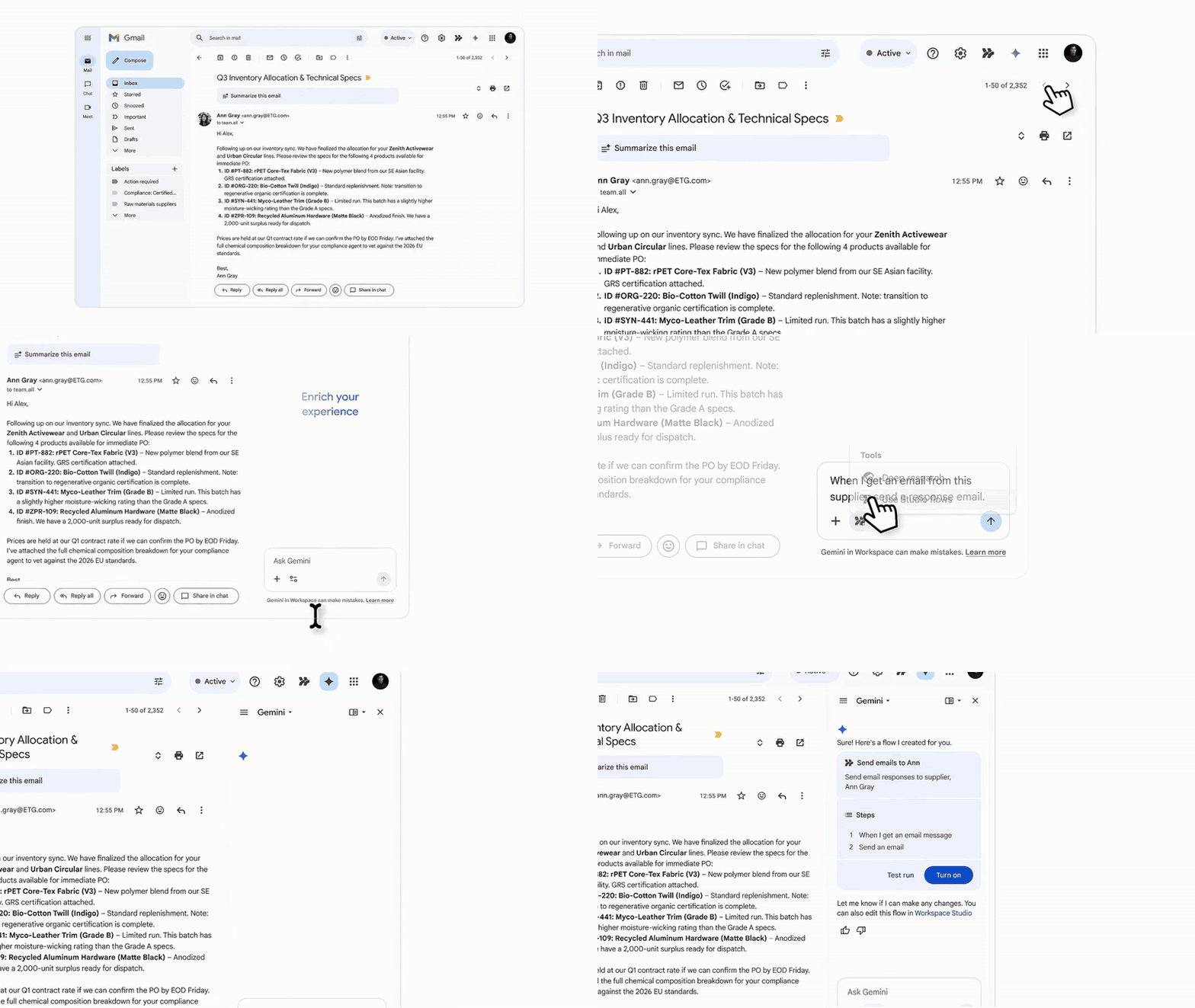
A recurring theme in Workspace is minimising the friction of context switching. To help with this, users will be able to request and generate automated workflows directly within the Gemini side panel (01:23). This brings the automation layer directly to the user’s immediate environment, removing the need to navigate away to separate developer consoles.

Image credit: Google

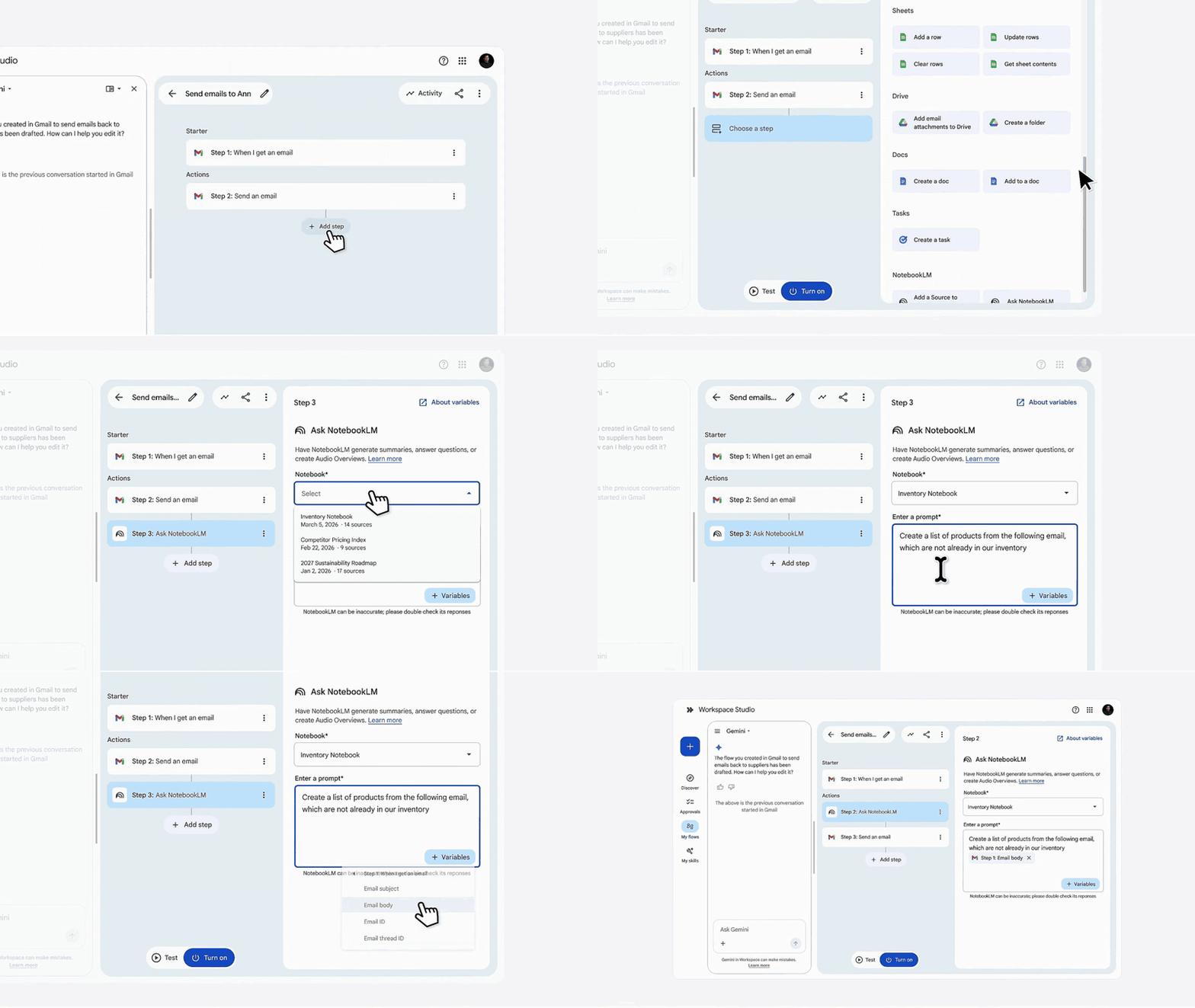
Beyond surface-level generation, the integration paths are expanding. One of the substantial updates is that Workspace users will be able to create flows that use NotebookLM notebook to both query and add sources (02:41). This enables automated Q&A and FAQ workflows, with the ability to dynamically add resources to notebooks :0.

Image credit: Google

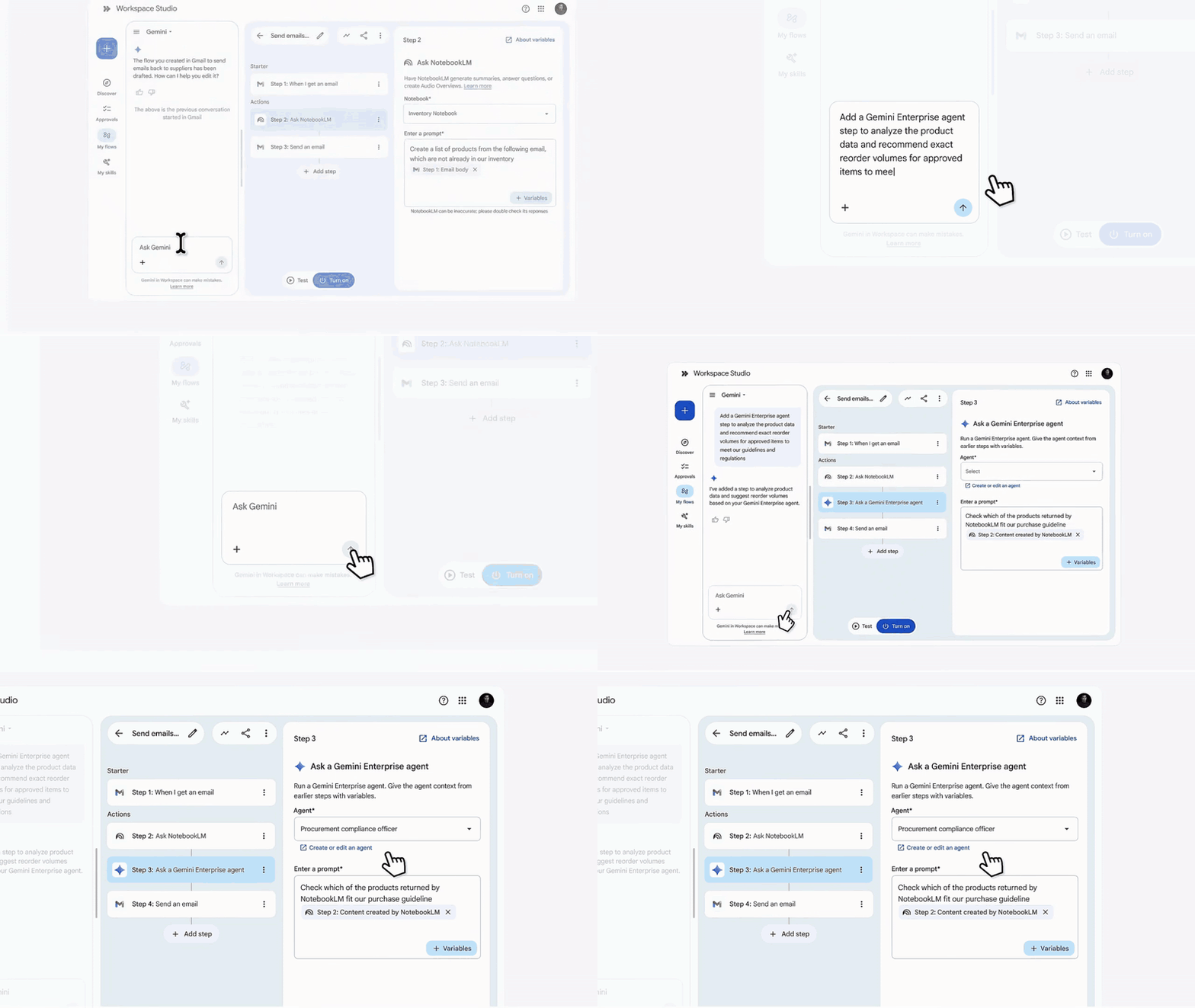
In terms of integration it will also be possible to use Workspace Studio flows with agents created in Gemini Enterprise (04:18). This allows for advanced agentic capabilities, meaning you can construct multi-step flows that query your enterprise data along the way.

Image credit: Google

Customisation and Codified Skills

For the power user and the Workspace administrator, the customisation updates are particularly relevant. We will be able to build custom triggers and steps using Google Apps Script (06:58) directly within these flows. This bridges the gap between low-code convenience and complex, proprietary logic. If you are integrating with external platforms, there will be new out-of-the-box connectors for services like HubSpot, Salesforce, and Jira. Webhooks are also fully supported for connecting to custom endpoints.

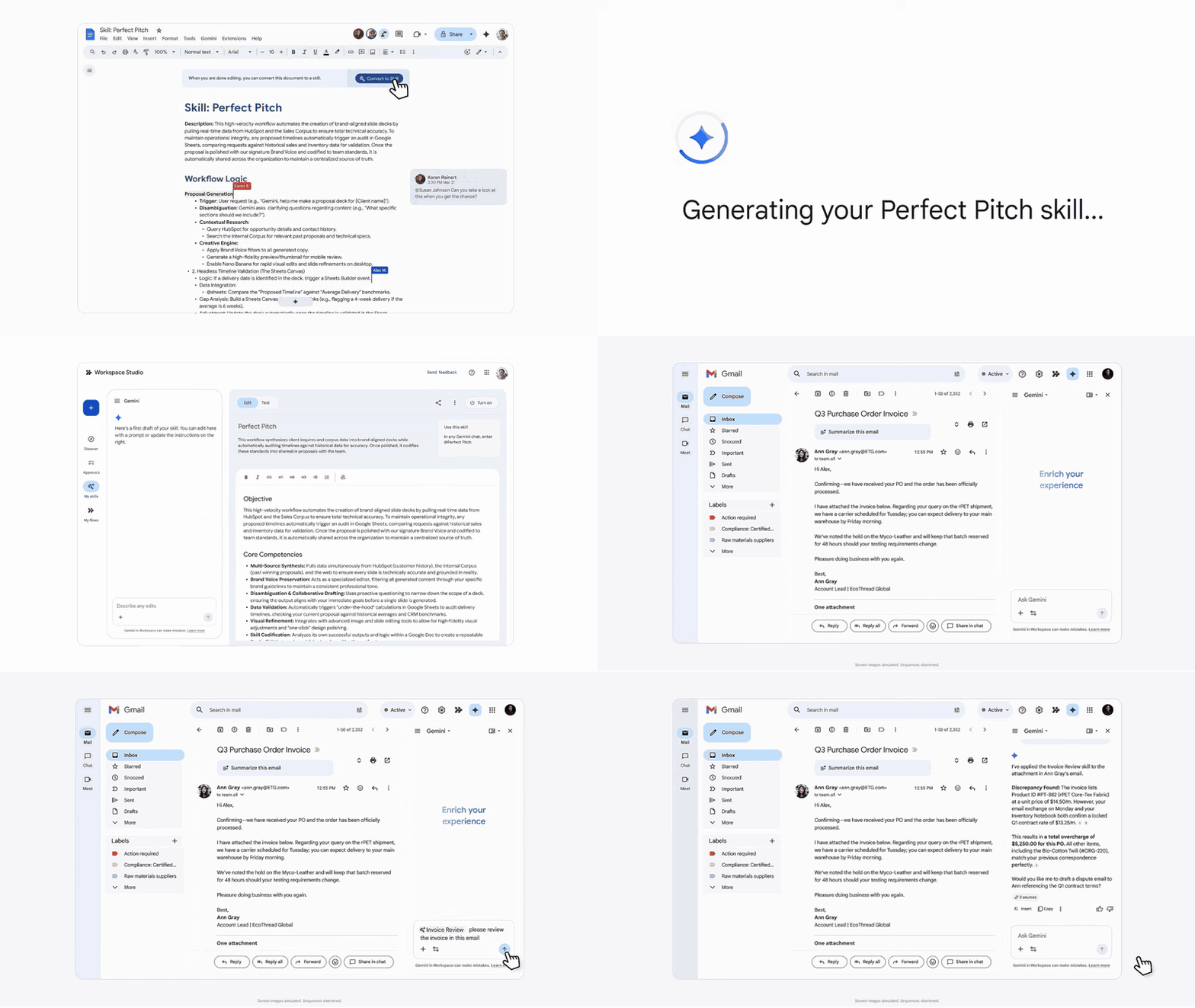
Another really interesting upcoming feature is the introduction of “Skills” (11:03). As we have seen recently discussed on AppsScriptPulse, Skills represent an emerging method for effective agentic automation. Instead of relying on monolithic scripts, this capability allows professionals to codify company guidelines, playbooks, or specialised know-how into reusable, atomic assets.

Image credit: Google

Security, Governance, and Transparency

As we build more autonomous flows that interact with shared resources, including posting to chat spaces and modifying shared Drive folders, this brings security considerations. Thankfully, the new updates include robust security and governance controls. A new unified Approvals page in Workspace Studio (08:21) will allow users to review and approve sensitive actions on their data before they execute.

Image credit: Google

For administrators, it looks like there will be a new management dashboards (09:53) that will provide clear visibility to manage agent access and permissions across the organisation.

Image credit: Google

A feature discussed but not shown in the video is users will see clear visual badges (10:35) indicating when an action was performed by an automated agent. This type of attribution is something I know will be valued by users and necessary for maintaining transparency in an increasingly automated work environment.

If you are interested in learning more about Google Workspace Studio check out the Google Workspace Studio playlist.

Extending Chat Apps Across Workspace with Universal Actions

In this video we build a Chat app as a Google Workspace add-on with Apps Script and extend it to other Workspace applications (Calendar, Gmail, Drive, Docs, Sheets, and Slides).

With the recent general availability of being able to build Google Chat apps as Google Workspace add-ons, the developer community now has a unified model for creating integrated experiences across Google Workspace.

To see this new framework in action, Pierrick Voulet from the Google Developer Relations team has released a fantastic video tutorial, ‘Build a Chat app as a Google Workspace add-on with Apps Script’.

The ‘OOO Assistant’: A Practical Demonstration

The video centres on building an ‘Out-of-Office Assistant’ that can block out the user’s Calendar for the day and set a Gmail out-of-office auto-reply. The real magic is how this Chat-based logic extends into a full Workspace Add-on, available in the sidebars of Gmail, Calendar, Drive, Docs, Sheets and Slides. This is achieved with minimal code changes, primarily by configuring the appsscript.json manifest to include:

  • A homepageTrigger to display a UI card in the add-on sidebar.
  • universalActions that reuse the exact same functions (blockDayOut(), setAutoReply()) originally built for the Chat quick commands.

The video provides a complete overview of the process, and you can get hands-on with the shared code yourself. For more technical details, check out the official Extend Google Chat documentation.

Source: Build a Chat app as a Google Workspace add-on with Apps Script (YouTube)
Code: Build a Google Workspace add-on extending all UIs (GitHub)
Docs: Extend Google Chat (Documentation)

Keys to Success: Amit Agarwal on Developing Google Workspace Add-ons, an Interview with Chanel Greco

Amit is a Google Workspace developer, the founder of Digital Inspiration, and a Google Developer Expert. He has published multiple Google Workspace Add-ons to the Workspace Marketplace and they have a combined 46 million+ installs.

Looking to create successful Google Workspace Add-ons? Chanel Greco (Google Workspace DevRel) recently interviewed Amit Agarwal (Founder, Digital Inspiration), who shared valuable insights for aspiring developers.

Amit Agarwal highlighted several critical areas for add-on development success:

  • Solve Real Problems with Great UX: Focus on addressing specific user needs with a clean, intuitive interface. A compelling first-run experience is key.
  • Build Trust with Documentation: Provide clear, comprehensive documentation and tutorials. A detailed privacy policy is crucial for user trust and smoother Google reviews. Prompt communication with Google during review is also important.
  • Smart Business & Future Focus: A freemium model can drive adoption. Keep an eye on future trends like AI integration to enhance your add-on.
  • Engage the Community: Participate in the Google Developer Community and programs like Google Developer Experts to learn and grow.

To find out more about these areas and more, check out the full interview.

Source: Developer Spotlight with Amit Agarwal, Founder Digital Inspiration

Google Cloud Next ’25 Developer Spotlight: Diving Deep into Flow, AI & the Future of Workspace Automation

I was thrilled to be invited by Chanel Greco (Google Workspace Developer Advocate) to join Vinay Vyas (Software Engineer, Google) and Steve Bazyl (Developer Program Engineer, Google) for a Developer Spotlight session recorded at Google Cloud Next ‘25.

We explored the exciting evolution of Google Workspace development, focusing on the tools and technologies shaping the future of automation and AI integration.

What We Covered:

  • The Rise of Flows for Workspace Automation: We kicked things off discussing the potential of Flows, a powerful new tool Google had just announced which is designed to simplify task automation in Google Workspace. We explored how developers can tap into its potential by building custom actions, including integrating with Vertex AI [01:17].
  • Extending Capabilities with Apps Script: Your existing Apps Script skills remain crucial! We discussed how they empower developers to extend Flows capabilities as the product evolves [02:08], offering significant opportunities within this user-centric automation tool [01:52].
  • Workspace as an Integrated Platform: Learn about the ongoing efforts to enhance connectivity with third-party services [02:35] and how add-ons (including Chat apps deployed as add-ons [03:32]) are key to keeping users productive within the Workspace context [02:52].
  • The Gemini Effect on Development: Hear our experiences with Gemini 2.5 and its significant impact on code development, particularly for Apps Script [05:29]. We discuss its impressive ability to generate substantial, high-quality code for complex tasks [06:35].
  • AI Agents & The Future: We explored the concept of AI Agents powered by Gemini within Google Apps Script for automating tasks using natural language and discussed the exciting prospects for deeper Gemini integration directly within Apps Script [14:41]. I checky asked Steve if there was going to be a Gemini Advanced Service for Apps Script (you’ll have to watch the video to find out the answer :).

Why Watch?

If you are interested in understanding the future direction of Google Workspace development, this discussion hopefully provides some practical perspectives and explores exciting possibilities.

Source: Developer Spotlight – Google Cloud Next 2025 Special Edition

Google Workspace Developer News: Managing Folders with Limited and Expansive Access with the Drive API

There are nine updates highlighted in this month’s Google Workspace Developer News. The news that caught my eye the most relates to updates to the Google Drive API and upcoming changes to My Drive folders with restricted access.

Google Drive API: Managing Folders with Limited and Expansive Access

Google recently announced that by 2026, it will stop allowing restricted access on specific files and folders in My Drive, instead consistently managing it via the limited access folder setting. These changes will align the My Drive experience with Shared Drives, which use an expansive access model where everyone sees the same items in a folder. For developers wanting to get ahead of the curve, there are several new fields that can be used. The Google Workspace Developer News episode gives an overview of these, and there is a new Google Developers Documentation guide on Manage folders with limited and expansive access. In summary:

  • Restricting Folder Access: To limit access to a folder, developers can set the boolean inheritedPermissionsDisabled field on the files resource to true.
  • Opt-in API Behavior: Developers can also opt in to expansive access API behavior in My Drive ahead of any future mandatory enforcement by setting the enforceExpansiveAccess request parameter to true on the permissions.delete() and permissions.update() methods.

Other Updates

Here’s a brief overview of the other updates covered in the Google Workspace Developer News video:

  • Apps Script Rhino Runtime Deprecation: Also already highlighted in Pulse, the Apps Script Rhino runtime will no longer function after January 31, 2026.
  • Google Meet API Enhancements: All meeting participants can query conference data, including the conference records, the conference artifacts, and the participant records, using the Google Meet API.
  • Google Meet Pre-Configurations: Auto-recording, auto-transcripts, and “take notes for me” can now be pre-configured within a meeting space when created. This feature is available through the Developer Preview Program.
  • Google Meet Media API: The Google Meet Media API is now available through the Developer Preview Program, granting access to real-time media from Google Meet conferences.
  • Reports API Updates: Google Chat now supports the customerUsageReports.get() and userUsageReports.get() methods for the Reports API.

Source: Apps Script’s Rhino runtime deprecated, launch of Meet Media API, and more!

Google Workspace Developer News: Google Chat features, Workspace Admin Policy API, and More!

Chanel Greco is back with more exciting news for Google Workspace developers in the latest Google Workspace Developer News video. As always Chanel is able to pack in lots of detail in under 4 minutes, and if you prefer text over video here are the highlights!

Spreadsheet Class Gets a Boost:

The Apps Script Spreadsheet class has received a handy new method: getSheetById(). This allows developers to directly fetch a sheet within a spreadsheet using its unique ID, simplifying sheet management within scripts.

Transparency for Calendar Events:

Developers can now control the transparency of Google Calendar events programmatically. The new functionality allows setting an event as TRANSPARENT (showing the calendar as Available during that time) or OPAQUE (showing the calendar as Busy). This granular control enhances calendar integration and automation possibilities.

Deprecation Notice:

While new features are welcomed, it’s also important to note deprecations. The getUrl() method for CellImage, CellImageBuilder, and OverGridImage classes within the Apps Script Spreadsheet service is now deprecated. This change reflects the fact that an image’s source URL isn’t consistently accessible regardless of the image insertion method.

Workspace Policy API Goes GA:

A significant announcement for Workspace administrators is the general availability of the Workspace Policy API. This API enables programmatic access to over 60 Google Workspace Admin settings, making auditing and monitoring the Workspace environment more efficient.

Open-Source Drive Picker on NPM:

The Google Drive Picker web component has been published to NPM, making it easier for developers to integrate the Google Picker API into their web applications. This open-source component, designed as a reusable custom HTML element, simplifies the process of adding Google Drive file selection capabilities to web projects.

Chat App Enhancements:

For developers working with Google Chat, there are several exciting updates, primarily available through the Developer Preview Program. These include:
  • Quick Commands: Users can interact with Chat apps more quickly and efficiently using quick commands, which invoke the app directly without requiring slash commands or additional input.
  • AppCommandPayload for Slash Commands: Chat apps built as Google Workspace Add-ons now utilize AppCommandPayload instead of MessagePayload for handling slash and quick commands.
  • Carousel Support: Chat apps can incorporate carousels to display scrollable collections of items, further enhancing the user experience.
  • Announcement Space Management: Developers can programmatically create announcement spaces and manage space permission settings using the Chat API with App Authentication.
  • Expanded UI Widget Library: More Google Workspace Add-on UI widgets are now available for Chat apps, providing developers with a richer set of tools for creating interactive experiences.

Stay Up-to-Date:

To learn more and explore these features in detail, visit the Google Workspace Developers YouTube channel and check the video description for links to relevant documentation.

Source: Update to Apps Script’s Spreadsheet class, new Workspace Policy API, and more!

Google Workspace Developer News: Google Sheets supports smart chips for link previews, Update to Chat API, and more

Chanel Greco is back with Episode 12 of the Google Workspace Developer News. An exciting update is that Google Sheets now supports smart chips for link previews to third-party resources. This now allows developers to create Google Workspace Add-ons that can pull information from their app directly into Sheets.

Other updates include:

  • The Chat API can now create announcement spaces and read/update space permissions.
  • New widgets for card-based Chat app interfaces are generally available.
  • Chat API Space & Membership management with App Authentication is available for Developer Preview Program members.
  • The Chat API can manage custom emoji when enabled for a Workspace organization.
  • The Meet Add-ons SDK can now retrieve the meetingCode property of an ongoing meeting.

More details including links to the documentation are included in the YouTube description.

Source: Google Sheets supports smart chips for link previews, Update to Chat API, and more!

Google Workspace Developer News: Create and organize Docs with the new ‘tabs’ API methods and more

A slightly shorter Google Workspace Developer News episode this month from Chanel Greco (Google Workspace, DevRel). New features for developers include using the Google Docs API or Apps Script to create and organize documents with tabs. Google Meet Add-ons now have the ability to end collaborations programmatically. Google Chat apps have expanded card interface features, such as Material Design buttons and ChipList widgets.

Lastly, developers are encouraged to use Cloud Client Libraries when calling Chat API for improved efficiency. You can find out more about all these updates by following the source link.

Source: Create and organize Docs with tabs, more card interface features for Google Chat, and more!

Google Workspace Developer News: Updates to Tasks API, Chat API, new allowlist feature for Apps Scripts, and more


I’m continually blown away by how much information Google Developer Advocate Chanel Greco squeezes into the Google Workspace Developer News video updates. It’s also great to see the continued development of features and services Workspace developers can use. This video covers a number of updates including:

  • Using the Tasks API to manage tasks assigned from Google Docs or Chat spaces.
  • The general availability of multiselect menus and columns for Google Workspace Add-ons.
  • Using the Chat API to make a Google Chat space discoverable to specific users within an organization by creating target audiences.
  • Authenticating Chat app requests using Cloud Functions, Cloud Run, or an App URL ID Token.
  • Importing spaces from other messaging platforms and allowing external users to join them.
  • The Google Drive API now supports the drive.meet.readonly scope.
  • Google Workspace admins can restrict which URLs Apps Scripts and Sheets can source external content from.

The video description includes all the related documentation links to find out more.

Source: Updates to Tasks API, Chat API, new allowlist feature for Apps Scripts, and more