Probation tracker tool to easily manage upcoming review meetings. Have automated reminder emails sent to Line Managers.
Manage probation review dates in a spreadsheet and be sent reminder emails
Key Functionality
The daily check is performed between 7am – 8am every day and for any emails that are sent a Note will be attached to the cell with its timestamp for record purposes and it will be coloured in light-green.
You can continue to append further rows for new staff starters after the initial Sheet setup or you may wish to delete/move rows for those that have completed their probation period.
You can adjust dates, emails addresses, etc at any point in time.
If you enter something into the ‘Probation Passed’ column then that given row will be skipped in future checks, to help save time if you continue to add to this Sheet.
You do not have to enter a review date for every single column, thus allowing flexibility between differing roles, just leave it blank.
There is a Log sheet to help capture any errors and it will attempt to email the account that creates the daily check (trigger) to alert them.
Editor: A reminder that Phil Bainbridge will be joining us on Totally Unscripted at the slightly earlier time for non-US viewers of 7pmUTC 20 March, 2024. This ‘Google Sheets probation tracker and reminder tool’ is a great example of the types of solutions Phil creates as part of his role at the University of York. Watch live at 1200 PT / 1500 ET / 1900 GMT
Totally Unscripted* returns live on 20 March 2024 at 1200 PST / 1500 EST and because of the crazy daylight saving time in the United States will be for many non-US viewers the earlier time of 1900 UTC/GMT.
Join us as we explore how Google Apps Script is being used to make a real impact in productivity. Our guest speaker, Phil Bainbridge, is an experienced IT specialist at the University of York and author of ‘The Gift of Script’ and regular contributor to AppScriptPulse.
Phil will share his insights on how Google Apps Script can be used to automate tasks, create custom solutions, and enhance your workflow. As part of this episode we will also discover how Phil and other members of York’s Digital Inclusion, Skills & Creativity team support digital literacy development in Google Workspace and Apps Script as well as the solutions they have created to improve productivity.
So if you are asking yourself how can you supercharge your productivity with Google Apps Script? Then this episode of Totally Unscripted is hopefully for you!
Google Next is only a few short weeks away and as of this morning, the Agenda builder is live. In this video I walk through how I choose which sessions to attend, and my recommended Google Workspace sessions.
Jesse Nowlin, tabGeeks founder and Google Workspace Admin expert, has complied this great video with tips on how to get the most out of Google Cloud Next ’24. Jesse has highlighted a number of Google Workspace related sessions which are linked from the video description.
Jesse has included the session Charles Maxson, Kara Ireland and myself (Martin Hawksey) will be doing on Day 3 April 11, 2024 at 11:00 AM – 11:45 AM PDT on Apps Script and Gemini: Build custom AI-powered Google Workspace solutions. Kara and I have already started discussing tactics for getting the mic off of Charles. The session is demo packed and hopefully full takeaways that can help with your own Gemini API powered Google Workspace solutions.
The entire Totally Unscripted crew will actually be at Next ’24 with Alice Keeler giving a Lightning Talk on Duet Your Data. If you are one of the anticipated 40K attendees (⊙_⊙’) please come and say hello. Finally, if you haven’t registered yet Jesse has a referral link in his video description.
Episode 4: Welcome to the fourth edition of the Google Workspace Developer News! Find out what’s new on the Google Workspace Platform.
Another great summary of Google Workspace Developer News put together by Chanel Greco from the Google Workspace DevRel team. The update includes information on:
Google Meet API and Google Workspace Events API now generally available: These APIs enable developers to programmatically create and manage meetings, and subscribe to meeting events.
Google Chat apps now support Google Apps Script’s Card Service: Developers can now use Card Service to build user interfaces for Chat apps.
Subscribe to Google Calendar changes: you can now get push notifications for a specific calendar events, such as working location, focus time, or out-of-office events
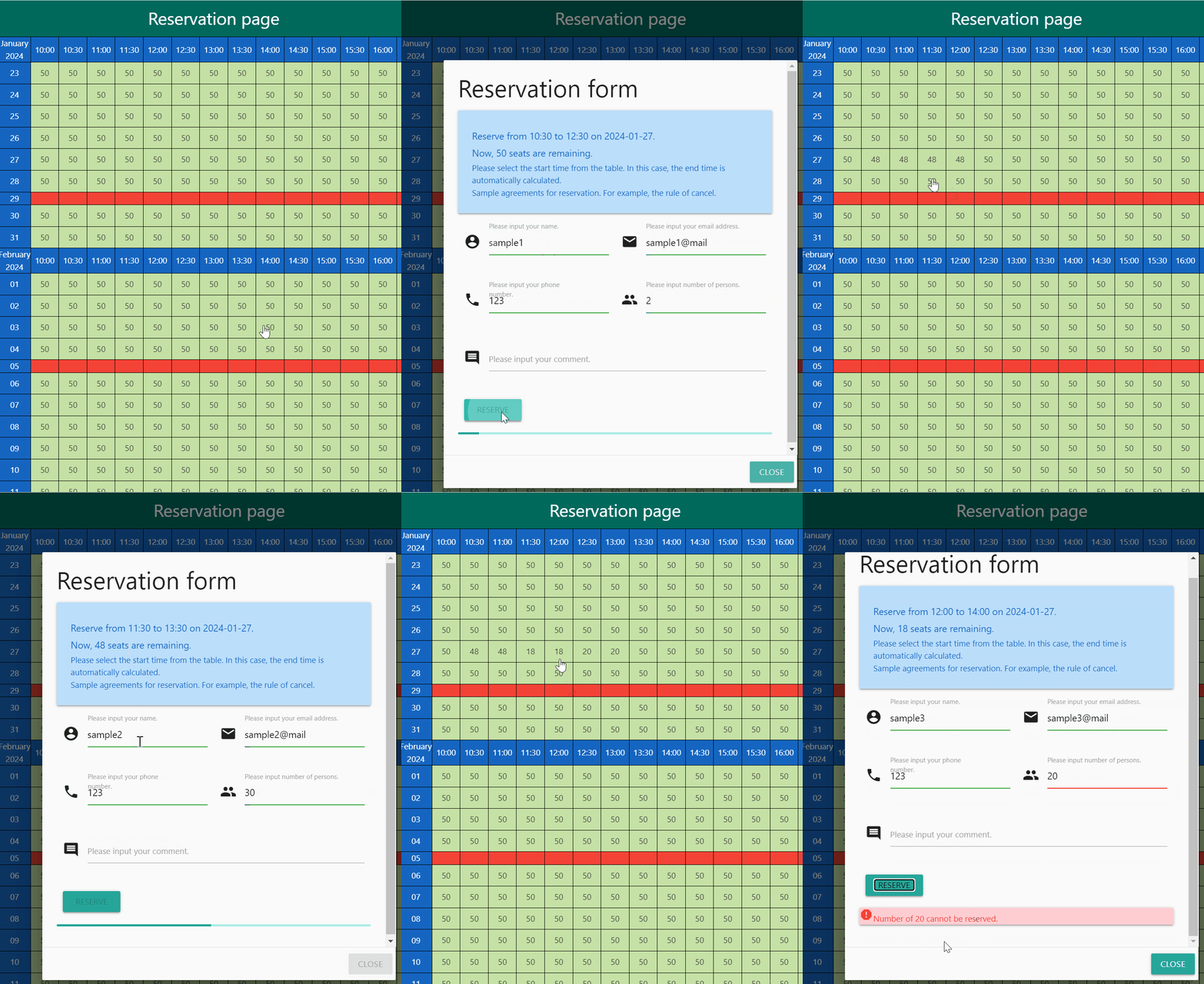
Google Apps Script automates tasks (even offline) and builds web apps using spreadsheets as databases. This report presents a basic dining reservation system to illustrate key aspects of web app development with Apps Script, HTML, and Javascript.
One of my first Google Apps Script projects was an event booking system. It was a great way to learn about integrating with the various services like Google Calendar. Roll forward 14 years and it is a topic that Kanshi Tanaike has revisited with a dining reservation system built on Google Sheets with a web app frontend.
All the code is published on GitHub and even if you don’t need a reservation system a great opportunity to see how one can be coded and there could be lots of juicy little snippets that you can use in your own projects.
If you want to publish your Google Apps Script project on the Google Workspace Marketplace, or if you already have an add-on or app on this marketplace and are using authorization scopes which are now restricted, you will have to go through a TIER 2 CASA security assessment.
If you would like an overview of the process from a developer’s perspective you are in luck as Kelig Lefeuvre (Product Engineer at Scriptit & Folgo) has shared a guide specifically with Apps Script developers in mind. The article includes a number of useful tips and information about the review process which you won’t find in the official documentation.
As part of the CASA process Kelig recommends using the option to you can submit bypass the Fortify scan and submit your own results. those results Kelig has also provided a second article with a step-by-step guide on ‘how to scan your Google Apps Script project for CASA’.
Whether you are managing projects, calculating budgets, forecasting sales, or just tracking your own to-do lists, there is almost always a spreadsheet involved.
In this episode of Totally Unscripted, we get back to basics and discuss the versatility and pure power (and joy) of spreadsheets! Joining us live is guest Ben Collins, who is a renowned spreadsheet educator, Google Developer Expert and Google Sheets master, and someone who has earned the honorary title of “King of Functions”. Ben will talk and answer your questions about trends, best practices, and of course demonstrate a few of his favourite functions that will confirm that “The Answer is Always a Spreadsheet” still rings true!
As always the show is broadcast live and you can ask questions via the YouTube chat, but also feel free to get your questions in early using the comments.
This tutorial shows how to make a Google Chat app that a team can use to manage projects in real time. The Chat app uses Vertex AI to help teams write user stories (which represent features of a software system from the point of view of a user for the team to develop) and persists the stories in a Firestore database.
A recent episode of Totally Unscripted delved into “going beyond basic bots”, highlighting a couple of Google Chat app tutorials from the Google Developer documentation. One example, the “project management” Chat App, is worth mentioning in a Pulse post.
While this example uses Google Cloud Functions instead of Google Apps Script, as discussed in the episode, both approaches share many similarities. Deploying the project management app involves several steps, but I believe it’s a worthwhile investment to learn how to combine different solutions for building Google Workspace integrations. For developers seeking to expand their Google Workspace Add-on capabilities, this example serves as a valuable reference.
If you’re interested in using Firestore for data management but prefer Google Apps Script, Justin Poehnelt’s post on “Using Firestore in Apps Script.” is a great resource. This post provides a basic Firestore wrapper and links to other relevant Apps Script/Firestore libraries.
Update 2024-02-26 17:28GMT – Latest update from Google “We believe the issue is mostly resolved for impacted services and our engineers are continuing to work on preventing similar issues in the future.”
Update 2024-02-26 15:00GMT – Still reports of issues for some users – “Our engineering team continues to investigate the issue. We will provide an update by Monday, 2024-02-26 08:00 US/Pacific with current details.” Updates are being posted to Google Cloud Support Portal
Update 2024-02-26 13:00GMT – Service being restored – many users are reporting all Apps Script services as being restored.
I’m sure the majority of Google Apps Script developers don’t need me to tell them that Google Apps Script is currently down. The outage is impacting multiple areas including the availability of the Script Editor, script executions and Google Workspace Editor Add-ons.
Issues were first reported in the public issue tracker at Feb 26, 2024 08:27AM – the ticket has been marked as P0. Please use the star/’Me too!’ button on the ticket to subscribe to updates (please avoid commenting on the ticket to make it easier for us all to track updates from Google).
Are you looking for an efficient way to get an overview of all shared drives and their access permissions within your organization? Whether you’re navigating a company reorganization or implementing security procedures, accessing this information can be challenging.
This post from Niek Waarbroek highlights the important of auditing Google Shared Drive permissions. This can be a challenge to do using the Google Workspace Admin Console, especially if you have lots of Shared Drives.
To help Niek has shared a Google Sheet with Apps Script code that automatically generates a list of all shared drives and their associated root level permissions.
Shared Drive auditing is bit of a niche subject, but I encourage you to have a look at the post and script as it has some nice features which could be applicable to other projects. For example, there is a gaspTimeManager to make sure the script doesn’t go beyond the script execution limit.