Get updated with 2019-nCoV (or any) real-time statistics with Google Sheets

What if you want to catch up with the numbers regularly, say, in particular areas? Of course you can keep scrolling your phone for it, but there are chiller ways to do so.

In this 3-part series, Claire Chung explores the spread of pneumonia outbreak and explains how you can import & track data with Google Sheets, organize it & send notifications.

Source: Get updated with 2019-nCoV (or any) real-time statistics with Google Sheets.

Google Apps Script snippet for Google Sheets to view json strings in a modal dialog

View json strings in a modal dialog

View json strings in a modal dialog. Activate the cell that contains a JSON string Click menu item A foldable JSON will be shown in the modal dialog

Handy little Google Apps Script snippet from Riël Notermans (Zzapps) that makes it easier to view any JSON you are storing in a Google Sheets cell.

Source: Zzapps/google_sheets_json_viewer

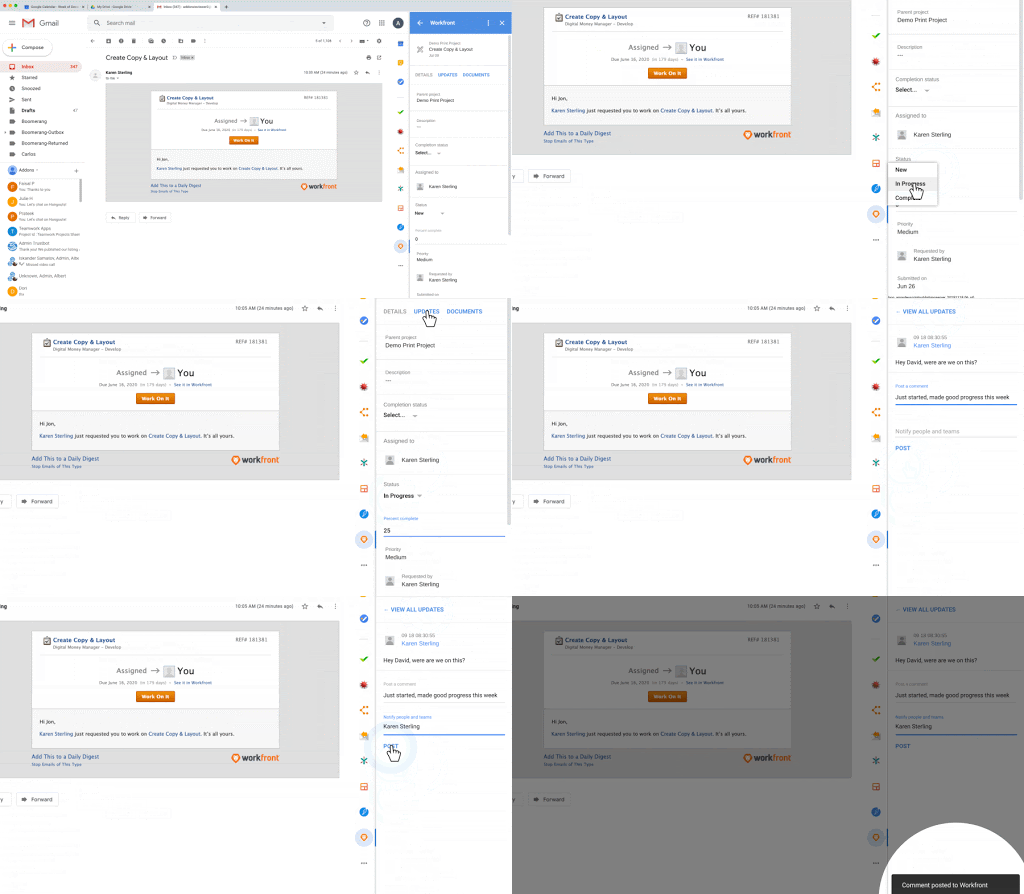
G Suite Updates Blog: G Suite Add-ons now generally available in Calendar, Gmail, and Google Drive

Take action without leaving G Suite
Image credit: Google – Take action without leaving G Suite 

Last year we announced the beta of G Suite Add-ons, a new cross-suite platform that connects G Suite to your favorite workplace apps. Beginning today, G Suite Add-ons will begin rolling out to all users.

Whilst the Add-on ecosystem is being extended making them generally available to end users developers will have to wait until you can start developing new add-ons for G Suite:

Organizations can also build their own add-ons using Apps Script. Note that the developer feature will be fully available in early February

Source: G Suite Updates Blog: G Suite Add-ons now generally available in Calendar, Gmail, and Google Drive

Manage Gmail with Google Apps Script

Ever had a messy inbox full of mails? Does it bother you to skip the inbox? Luckily, Google has provided many services that we can harness its utilities to organize the mail using personal preferences or workflow.

You will able to make an auto email archiver/remover after following the steps. This will be done by using Google Apps Script and setting the schedule trigger. The code is pretty simple and straightforward since Google has already provided us with ready-to-use objects for managing Gmail.

Source: Manage Gmail with Google Script

GGvulnz — How to check your domain and groups settings

This article will highlight how you have to be careful about settings when you make some content available publicly, like Groups or Drive file.

The original article describe how an external person of the domain can subscribe to your Slack company channel by using a Google Groups that is publicly accessible. Stéphane Giron’s article helps answer the question – how to prevent and how to identify if some groups are concerned.

Source: GGvulnz — How to check your domain and groups settings

How to get that inactive Twitter handle you really want using Google Apps Script

You may have seen in the news that Twitter will begin deleting inactive accounts of users who hadn’t logged in within the past 6 months before Dec. 11, 2019.

This is bad news if you happen to be @qwerty123, but great news if — like me — you’ve found the perfect username but some clueless bovine has been accidentally hoarding it for the past 8 years.

In this post Sean Cann shows you how you can use Google Apps Script to detect when your preferred new Twitter handle becomes available.

Source: How to get that inactive Twitter handle you really want

TSDynamicUrls (#1) — Leverage the URL Power of Google Docs, Sheets, Slides, Drawings & Forms 💥

In my previous post, I outlined the power of Google document URLs to perform “Simple, Powerful, Work” and promised to share several tools I’ve developed to aid in building them.

Source: TSDynamicUrls (#1) — Leverage the URL Power of Google Docs, Sheets, Slides, Drawings & Forms 💥

AppSheet purchased by Google Cloud – News – Google Groups

Google Cloud has acquired AppSheet. Do I care? At first I thought, “Not really, it’s just interesting news.”

I guess that I do care in the sense that I want to be valued as a programmer, and no-code development feels like programmers are being thrown away in favor of something else. The driving force behind this is development costs. Even if an independent programmer only charged $5 dollars an hour, in two hours the customer would have paid $10 dollars, which is twice as much money as the $5 a month AppSheet plan.

It was recently announced that Google has acquired AppSheet a low-code platform for business users that lets you build applications that can integrate into a variety of sources including Google Sheets. This has resulted in an interesting thread on the Google Apps Script Community Google Group linked to from the source link at the end of this post, in particular, impact on Apps Script developers. On the one hand you can argue that products like AppSheet, with there low/no code environments remove the need for developers. However, the general consensus on the thread is rather than removing developer opportunities it may in fact create them with opportunities to extend the basic functionality of AppSheets. This comment from Alan Wells in particular caught my eye:

What AppsSheet does, is increase the number of apps and code being created, as opposed to lots of business creating no apps at all.  It’s kind of like, you need a lot more mechanics if everyone can afford a car.  If only the rich can afford a car, then there aren’t going to be many car mechanic jobs.  So, I think that AppSheet is filling a need, which increases the number of apps.  Some of those apps will crash, and they’ll need the equivalent of an auto body technician to repair the damage.  This is part of the evolution of the computing industry.

You can join in on this discuss using the following link:

Source: AppSheet purchased by Google Cloud – News – Google Groups

5 Google Sheets Script Functions You Need to Know

Google Apps scripting is a background scripting tool that works not only in Google Sheets but also Google Docs, Gmail, Google Analytics, and nearly every other Google cloud service. It lets you automate those individual apps, and integrate each of those apps with each other.

Source: 5 Google Sheets Script Functions You Need to Know

Google Apps Script Development – Best Practices – Andrew Roberts

This is an overview of the various techniques and best practices I have evolved in developing Google Apps Scripts over the years. Of course Google have got a few suggestions of their own, and there are plenty of more general …

This includes some good design pattern considerations for Apps Script projects as well as links to testing libraries, boilerplate frameworks, and extensions that help manage Apps Script work.

Source: Google Apps Script Development – Best Practices – Andrew Roberts