Google Apps Script, Google Sheets, Javascript Have you ever wanted to have a Google Sheet available for only those users who need to edit and then once they are done, take their edit permissions away to maintain the integrity of the sheet? I know that I have come across these conditions a number of times … Continue reading “Google Apps Script: How to Add and Remove Editors to a Google Sheet based on Sheet Data”
AppSheet and Apps Script bring together a lot of powerful customization and functionality to Google Workspace, but you may be wondering when to use which platform. Here’s the answer.
This post covers various scenarios where you might want to use “AppSheet, Google Cloud’s no-code development platform, and Apps Script, Google Workspace’s integrated low-code development platform”.
It was the last line in the post that particularly caught my eye:
We plan to continue to integrate AppSheet and Apps Script in interesting ways, and to make it even easier for you to build powerful solutions. We’re eager to see what you create.
… how to send Charts in Email using Google Apps Script. Sending charts on Email can be used to send the attendance charts of the students, sales chart for the week, share price charts, etc.
Always nice to see others in the Apps Script community use the work of others for inspiration and reshare the results. In this post latest post from Aryan Irani you can learn how to send charts from Google Sheets. This post covers a basic technique that you can easily expand on (if you are having issues with the charts rendered in your emails using this solution check out my referenced post for an alternative method).
Your documents and files in Google Drive can be modified by anyone who has edit access to the file. You can always remove external collaborators from your documents to prevent them from editing your files but how do you prevent yourself (the owner) from accidentally editing your own files in Google Drive? Google Drive doesn’t have a simple button (yet) for locking files so here’s a little Google Script that can help you make any file in your Google Drive read-only.
Nice post from Amit Agarwal showing how the new Google Drive Locking API can be used with Google Apps Script. The post contains all the code and instructions you need to get started.
Turn your spreadsheet into a database with examples for querying, inserting, updating, and deleting via API. In this guide. I’ll also explore the limitations of Google Sheets, including scalability, and where it makes sense to start looking at more complex alternatives.
Whilst not directly Google Apps Script related this post from Jacob Lee (Co-founder Autocode) provides lots of useful advice and tips on using Google Sheets as a database. The post also does an excellent job of highlighting the hard limits as well as usability issues before you hit those limits.
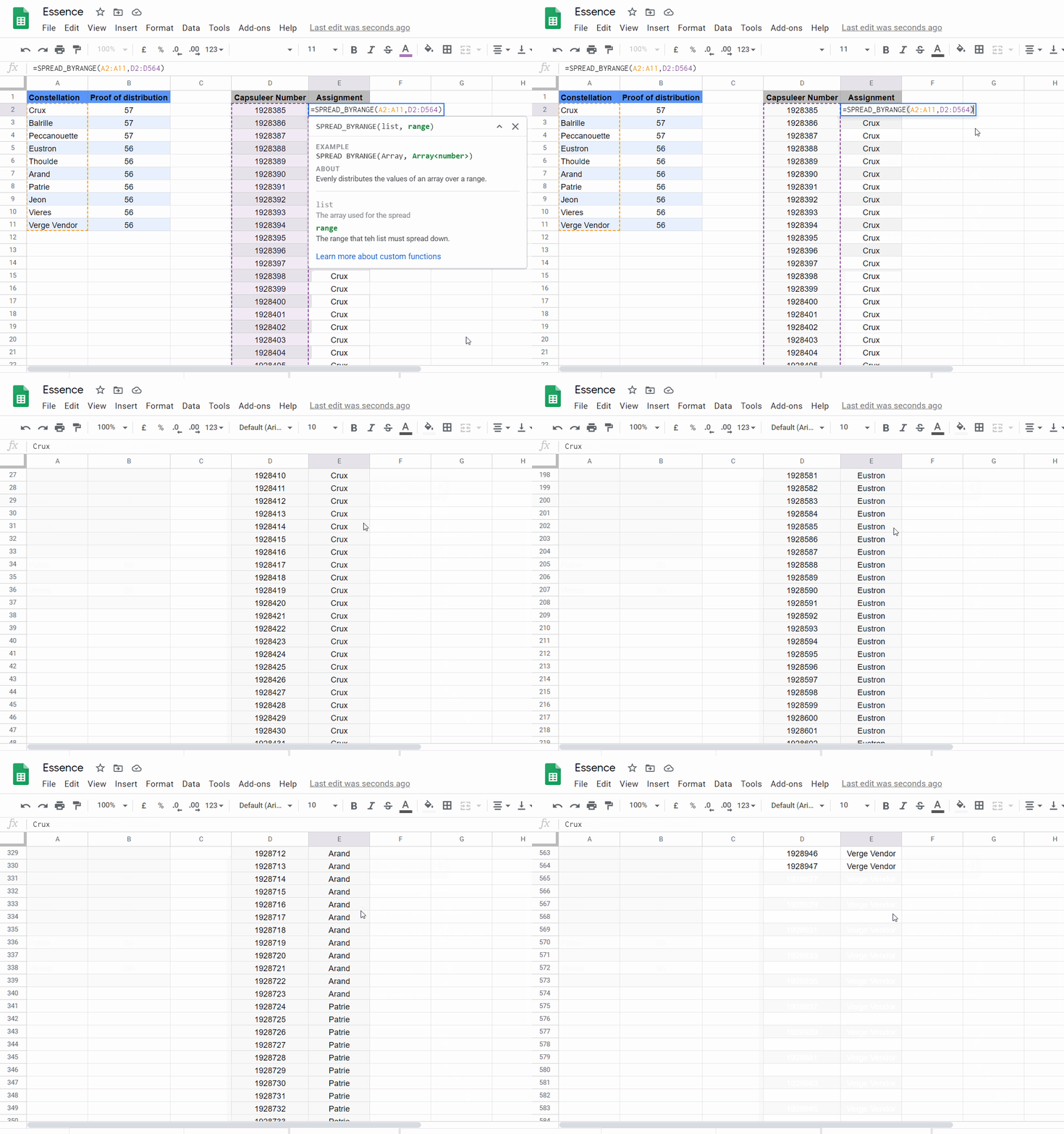
Imagine if you have a set of data, say, Cat, Dog, Goat and you want to create a new column where each item is repeated 3 times. Essentially what we are doing here is spreading out our original … There is no real easy approach to do these things with the standard Google Sheets Formulas (Known as Functions in Google Sheets). Fortunately, we can create custom functions with Google Apps Script to do the job.
In this post, I will go over the 3 custom functions that I created to solve these three problems. I’ll then provide a quick-use guide if you just want to dive in and get started using them. Finally, I go over some of the interesting parts of the Google Apps Script code for those of you who wish to learn more about creating your own custom functions.
Rather than manually update my team hourly, I used a slack bot that grabs the AQI from the air now API every hour. So I thought I’d share how I did it, and maybe if you use G Suite and Slack in your workplace you could set one up too.
Nice post describing how you can use Google Apps Script to develop a Slack bot that is setup to post messages to a Slack channel at regular intervals. Click through to the source to find out more.
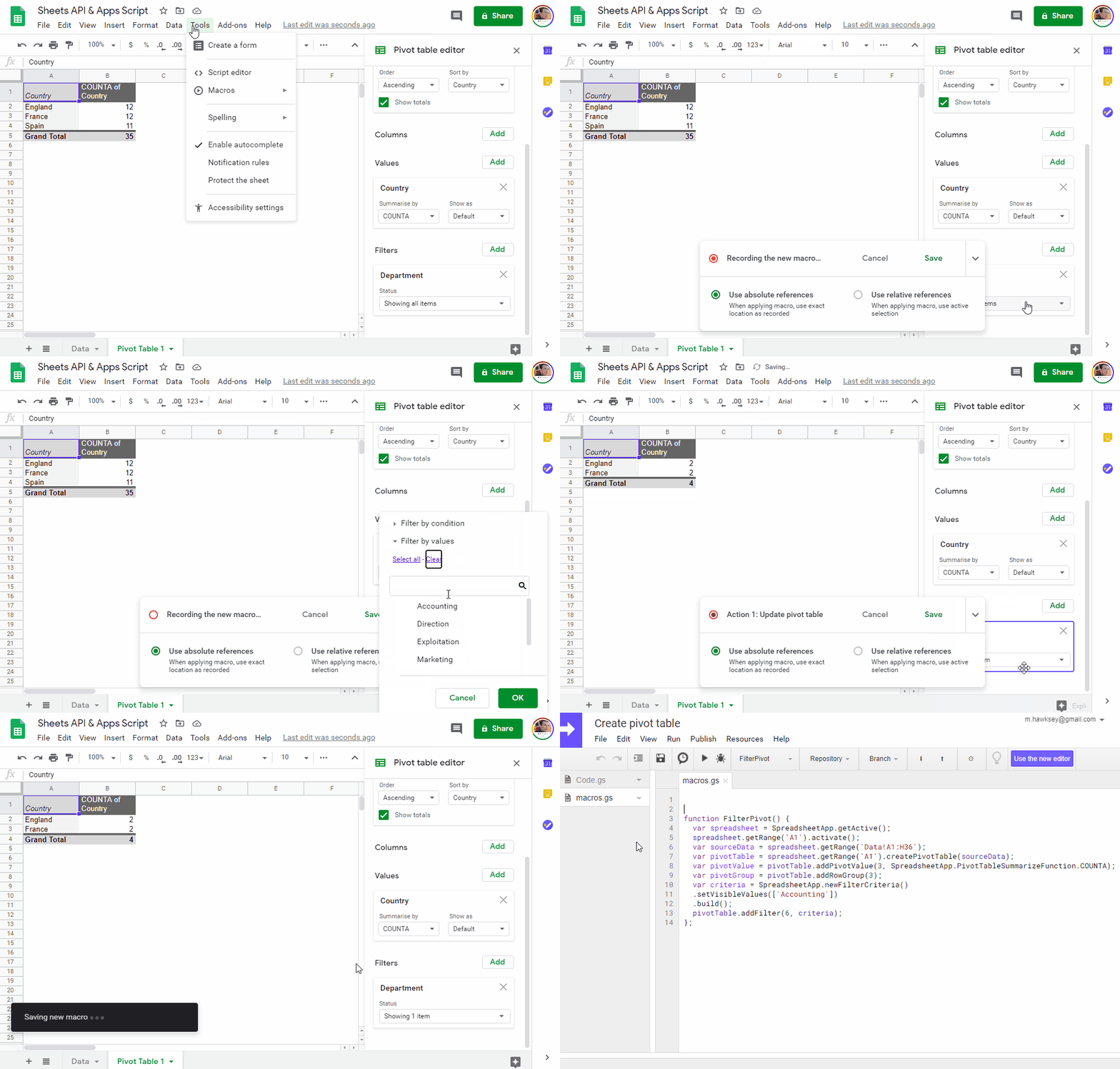
Pivot tables are a quick and powerful way to analyse data. Using Google Apps Script, there is an ability to build and modify pivot tables in Google Sheets. In this post I’ll share some tips and tricks for interacting with pivot tables in Google Sheets.
Here, I would like to report the process costs for searching values in Spreadsheet using Google Apps Script (GAS). When the values are searched in Google Spreadsheet, the following 3 patterns can be considered. Ref
Retrieve all values using getValues, and the values are searched from the retrieved array.
Use TextFinder.
Use Query language.
TextFinder is a relatively new addition to Google Apps Script with was released on April 5, 2019. TextFinder is part of the Spreadsheet Service and provides methods for finding or replacing text within a range, sheet or spreadsheet. There have been some reports on Stack Overflow that the TextFinder methods can be relatively slow to execute compared to using native JavaScript techniques. This post by Tanaike explores the process time of TextFinder against other techniques. Click through to the source for the results and code for running the experiment.