DNSQuery and G Suite domain detection in Google Sheets using the Cloudflare name resolution service

Dos funciones personalizadas para hojas de cálculo de Google desarrolladas en Apps Script que proporcionan un envoltorio para la función NSLookup, tal y como aparece en la documentación del servicio de resolución de nombres de CloudFlare. Consulta el registro indicado en el o los dominios que se pasan como parámetro utilizando el servicio de resolución de nombres de CloudFlare. Determina si un email o dominio (o lista de emails o dominios) está gestionado por Google o no. – pfelipm/dnsquery

Pablo Felip Monferrer has shared two custom functions for Google Sheets that provide an extension to the NSLookup function originally shared by Cloudflare. The first is a wrapper that makes it easy to list specific DNS record types for a single or list of domains. The second function uses the domains MX record to automatically detect if a domain has G Suite Gmail settings applied.

Source: pfelipm/dnsquery

Marketing Data Extraction using SOAP API — Apps Script Automation

Recently I had setup a daily extraction automation from a marketing platform and they had SOAP API. I had worked with xml before, so after some trial and error I was able to fetch marketing data from trafficvance.com platform right inside Google Sheets

Nice post from Urwa Shabir highlighting how to interact with 3rd party APIs using SOAP which relies heavily on XML. The post covers formatting a SOAP request now that SOAPService is deprecated in Apps Script, as well as parsing the XML response.

Source: Marketing Data Extraction using SOAP API — Apps Script Automation

DNS in Google Sheets – Cloudflare Resolver

They thought we wouldn’t go there, but they thought wrong. If you want or need to find out some DNS records inside of Google Sheets, create a Google Function

Eric Koleda spotted (see tweet) that Cloudflare has been having some fun with Google Apps Script sharing a custom function that lets you do a DNS lookup for domain names in Google Sheets. Eric notes he can’t imagine when you would need to do this, but I always find it encouraging to see big companies using and promoting Google Apps Script.

Source: DNS in Google Sheets – Cloudflare Resolver

Hacking it: Generate PDFs from Google Forms

Some time ago, I had a request from one of my colleagues to help automate a rather repetitive and might I add, highly prone to error, process. One of the clients required her to fill in the same form several times in a day, manually, and then send it back for approval and signing. Of course, I’m simplifying a bit but that was what it was in essence.

In this detailed post, Neha demonstrates how to use Google Forms to generate professional looking PDFs from the data submitted via the form, using Google Sheets and Apps Script.

Source: Hacking it: Generate PDFs from Google Forms

Streamline access to resources for vendors via Google Sheet – Sheets to Apps

Need to share a variety of documents with vendors? Don’t want to share access one by one? In this episode of Sheets to Apps, we’ll cover how to use an Apps Script in a Google Sheet to automatically add members to a Google Group, helping you share documents at a large scale that will save you time.

We’ve previously shared the Medium post that provides more details for setting up this solution. If you missed that post or were unclear Alexandrina Garcia-Verdin, better known in the community as AGV, provides a very useful overview.

The code and other resources presented in this episode are available from the video description.

How to format cells through code in Google Sheets

If you had used the GUI to manage your custom formulas used for conditional formatting, then to see and manage that logic, you would have to find and select the correct cell, or select the entire spreadsheet, and then right click and select “Conditional Formatting”, or go to the menu and select “Format -> Conditional Formatting”, to actually see and edit that logic. Which can be quite inconvenient at times.

Set conditional formatting rules through your script, which would allow you to keep everything configured in a single script.

Source: How to format cells through code in Google Sheets

Grant access to resources 🚣 from a Google Sheet in G Suite

Use a Google Group to work cross-functionally with vendors, partners, customers, and volunteers outside of your domain, and scale access to work assignments and leverage security controls.

Share documents, events, and communications with users outside (or inside) your G Suite domain.

Source: Grant access to resources 🚣 from a Google Sheet in G Suite

Capture Gmail Messages in a Google Sheet using Google Apps Script | Practical Ecommerce

With Google Apps Script, marketers can capture Gmail messages, parse them for relevant information, and add them row-by-row to a Google spreadsheet. This can be especially helpful for capturing leads or contacts.

A comprehensive write-up from Armando Roggio on using Google Apps Script to copy emails from your Gmail account to Google Sheets. As an added bonus the tutorial is also written using the new V8 runtime syntax.

Source: Capture Gmail Messages in a Google Sheet | Practical Ecommerce

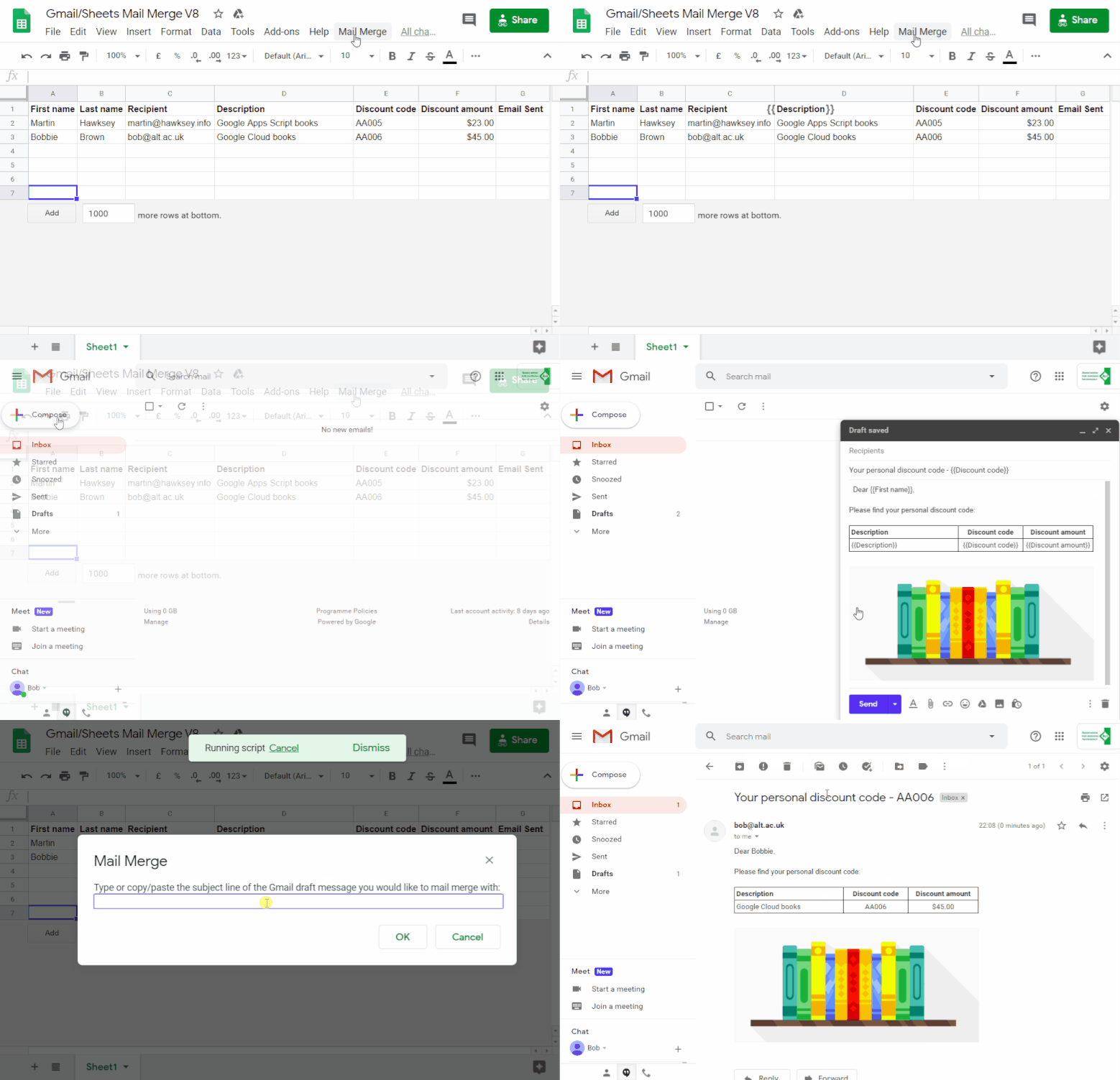
A bulk email/mail merge with Gmail and Google Sheets solution evolution using V8 – MASHe

Last year I had a ‘mail merge using Gmail and Google Sheets’ contribution accepted on the G Suite Developers Solution Gallery. Just over 6 months on there has been lots of useful feedback and requests for solutions to some of the limitations of the original published script. In the meantime Google has also made the new V8 runtime for Google Apps Script generally available. Given this it seemed appropriate to revisit the original solution updating it for V8 as well as covering the most commonly asked for changes. In this post I’ll highlight some of the coding changes as well as some easy modifications.

This post picks up some common requests I get for features like advanced send parameters (cc, bcc, sender name/from, replyTo), sending emails with emoji/unicode and scheduling/triggering bulk emails. Some other areas covered in this post might be of general interest to Apps Script developers interested in using formatted Google Sheets cell values for currencies, dates and more as well as detecting/ignoring filtered hidden rows.

Source: A bulk email/mail merge with Gmail and Google Sheets solution evolution using V8 – MASHe

How To Connect Google Sheets To A Database, Using Apps Script

App Script comes with a JDBC Service that lets you connect to MySQL, Microsoft SQL Server, and Oracle databases.

This is a guest post from Mike Ritchie (on benlcollins.com), co-founder of Seekwell.io, which adds SQL to the apps you need it in.

Source: How To Connect Google Sheets To A Database, Using Apps Script