Creating dummy data for Gmail using Google Apps Script

Nice little helper script from Eric Koleda using a model you might want to use in other projects to testing/debugging.
Bulk Gmail Label Manager (made with Google Apps Script)

Use this spreadsheet to manage your Gmail labels in bulk! To get started, follow the steps below:

  1. Make a copy of this spreadsheet.
  2. Wait a few moments for the “Bulk Labels” menu to appear.
  3. Click “Bulk Labels > Pull labels”.
  4. When prompted, grant the script authorization to your account.

You can then use the spreadsheet to create, rename, and delete labels. You can also merge labels, which deletes a label but also moves all of it’s messages to another label.

When ready, click “Bulk Labels > Perform actions” to make the updates.

Repost: Sending bulk email (mail merge) using Gmail and Google Sheets – MASHe

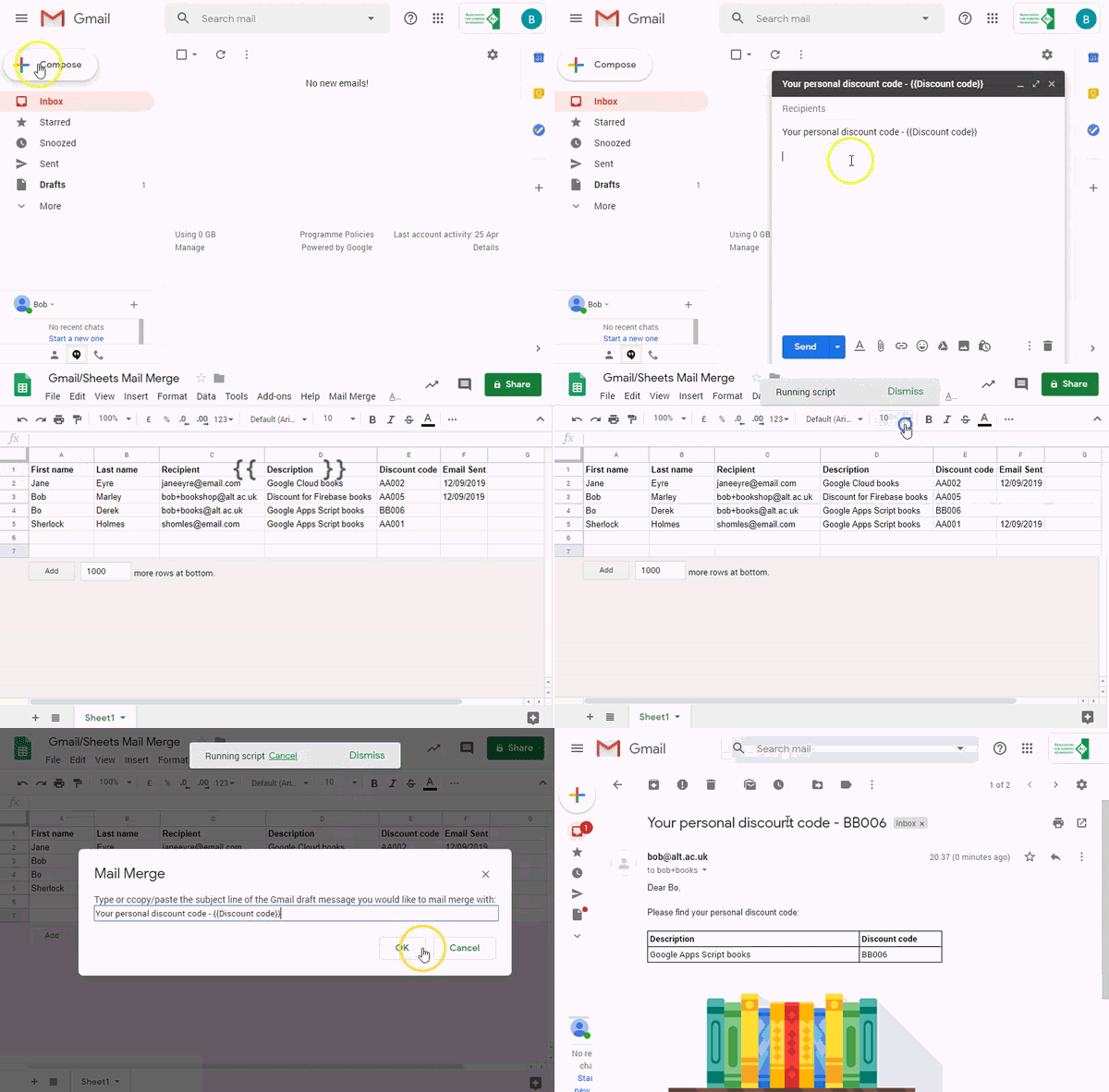
Simplify the process of producing visually rich mail merges using Gmail and combining it with data from Google Sheets. With this solution you can automatically populate an email template created as a Gmail draft with data from Google Sheets. Merged emails are sent from your Gmail account allowing you to respond to recipient replies.

Source: Repost: Sending bulk email (mail merge) using Gmail and Google Sheets – MASHe

Google Apps Script Patterns: Celebrating 10 years by revisiting mail merge/bulk emailing – MASHe

Over the last 10 years of Google Apps Scripts there have been a number of bulk email solutions shared by the community. This post revisits some of these examples and shares one of the latest examples from the GSuite Solutions Gallery

TL;DR A new solution for creating and distribute visually rich bulk emails with Gmail and Google Sheets.

Source: Google Apps Script Patterns: Celebrating 10 years by revisiting mail merge/bulk emailing – MASHe

Build your own Mail Service for Apps Script with Glitch & Gmail SMTP relay

Since this year (2019) Google will have more strict policy regarding the Gmail scope. If in the past for sending notifications we were used to request the Send Email scope to user, now it is less comprehensible and on Google side you will have to provided lot of more details and your application can be rejected. So it become time for thinking to send email as the application and not as the user. Say Hello to RelayApp service

Source: Build your own Mail Service for Apps Script with Glitch & Gmail SMTP relay