Code Blocks – Syntax Highlighting for Google Docs

Syntax highlighting for Google Docs

With the Code Blocks add-on for Google Docs you can create formatted code blocks using a wide variety of themes and language support for syntax highlighting. This is a great add-on for anyone wanting to create technical training materials in Google Docs.

Source: Code Blocks – G Suite Marketplace

Docs to Markdown Add-on

Drive add-on that converts a Google Doc to simple, readable Markdown or HTML.

This add-on is helpful for anyone doing technical writing or producing technical content. With Docs to Markdown, you can easily export the content of your Google doc for publication on a variety of other web-based platforms or CMSs.

Source: Docs to Markdown – G Suite Marketplace

Google Apps Script: Get Google Doc Text Based on Reference Characters – Yagisanatode

This simple tutorial should get you started with grabbing text from a Google Doc for other uses. You could certainly make a lot of changes to the code to introduce more search rules. Likewise, you could use regular expressions to search for some really cool stuff, but for a simple overview this should get you started.

This post provides a detailed how-to of getting a list of information from the document that you have noticed are between two sets of characters.

Source: Google Apps Script: Get Google Doc Text Based on Reference Characters – Yagisanatode

G Suite Solutions —  Apps Script Powered Workflow Automation

Laura Taylor recently spoke at SheetsCon on the topic of Automation with Apps Script. During the presentation, she walked through a simple approval workflow for a hypothetical small business to demonstrate the power of Apps Script to automate workflow inside G Suite. She also showcased modern ECMAScript features supported by the new Apps Script V8 Javascript runtime.

The article is an overview of the workflow covered in the author’s presentation along with install instructions for trying it out in your G Suite domain.

Source: G Suite Solutions —  Apps Script Powered Workflow Automation

Students use Google Apps Script to quickly identify overused words in a body of text

Great to see some new young Google Apps Scripters at work

TSDynamicUrls (#1) — Leverage the URL Power of Google Docs, Sheets, Slides, Drawings & Forms 💥

In my previous post, I outlined the power of Google document URLs to perform “Simple, Powerful, Work” and promised to share several tools I’ve developed to aid in building them.

Source: TSDynamicUrls (#1) — Leverage the URL Power of Google Docs, Sheets, Slides, Drawings & Forms 💥

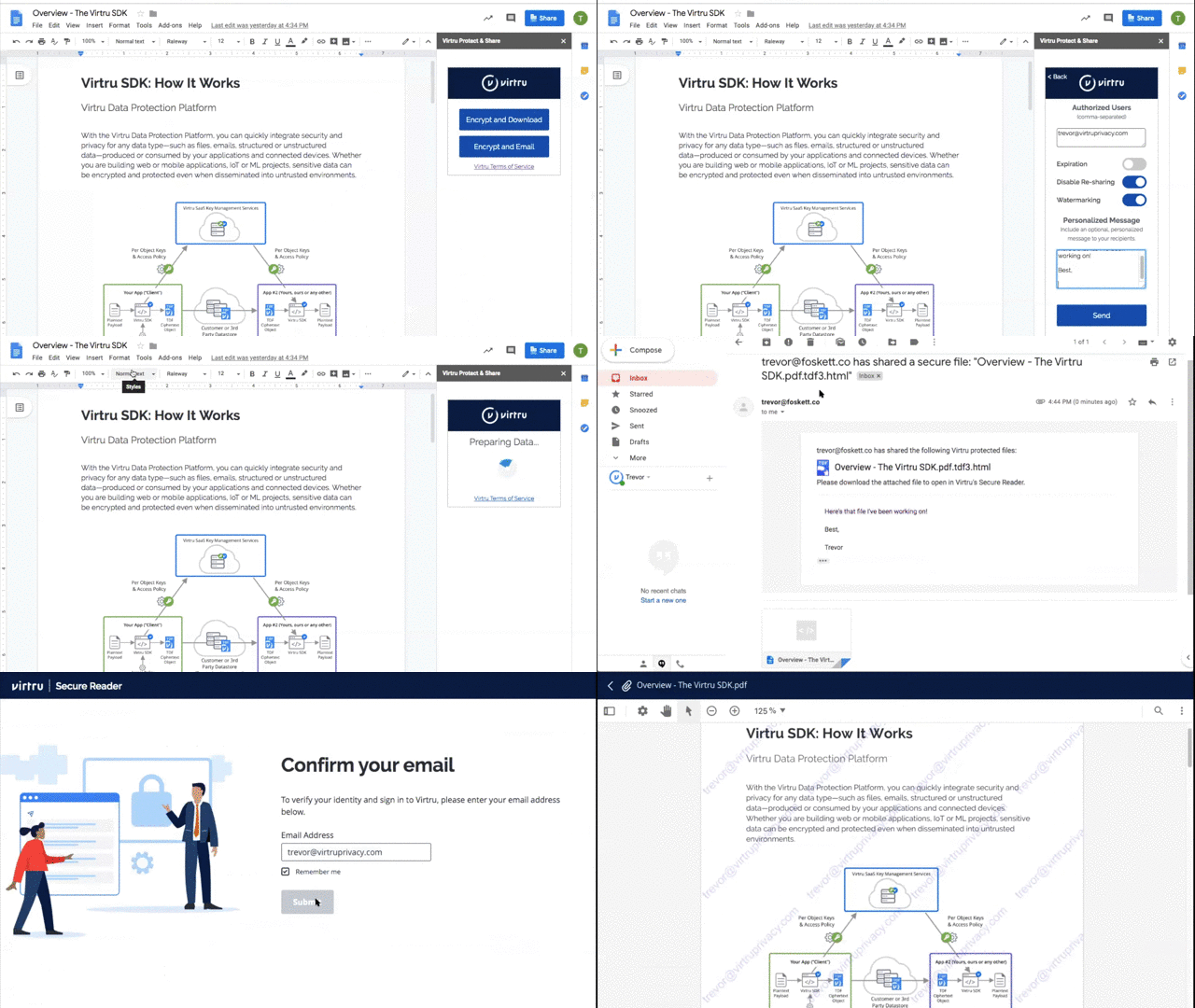
Use Google Apps Script to Securely Share Google Docs

It actually is really easy to add the Virtru SDK to your project, as I’ll demonstrate through the construction of a “Protect & Share” Google Docs add-on.

I’m not familiar with Virtru but in this post from Trevor Foskett (Senior Solutions Engineer at Virtru) shows how their product can easily be integrated into Google Docs as an add-on. You’ll hopefully find this post useful to find out about Virtru as well as how client side and server side processing can be handled using Google Apps Script.

Source: Use Google Apps Script to Securely Share Google Docs

Send automatic FYI emails for Meeting Action Items

Now you can get the Action Items (AIs) delivered right to your inbox! Joanna Smith’s (@dontmesswithjo) custom solution to integrate Google Docs with Apps Script allows you to send everyone a personalized list of their AIs at the end of every meeting.

Source: Send automatic FYI emails for Meeting Action Items