I quite often get called upon by clients to create Google Sheet templates that have Google Apps Script Automations bound to them. Sometimes these Google Sheets require an automated setup process to run things like gathering initial data, setting up time triggers, approving scopes connected to onEdit() or onOpen() triggers or renaming connected forms and their contents.
One of the challenges is getting new owners of the duplicated template Google Sheet to run the bound script before they dive into working on the Google Sheet. … After quite a lot of trial and error, I have devised a pretty solid approach that seems to have the most success in getting users to run through the authorisation of scopes and then run the startup script.
Scott Donald shares his approach for helping users get setup when first using a container bound script project in Google Sheets. The process has some nice features including revealing additional sheets, changing the active sheet and cell as well as removing the setup sheet. The post also highlights some useful tips and considerations as part of the user experience including the type and placement of supporting information.
In this episode of Google Workspace Add On Walkthroughs (GWAOw!), we take a look at ImportFromWeb by NoDataNoBusiness.
ImportFromWeb is a powerful web scraping tool for Google Sheets that allows you to grab data from any website. The creators call it IMPORTXML on steroids.
The latest episode from Scott Donald’s GWAOw! is now available. As explained by Scott ImportFromWeb is a Google Sheets add-on which allows users to use the custom function to import data from other websites into Google Sheets.
Even though this add-on is primarily used to add a custom function to Google Sheets the developers, NoDataNoBusiness, have taken the time to use the sidebar with some useful UI elements to help users get started.
GWAOw! is a YouTube series that explores the best Google Workspace Add Ons in the Google Marketplace to help you learn what is out there.
This new YouTube series from Scott Donald at yagisanatode.com will hopefully be a great way to see and learn how other developers have implemented Google Workspace Add-ons, picking up UI tips and tricks. For the first episode Scott takes a look at Workbook Statistics by Sourabh Choraria. Scott is planning one/two episodes a month and if you have published your own add-ons you can find out about getting it featured in GWAOw!.
If you have tried to seamlessly subscribe a user to a Google Calendar as part of an automation workflow in Google Apps Script and discovered that all that happens is that the user gets an automated email request to join, and then it is up to them to accept the calendar invitation to add it to their live calendar list, you’re in the right place. … How to force subscribe a user in your domain to a Google Calendar using Google Apps Script and Service Accounts.
Scott Donald always crams in lots of very useful tips and guidance in his posts. In this latest piece by Scott you as well as learning about the Google Calendar Advanced Service you can also learn about service accounts and domain wide delegation setup, which enables super powers (and responsibilities). If you are interested in learning more about service accounts in Google Cloud Console Scott has included a selection of other community contributions at the end of his post.
There have been a few instances in my work where I need to remove a button (more accurately, a button drawing) or and image from a Google Sheets tab once the associated script has been run.
Perhaps we just want the user to run a process on a Google Sheet workbook, just once but not more times. This would be a good case for removing the button or drawing after use.
Note: This tutorial expects that you know how to create a drawing or a button from the Google Sheets drawing tool.
Learn how to instantly share newly enrolled teachable students to Google Drive files and folders with Google Sheets and Apps Script.
Scott ‘Yagi’ Donald provides a very thorough walk-through of how he has connected a webhook from a third party service to Google Sheets to share specific Google Drive folders and files with named users. This post is well worth a visit as it contains a number of tips and tricks like using Google Forms to follow-up with user email addresses that are not associated with a Google account.
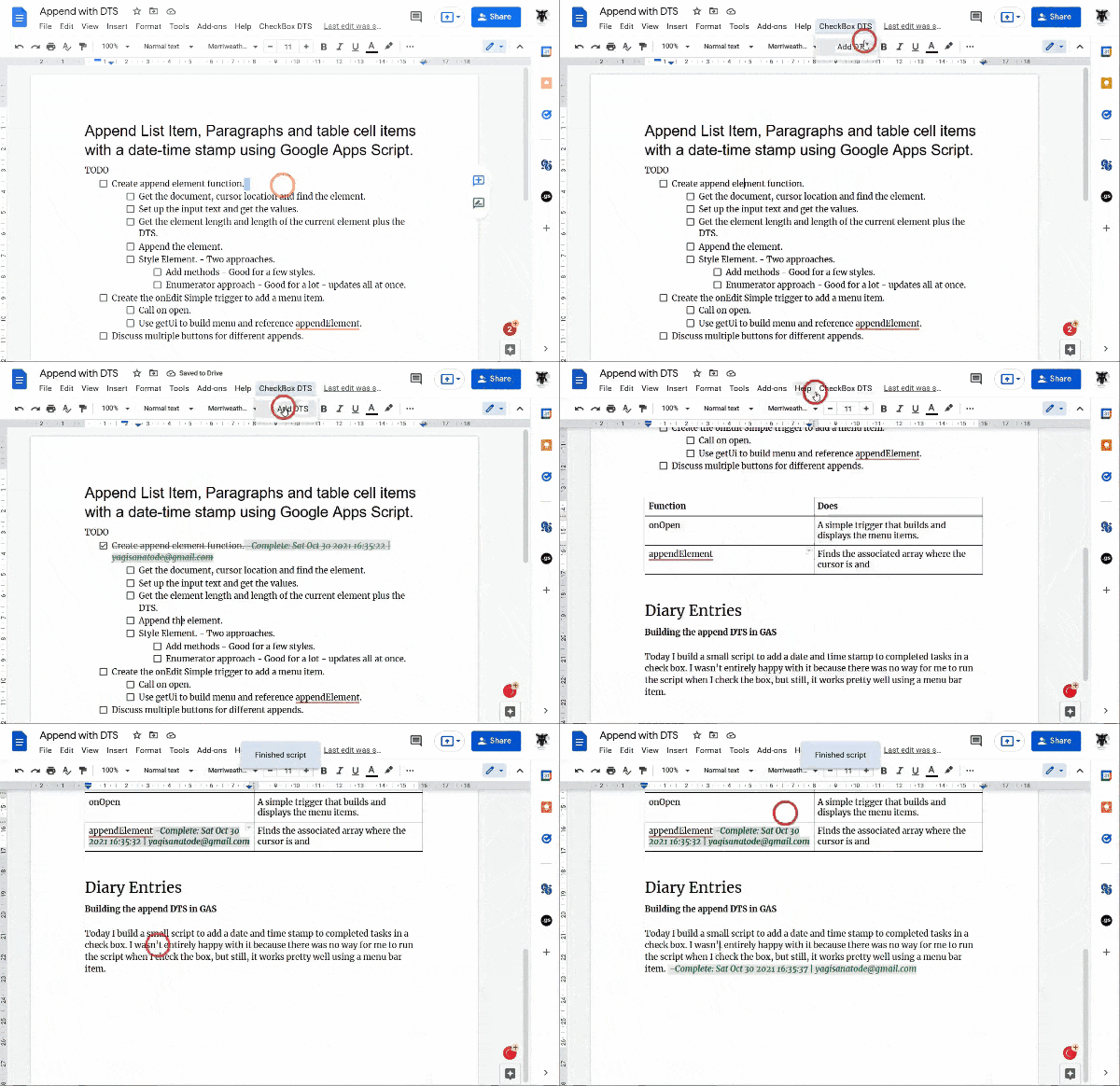
Learn how to append a date-time stamp to list items, paragraphs and more in Google Docs with Google Apps Script
A very slick example from Scott ‘Yagi’ Donald which shows a very simple method for appending text at the current cursor position and all achieved in just over 50 lines of code, with comments. Head over to the source for the full code and explanation.
Learn how to validate specific users on a Web App, Google Workspace sidebar or dialogue box with Google Apps Scripts. In this tutorial, we will explore how to validate selected users to provide access to your web app. For our example, we validate users based on whether or not they have edit access to a Google Drive file ( a common occurrence). In the discussion, we will also look at alternative ways of validating emails.
Interesting solution for access control to a Apps Script web app by using a Google Doc share permissions as a proxy. The post contains all the code you need and a discussion of other approaches.
Note! This tutorial is for Google Workspace for organisations and not the free consumer account, unfortunately. While the Google Apps Script docs provide a great example of how to get a list of users in a Domain on a Google Workspace account, it is not in the scope of the documentation to go into the weeds and explain all the ways we can search for all users.
In this tutorial, we will cover how to access your Google Workspace organisation’s user data, what data you can retrieve and how it looks, who can retrieve it and a couple of ways to display what you need.
Scott ‘Yagi’ Donald gives another thorough post for Google Apps Script users. Whilst targeted at Google Workspace users this tutorial has some great explanations of common Apps Script patterns, such as pagination and query parameters, that are useful to know when interacting with other Google APIs.
If your organisation is using Google Workspace Business Standard, Business Plus, Enterprise, or one of the other supported plans, you are likely taking advantage of the power of Google’s Shared Drives.
If you have decided to create a Google Apps Script project that needs to get a list of your Shared Drive (or a user’s shared drives in the case of a WebApp), then you might be scratching your head right now wondering how to get this list using the built-in DriveApp class.
Whelp, unfortunately, at the time of writing this article the DriveApp class does not have this functionality. However, it is pretty easy to access in a single line of code using an Advance API.