During the summer I was asked to help with some video recording for a rugby tournament, but rather than spending hours rewatching footage to find highlights, I quickly threw together some tech to make things a lot easier.
A slick solution that uses a AppSheet app for data collection with Apps Script to cue up video files hosted on Google Drive. The Apps Script code is hosted on GitHub if you’d like to take a peak. Hopefully this example gives you inspiration for your own little projects.
As the way we work continues to change, the need for no-code and low-code tools that enable hybrid work and empower the workforce across all industries is on the rise. The democratization of software creation is also gaining ground within organizations, and by 2024 more than 65% of applications will be developed by low-code tools.
I was late to AppSheet, my journey only really starting in May 2022. Like all platforms, even no/low-code, there is a bit of a learning curve to get your head around how it works, but once you do there is a world of opportunities for a wide range of users. Even for seasoned developers features like the Apps Script integration and AppSheet API mean there is plenty of scope to extend the capabilities of AppSheet.
This post from Google provides some useful reference cases, evidencing the impact the platform has had on a range of customers as well has highlighting some recently developments in the AppSheet platform including the opportunity to deploy AppSheet powered Google Chat apps.
At CTS, where I work, we have a range of services to support AppSheet adoption ranging from hackathons, training and development. Feel free to get in touch if you would like to find out more.
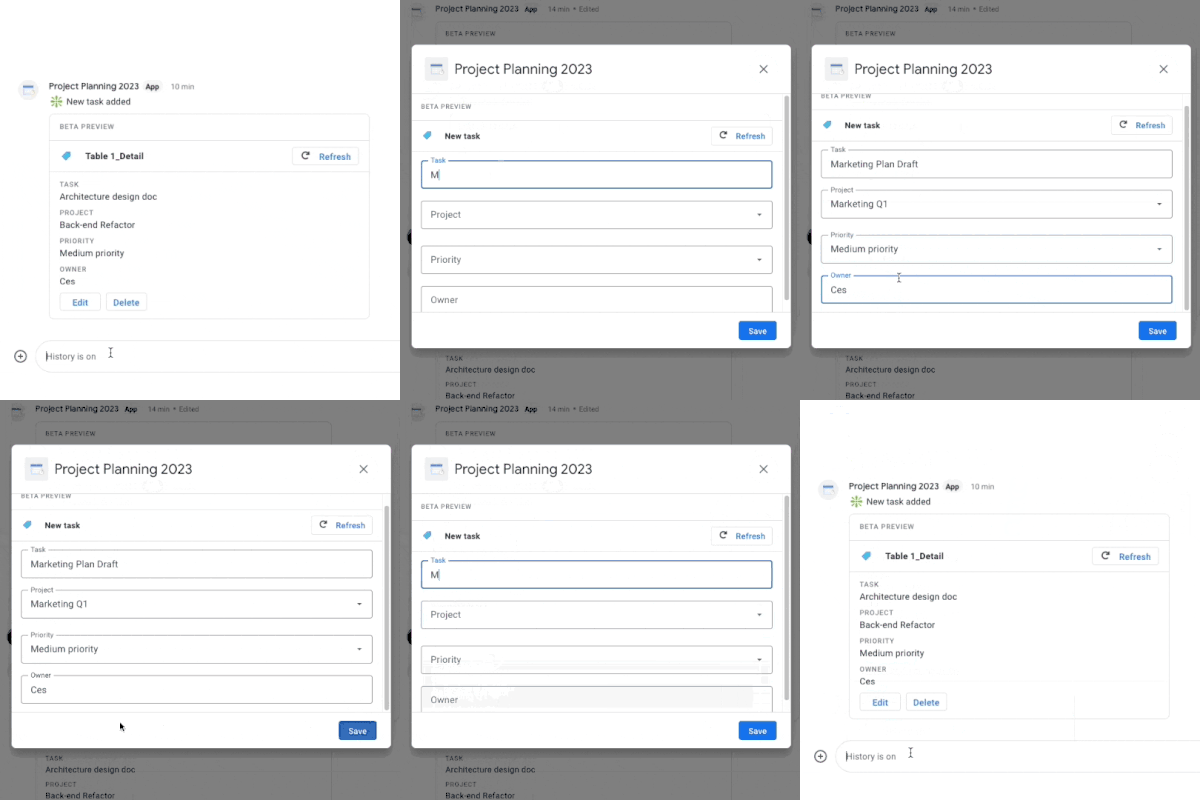
We’re happy to announce that AppSheet-powered no-code chat apps are now available in preview for Workspace customers in AppSheet!
You can access this feature right now if you are in the Preview Program, and you can provide any feedback in this thread. If needed, additional information can be found in our help center articles. We’re targeting a full launch for later this year.
I’ve been spending a fair bit of time in Google’s ‘no-code’ platform AppSheet. Even for developers there is plenty to get your teeth into with features like Apps Script integration. One of the incredibly powerful core features of AppSheet is the ability to send dynamic emails which include forms designed in AppSheet. These allow users to interact with your app without leaving their inbox.
Whilst the inbox dominates in many business sectors, support for frontline workers increasingly leans on other communication channels including Google Chat. With the announcement of AppSheet powered no-code Google Chat apps there is now an opportunity to also push dynamic forms, send data and interact with Chat users in that space. For developers there is also the opportunity to do even more with the Apps Script integration. Follow the link to the announcement post to find out more…
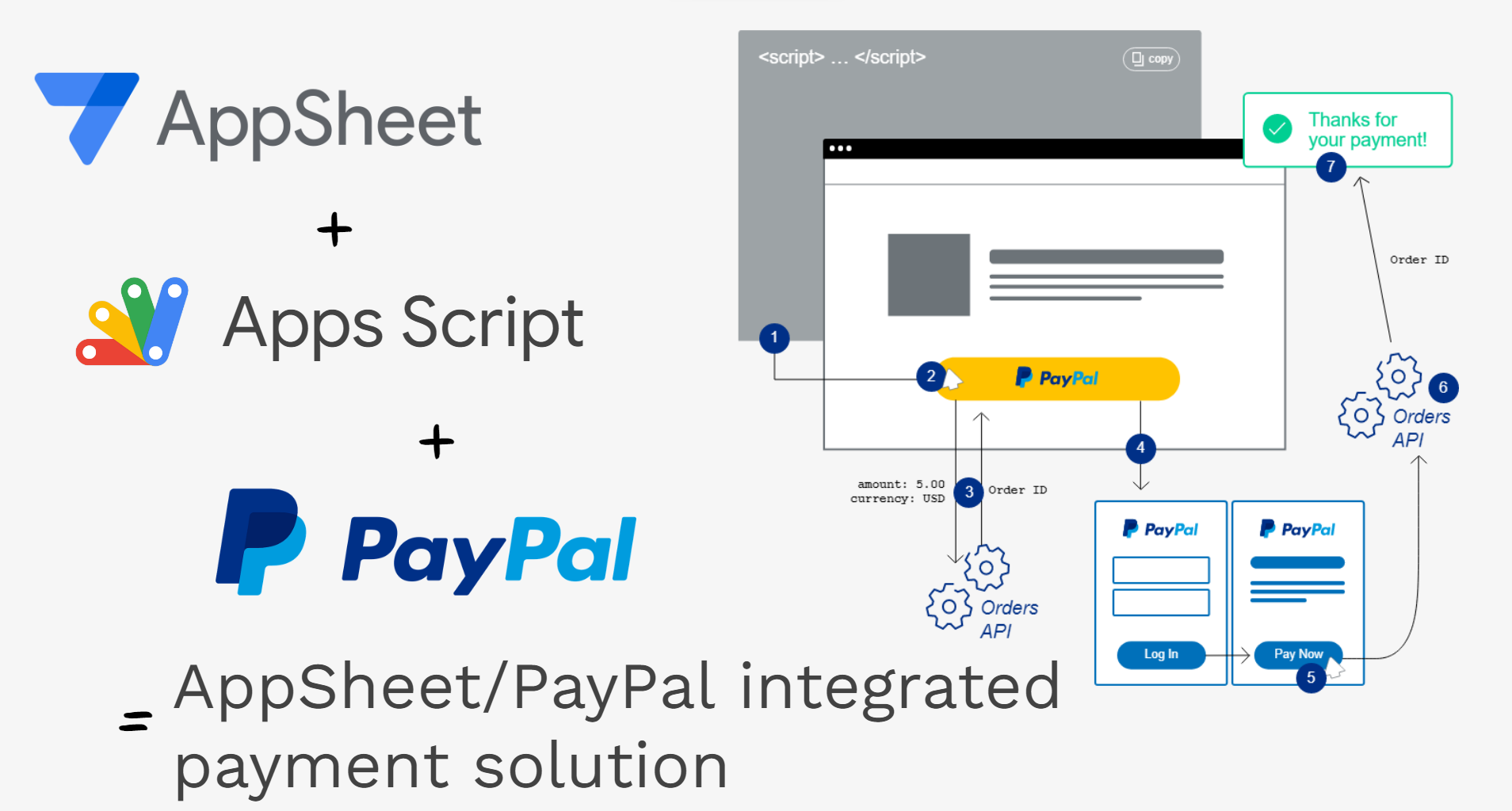
In this post I’ll provide an overview of how PayPal was integrated into AppSheet with the help of Google Apps Script. Even if you are not interested in payment integrations this post also hopefully pulls together useful tips, best practices and code patterns for reading/writing data to Google Sheets.
Hopefully this post illustrates not only just a method for integrating a PayPal payment processor into an AppSheet app, but also a method which can generally be used to extend AppSheet functionality with Google Apps Script powered Web Apps.
As a bonus you also get some of my top tips for interacting with data in Google Sheets including efficiently reading/writing data for multiple users without concurrent overwrites.
In this blog I am going to show you how to combine Google Apps Script with Google AppSheet to make automation even more powerful.
Whilst Google AppSheet is marketed as a ‘no-code’ development platform for coders there have been a number of ways to add some customisations to AppSheet apps. Previously webhooks were the main way you could do this, but the recent Apps Script connector for AppSheet makes it possible to call and if required pass parameters from AppSheet into custom Apps Script functions.
If this is something you would like to learn more about Aryan Irani has continued his AppSheet tutorial series on Medium with this post which goes through the step-by-step process for setting up and using Apps Script code in AppSheet. Click through the source link to find out more.
Recently, I got the chance of giving a training on Google AppSheet at O’Reilly Media, Inc. … This was a three hour long training where I talked about the basics of Google AppSheet and how to create apps on Google AppSheet.
Aryan Irani has shared a really helpful post with highlights from an O’Reilly Media hosted course he led focusing on ‘Developing Robust Applications with Google AppSheet’. The post links to a number of other tutorials Aryan has published on how to create various AppSheet based applications including an Expense Tracking App, Vehicle Inspection App, Inventory Management App and more. Aryan touches on how Google Apps Script can be used in combination with AppSheet. If this is a topic you are interested in Chanel Greco recently highlighted a Google I/O session on the topic.
In this blog, I am going to show you how to create a To-Do list app using Google AppSheet. A To-do list app lets you write organize and prioritize your tasks more efficiently. In this blog, we will be creating a To-Do list app using Google AppSheet that will allow you to do the same. Additionally, we will be using the automation features in Google AppSheet to send an email as soon a task is completed.
Aryan has written a great tutorial on how to get started and takes us through how we can connect Google Sheets to AppsSheet and how to create a simple to-do list app from it.
I’ve been using Apps Script since 2015 and absolutely love it. I share various projects and ideas on my site bazroberts.com and I have also written a number of books on Apps Script, taking people through step-by-step from the very basics to more complex areas whilst making practical applications. I also share news on Apps Script and on Google Workspace in general on Twitter @barrielroberts
This week, we launched the Apps Script connector for AppSheet, which now makes it possible to call Apps Script code functions from a no-code AppSheet app. This greatly extends the abilities of AppSheet apps by letting them access the power that Apps Script provides. For example, an AppSheet app can now use Apps Script to automate workflows with Google Workspace using the Workspace APIs for Drive, Docs, Sheets, and Admin SDK, and more – as well as other Google services like YouTube, Google Analytics, and BigQuery.
If you are already familiar with this new feature you may find it useful to read the full announcement as it contextualises this feature within the ‘no-code’ / low-code marketplace and the benefits of integration with Google Workplace, Workplace APIs and other opportunities through Google Apps Script.
Add custom integrations to your app using Apps Script. … You can use custom logic from within your AppSheet app by calling Apps Script from an AppSheet automation bot.
Examples of custom logic that you can implement include:
Create a calendar appointment when a button is clicked
Add a slide to a presentation when a new row is added
Save photos to Drive and share with specific individuals when uploaded using a form
Create an audit log by generating a Google Docs file with data from a table
Call an external service for machine learning prediction using data from a newly added row and write back model prediction
If you are not familiar with AppSheet it’s Google Cloud’s no-code platform that allows users to create custom applications that can be deployed across mobile and web, often setup using Google Sheets as a data source. AppSheet can be customised with workflows and automations, and those automations have recently been extended with a new preview integration to Google Apps Script. The video in the Call Apps Script from an automation page provides a great summary of how the Apps Script integration works.
Did you know that AppSheet can integrate with Google Workspace? In this video, we speak to how AppSheet – Google Cloud’s no-code application platform – helps citizen developers streamline their workflows, and demo how you can create your own app in Google Sheets. Watch to explore the possibilities of AppSheet!