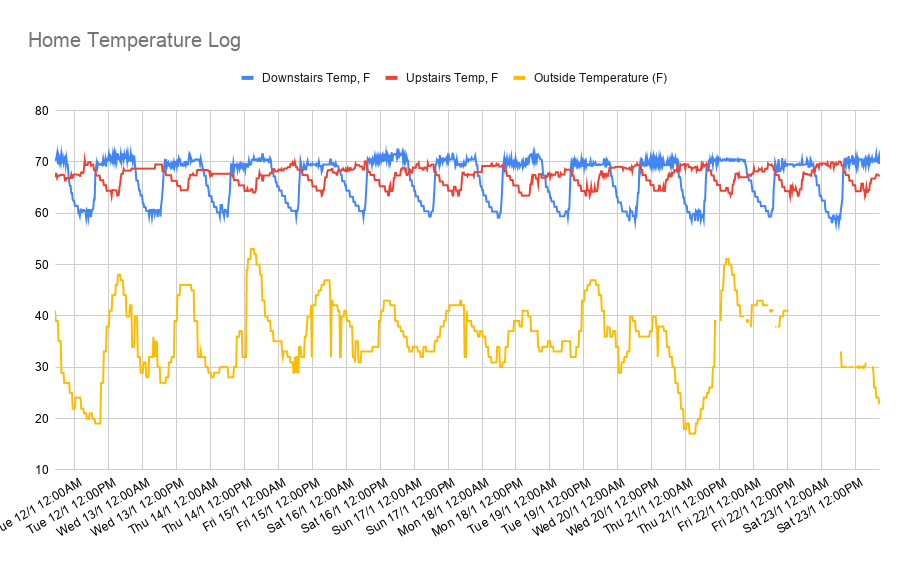
If you have a Nest thermostat at home, you can access it from your Google Sheet by using Apps Script to connect to the Smart Device Management API. It means you can do some cool stuff like build a virtual, working Nest thermostat in your Google Sheet
This article will discuss how to manage multiple, container-bound script projects using the Google Apps Script API from within Google Apps Script itself.
Interesting write up of how you can manage container bound Apps Script projects from an Apps Script…
Google Apps Script: WebApp In this tutorial, we will cover how you can get a unique temporary access key from a user accessing your WebApp that lasts for 30 days. Temporary access keys allow you to track users as they use your WebApp over time while still providing anonymity to the user by providing only an access key to that user.
Recently I came across a nice post from Ravgeet Dhillon, which looked at how to Add Unsubscribe link in emails using Google Apps Script. The solution uses a Google Sheet and a Google Apps Script web app to add an unsubscribe link to emails. As I noted when shared via AppsScriptPulse this is a useful addition if your mailing needs comply with PECR or similar electronic communications regulation compliance.
Having recently updated my ‘Create a mail merge using Gmail and Google Sheets’ in the Google Workspace Solution Gallery to handle inline images I thought it would be useful to show how this example can be extended to include a variation on Ravgeet’s post.
With Google Drive, Apps Script, Bootstrap, and a little jQuery, you can develop an Image Library web application with search and download functionality!
Useful little tutorial if you are interested in learning how to interact with Google Drive files. The post is also a nice introduction into using the Bootstrap framework for building responsive web apps.
Provide your subscribers an option to opt-out of mailing lists by adding unsubscribe link using Google Apps Script.
A useful post on creating a system to allow users to indicate they wish to opt-out of further mailings (useful for PECR or similar electronic communications regulation compliance). The post has the broad steps and code needed for this solution and you will need to fill in some of the blanks like how to record the unsubscribe_hash in the Google Sheet.
The new Twitter API brings a much better way to get a list of publicly available Tweets in Google Sheets to retrieve Tweets and their details, including the username of the author.
Always nice to see when other web services feature Google Apps Script. This is a great example from Daniele Bernardi (@i_am_daniele), DevRel at Twitter, highlighting how Google Sheets custom functions can be used to interact with the Twitter API. The post has everything you need to know plus a link to a gist with all the code.
Create a meeting in Zoom via the API and OAuth, using Google Apps Script and a Web App. The details for the meeting will be collected from a Google Sheet.
Get your Zoom meeting settings via the Zoom API and OAuth, using a Web App in Google Apps Script. Here we will access user settings in your Zoom account, specifically the meeting settings, and log the results in a Google Sheet. This provides both a way of confirming we have made a successful connection and will allow us to create subsequent Zoom meetings using these settings.
This will log the results in a Google Sheet to help you understand what is happening and the type of data that is returned.