You know that idea you always keep at the bottom of your backlog for that elusive day you’ll find enough time to address? For me, it’s the possibility to connect a chatbot to an SAP system.
Julien Delvat shares how you can connect the SAP Graph API to Google Chat with Google Apps Script. The post provides details of the entire development and deployment process with useful tips on how you can extend the project.
A tutorial on how you can sync and analyze your Peloton workout stats into Coda with custom dashboards. Sync with a Google Apps Script or serverless function on Google Cloud.
We’ve featured this example from Al Chen on interacting with Peleton data with Google Apps Script before. Al has recently updated the post to include a “new table ‘Friend Workouts’ contains latest 10 cycling workouts from people you follow”. Follow the source link for more details…
I intend this post for established Add-on developers who want to use Angular in Google Workspace editor Add-ons and Google Apps Script webapps. This does not attempt to show how to create Add-ons or Angular apps, but the tooling and build process to use Angular apps in Add-ons. I am also assuming familiarity with installing and using CLI tools in your development workflow.
In this article I will showcase the way I deploy Google Apps Script code in an Enterprise environment. I will share the actual build file and the necessary steps and tools to reproduce my workflow. This approach does require Google Cloud Platform knowledge and a credit card. The instructions are high level, this article is not a codelab.
For those interested in scaling up their Google Apps Script development Jasper Duizendstra outlines how you can use Google Cloud Build for version control and Continuous Deployment (CD). As Jasper notes:
When the CD pipeline is in place it becomes easy to deploy the script, separate the responsibilities and support multiple versions and implementations of the code … the most important advantage of using CD is the mindset that it enables. It provides an environment where I feel confident and safe to create small incremental changes in my applications.
I have programmed an application that searches for (or rather knows) the correct answers to the competition questions from the Kalendárium program, all using Google Cloud AI. I decided to write the entire application in Google Apps Script technology, which offers an online IDE editor, application operation in the cloud and the possibility of a quick connection to Google services. [auto-translated]
You’re going to have to hit Google Translate to read this post from Ivan Kutil, but it’s worth it is a nice example of how Google Apps Script can be used for orchestration. All the details are in the post and it’s also a nice reminder of the Parser library Ivan released in 2016, which makes it easy to scrape data from websites using UrlFetchApp (read more about the web scraping).
A common workflow solution in Google Apps Script is to use a Gmail draft message as a template for sending emails. For the user the benefit is they can draft a message in a familiar environment adding formatting without having to worry about writing HTML. A problem often encountered is the inclusion of inline images. This post looks at solving the issue of missing inline images.
A tutorial on how you can sync and analyze your Peloton workout stats into Coda with custom dashboards. Sync with a Google Apps Script or serverless function on Google Cloud
Nice post from Al Chen for Peloton users keen to add to their ‘quantified self’ pool of data. This post might be of particular interest for community members interested to see how authentication cookies can be handled with UrlFetchApp.
In this article I will showcase one of the many ways you can customize your Google Workspace environment. We will implement two custom functions in Google Sheets. With these functions as an example I will demonstrate how to use Google Apps Script Libraries to organise and distribute your solution. There are multiple ways to distribute your Apps Script code within the Google Workspace, and this article will help you decide if this library method is right for you.
Always nice to have some advanced techniques in your toolbox. In this example from Jasper Duizendstra he explores how custom functions in Google Sheets can be packaged and used in Libraries.
Source: How to write a custom function library for Google Sheets
Google Apps Script can go way beyond a simple script that solves a problem. In this article I will showcase the way I deploy Google Apps Script code in an Enterprise environment. I will share the actual build file and the necessary steps and tools to reproduce my workflow. This approach does require Google Cloud Platform knowledge and a credit card.
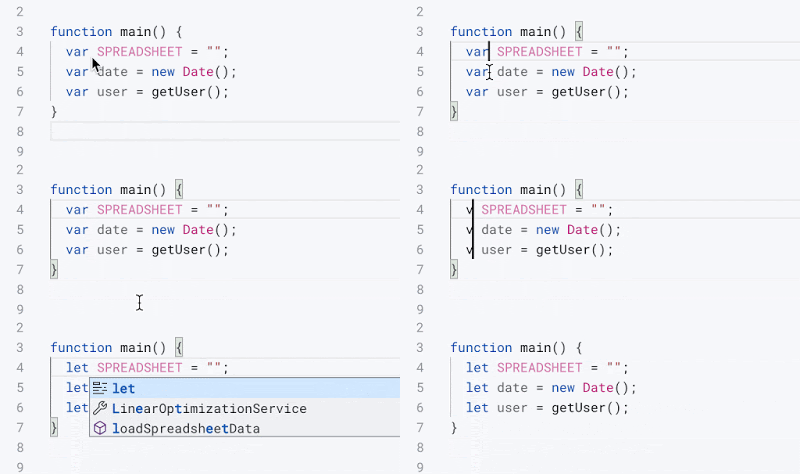
Google Apps Script has a new editor, which is better, nicer, and completed ready for future new features. Today, I would like to introduce you to several dirty and secret tricks, what you can do.
If you like a keyboard shortcut you’ll love this post from Ivan Kutil! For those less keen on keyboard commands there is still plenty of other productivity tips from Ivan shared in this post.