List of over 130 shared Google Apps Script libraries developed by Bruce Mcpherson

Regular Google Apps Script Community contributor Bruce Mcpherson has published a list of all the Google Apps Script libraries he’s developed since 2012. The list includes links to the source repositories and if you spot a library you like the sound of you can search for more information on Bruce’s Desktop Liberation site .

Source: List of shared Apps Script libraries · Issue #31 · brucemcpherson/desktopliberation

How Deliveroo invented Virtual Neighbourhoods in order to grow Paid Search by 166% with the help of Google Apps Script

We created a series of Google Apps scripts to group together the coordinates of every restaurant within a given neighbourhood. Next, we developed a formula to calculate the mid-point of that group of restaurants and determine the distance between the furthest apart restaurants in that neighbourhood.

This post was highlighted by Tim Leighton-Boyce and while no Apps Script code is included it’s a useful usecase of how Apps Script is helping businesses deliver.

Source: How Deliveroo invented Virtual Neighbourhoods in order to grow Paid Search by 166%

Follow the trend of Apps develop in your org with a Dashboard of the default Cloud SQL App Maker Instance

Adoption dashboard
Image credit: Jérémy Dessalines https://link.medium.com/yqklXl2p22

Monitoring Google App Maker adoption in our Organisation. For this I realized an Apps Script project calling the Cloud SQL Admin API, a REST API for administering your instances programmatically in order to Lists instances under a given project in alphabetical order by instance name.
Data will be displayed on a DataStudio dashboard.

Source: Follow the trend of Apps develop in your org with a Dashboard of the default Cloud SQL App Maker Instance

Build a Google Analytics dashboard 🖥️ with an Apps Script, a Sheets add-on, and Google Sites

If you help manage websites for your organization, and use Google Analytics, you can have data synced directly into a Google Spreadsheet on a routine basis (aka daily at 9am), by installing the Google Analytics add-on in your Sheet.

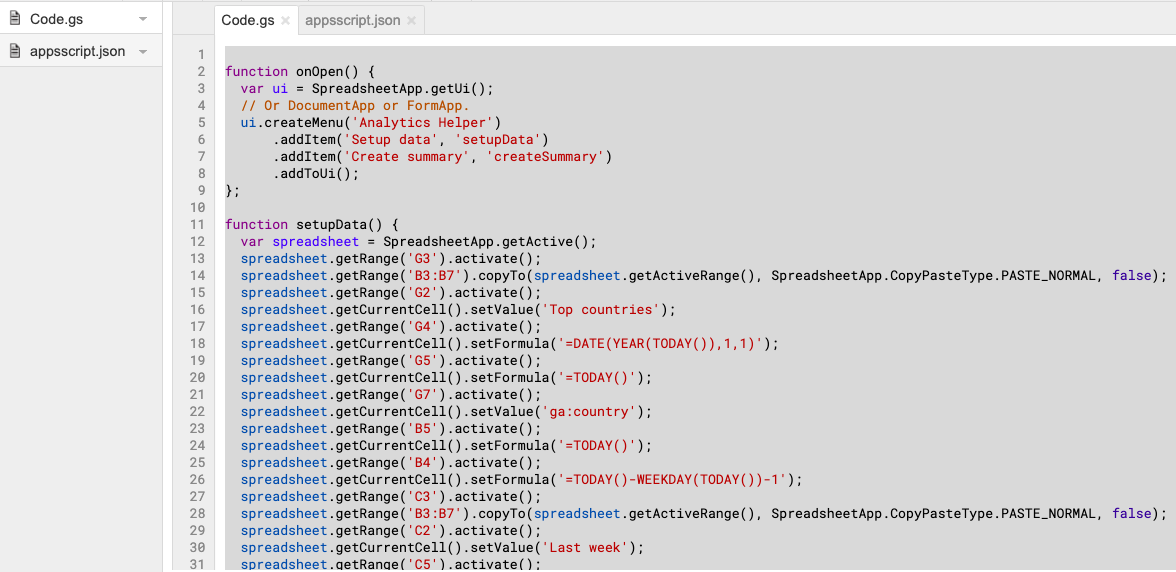
In addition to using the add-on, you can record your steps using a macro recorder and convert that into a custom menu that automates the setup of your report and creates a summary in chart form.

In this article I walk you through how to build a process to gather unique pageviews for this week, last week, this year, last year, regional location of audience, and top browsers used.

Source: Build a Google Analytics dashboard 🖥️ with an Apps Script, a Sheets add-on, and Google Sites

Analyzing Mailchimp Campaigns using Google Apps Script — PART II

So when you send out a campaign, Mailchimp tracks how many people opened the emails and which links were clicked within the email. So this information might not be available in a format you might like. So we will utilize the power of Mailchimp API and Google Sheets to put it in a format that we desire.

Source: Analyzing Mailchimp Campaigns using Google Apps Script — PART II

Automating Mailchimp Campaigns using Google Apps Script — PART I

Mailchimp has an amazing, well documented RESTful API. I loved exploring all what it had to offer and using it with Google Sheets and automating the whole campaign process right at the click of the button was surely fun.

Some detailed guidance on composing marketing campaigns in Mailchimp using Google Apps Script.

Source: Automating Mailchimp Campaigns using Google Apps Script — PART I

Send bullk emails with personalised images in G Suite using Google Apps Script

Earlier in the year I managed to get a bulk emailing script published in the G Suite Developer Solutions Gallery. In this post I want to show you how you can extend this script so that you can send personalised images using Gmail, Sheets and Slides.

Source: Send bullk emails with personalised images in G Suite using Google Apps Script

Analyze sentiment of open-ended feedback and gain insights in Google Sheets Sheets to Apps – YouTube

Some of the most valuable insights come from free-form user feedback, but text data can be difficult to process and summarize in a scalable way. In this episode of Sheets to Apps, Alicia Williams shows you how to use Cloud Natural Language to analyze and interpret free-form text, directly in Google Sheets!

Making Google Forms and Spreadsheets a Bit Less Rigid Block Style – CogDogBlog

Here is how I learned to do some scripts to (a) use the WordPress API to dynamically populate some cells in a Google Spreadsheet; and (b) how to script a way to use these results to dynamically update text and menus in Google Forms.

A very comprehensive writeup of integrating Google Forms/Sheets and WordPress with Google Apps Script.

Source: Making Google Forms and Spreadsheets a Bit Less Rigid Block Style – CogDogBlog